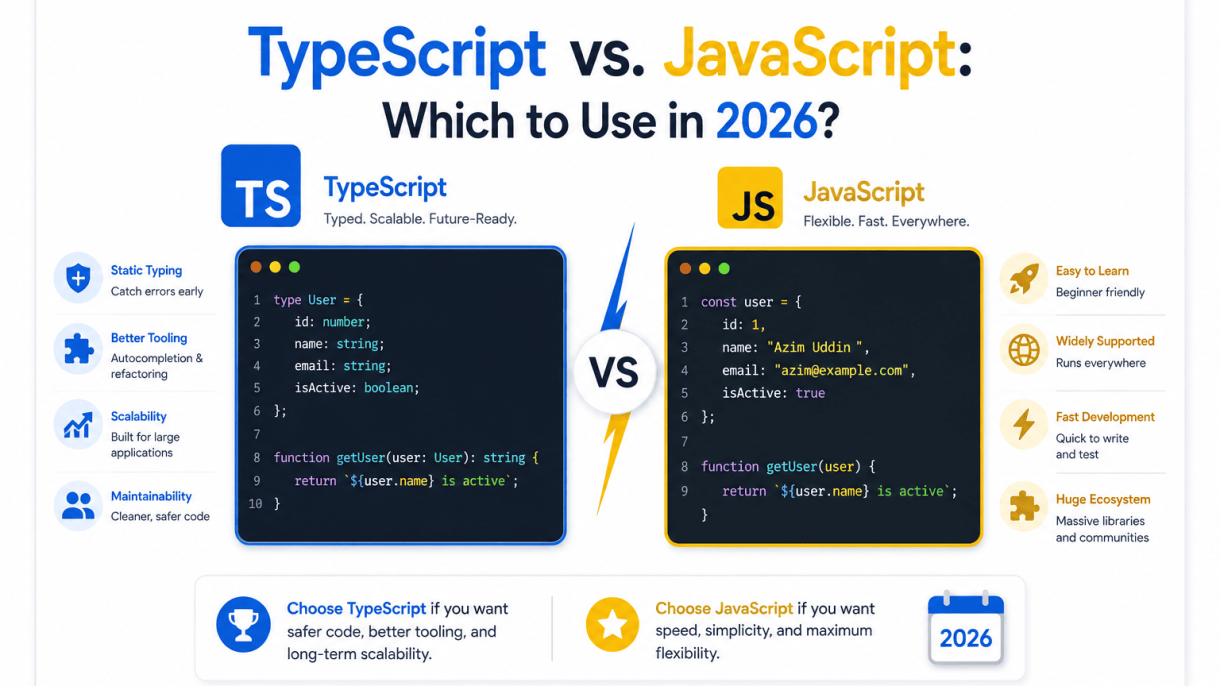

Introduction: The State of JavaScript and TypeScript in 2026
By 2026, the JavaScript ecosystem has matured into a sprawling, high-performance environment where the lines between “scripting” and “application development” have blurred entirely. TypeScript is no longer a niche preference; it is the default choice for enterprise backends, frontend frameworks, and even serverless functions. Yet plain JavaScript remains not only viable but essential for specific contexts—from lightweight browser extensions to quick prototyping and environments where build steps are undesirable. The central question for developers is not “which language is better” but rather “which tool fits the constraints of my project, team, and long-term maintenance plan?” This introduction sets the stage for a nuanced comparison, acknowledging that the 2026 landscape rewards deliberate choices rather than tribal loyalties.
The Evolution of JavaScript: From ES5 to Modern ECMAScript
JavaScript has undergone a quiet revolution since the dark days of ES5. The annual ECMAScript release cycle, now firmly established, delivers features that were once the sole selling points of TypeScript. Optional chaining (?.), nullish coalescing (??), private class fields (#), and static type annotations via the Type Annotations proposal (stage 3 in 2025, now standard in 2026) mean that vanilla JavaScript can express types directly in the language itself. Modern runtimes—Node.js 24+, Deno 2.x, and Bun 1.5+—execute these features natively with impressive speed, eliminating the need for transpilation in many cases. However, this evolution has not made TypeScript redundant. Instead, it has raised the baseline: plain JavaScript now offers a smoother on-ramp, but TypeScript’s mature tooling—incremental type checking, declaration files, and refactoring safety—still provides a structural advantage that the ECMAScript spec deliberately avoids.
TypeScript’s Meteoric Rise: Adoption Trends and Industry Reports
Industry surveys from 2025 and early 2026 paint a consistent picture: TypeScript is the dominant language for serious software projects. The annual Stack Overflow developer survey reported that TypeScript ranked as the “most admired” language for the fourth consecutive year, with over 68% of professional developers using it regularly. More tellingly, the npm registry’s download statistics show that typescript is now downloaded more than 200 million times per month, surpassing even React in volume. Major frameworks have cemented this dominance: Next.js, Remix, SvelteKit, and Angular all ship with TypeScript as their default template, and even Vue’s core team has migrated its internal codebase to TypeScript. In the backend world, NestJS, Fastify’s type-safe plugins, and the entire AWS CDK ecosystem assume TypeScript. This adoption is not merely a fashion trend; it reflects a structural shift in how teams manage complexity, with type-checking serving as a form of executable documentation that catches entire classes of bugs before they reach production.
Why the Debate Still Matters: Performance, Developer Experience, and Team Dynamics
Despite TypeScript’s dominance, the debate remains relevant for three concrete reasons:
- Performance overhead: TypeScript adds a build step, increases memory usage during compilation, and can slow down continuous integration pipelines. For microservices with trivial logic or for scripts that run in constrained environments (e.g., IoT devices), the overhead can outweigh the benefits.
- Developer experience trade-offs: TypeScript’s strictness can be a double-edged sword. Junior developers benefit from guardrails, but experienced developers often find themselves fighting the type system over edge cases that are better handled with runtime checks. In contrast, modern JavaScript with JSDoc annotations offers a middle ground—types without a full compile step.
- Team dynamics: For small teams or solo developers, plain JavaScript reduces onboarding friction and allows for rapid iteration. For larger teams, TypeScript’s interfaces and generics enable parallel work on shared modules without constant communication overhead. The choice often comes down to the team’s existing skill set and the project’s expected lifespan.
Ultimately, the 2026 debate is not about which language is objectively superior, but about which tool aligns with your specific constraints. The following sections will dissect each dimension—type safety, tooling, ecosystem, and performance—to help you make an evidence-based decision for your next project.
Core Differences: Static Typing vs. Dynamic Flexibility
At its heart, the difference between TypeScript and JavaScript is not about features but about when you catch mistakes. JavaScript is a dynamically typed language: types are determined at runtime, and a variable can hold a string one moment and an object the next. TypeScript, by contrast, introduces a static type system that runs before your code executes. Crucially, TypeScript is a superset of JavaScript—every valid JavaScript program is also valid TypeScript. The compiler simply adds a layer of analysis on top.
The practical consequence is a shift in developer experience. With JavaScript, you get immediate execution but face runtime surprises like undefined is not a function. With TypeScript, you trade a small amount of upfront verbosity for compile-time guarantees. This trade-off affects everything from refactoring confidence to IDE autocompletion.
Type Annotations and Type Inference: How They Work
Type annotations are explicit markers you add to variables, parameters, and return values. For example:
function greet(name: string): string {
  return `Hello, ${name}`;
}
Here, : string constrains the parameter and return type. But TypeScript does not force you to annotate everything. Its type inference engine deduces types from usage. If you write let count = 5, TypeScript infers count is a number—no annotation needed. Inference shines in complex scenarios, like extracting types from API responses or chaining array methods, where manual annotations would be redundant.
- Explicit annotations are best for public APIs, function signatures, and ambiguous data.
- Inferred types reduce noise in local variables and straightforward expressions.
- Type aliases and interfaces let you name shapes, making code self-documenting.
JavaScript has no such mechanism. You rely on JSDoc comments or runtime checks, which are optional and easily bypassed.
Compilation Steps: Transpiling TypeScript to JavaScript
Browsers and Node.js do not understand TypeScript. They execute JavaScript only. Therefore, TypeScript must be transpiled—converted into plain JavaScript—before deployment. The process involves several steps:
- Parsing: The TypeScript compiler (tsc) reads your
.tsfiles and builds an abstract syntax tree. - Type checking: It validates types against the annotations and inferred types, reporting errors without stopping output.
- Transformation: It removes type annotations, interfaces, and other TypeScript-only syntax, producing clean ES5/ES6+ JavaScript.
- Output: The resulting
.jsfiles are ready to run.
A basic command-line example:
# Compile a single file
npx tsc app.ts --outDir dist

# Watch mode for development
npx tsc --watch
Modern build tools like Vite, esbuild, or Webpack often handle this transpilation automatically, but the principle remains: you never ship raw TypeScript.
Runtime Behavior: Why Types Are Erased and What That Means
When TypeScript compiles to JavaScript, it erases all type information. The : string annotations, interfaces, and generics vanish. This is by design—JavaScript engines have no concept of static types, and adding runtime type checks would slow execution and increase bundle size. The output is plain, optimized JavaScript.
The implications are significant:
- No runtime safety: TypeScript cannot prevent type errors that occur after compilation. If you cast a value with
as any, you opt out of checks entirely. - Performance parity: Because types are removed, a TypeScript program runs at the same speed as its JavaScript equivalent—no overhead.
- Tooling gap: Since types are gone, debuggers and profilers see only JavaScript. You must rely on source maps to map errors back to your TypeScript code.
- Dependency on compile step: Your deployment pipeline must include transpilation, adding a build step that pure JavaScript does not require.
This erasure also means TypeScript cannot perform type-based overloading or pattern matching at runtime. Any such logic must be implemented manually with conditional checks. In practice, the benefit—catching errors before they reach users—far outweighs the absence of runtime types, but it is a crucial mental model for debugging and architecture decisions.
Developer Experience and Productivity: Which Feels Better?
The day-to-day coding experience in 2026 hinges less on language syntax and more on the feedback loop between writing code and seeing results. JavaScript offers immediate execution and zero build friction, while TypeScript introduces a layer of cognitive overhead that pays dividends in larger codebases. The “feel” of each depends heavily on your project size, team maturity, and tolerance for tooling configuration. For solo developers prototyping rapidly, JavaScript remains pleasantly lightweight. For teams maintaining long-lived applications, TypeScript’s structured environment often feels like a safety net rather than a constraint.
IDE Support and IntelliSense: VS Code and Beyond
Modern editors treat TypeScript as a first-class citizen, but the experience is not identical. VS Code, WebStorm, and Neovim (via the TypeScript language server) provide rich autocomplete, go-to-definition, and rename refactoring for both languages. However, TypeScript’s explicit type annotations enable semantic IntelliSense: the editor understands your data shapes and flags mismatched properties before you run a single test. JavaScript relies on JSDoc comments or runtime inference, which is less reliable for complex objects.
- TypeScript: Autocomplete suggests only valid properties based on declared interfaces; rename refactors update all usages across files.
- JavaScript: Autocomplete often shows all possible properties, including typos; refactoring may miss dynamically accessed keys.
- Beyond VS Code: TypeScript’s language server powers better support in JetBrains IDEs, Eclipse, and even mobile editors like Code-server.
The practical result: TypeScript developers spend less time mentally tracking object shapes, while JavaScript developers rely more on memory and documentation.
Catch Errors Early: The Debugging Advantage of TypeScript
Static analysis catches a class of bugs that JavaScript only reveals at runtime. Common examples include passing a string where a number is expected, accessing a property on a possibly-undefined value, or forgetting to handle a union type branch. In 2026, TypeScript’s compiler with strict mode flags these during editing, reducing debugging sessions by a measurable margin. JavaScript requires manual testing or runtime assertions, which are often skipped under deadline pressure.
| Error Type | TypeScript (2026) | JavaScript (2026) |
|---|---|---|
| Type mismatch (e.g., string vs. number) | Caught at compile time | Caught at runtime or never |
| Null/undefined access | Strict null checks flag it | Throws only when code executes |
| Misspelled property name | Editor highlights immediately | Silently returns undefined |
| Refactoring safety | Compiler verifies all call sites | Manual search and replace risk |
That said, TypeScript cannot catch logical errors (e.g., wrong algorithm) or runtime exceptions like failed network requests. The advantage is narrow but significant: it eliminates an entire category of silly bugs before they reach production.
Learning Curve: Onboarding New Developers in 2026
JavaScript remains the simpler entry point. A new developer can write functional code within hours, with no build step or type system to learn. TypeScript introduces concepts like generics, conditional types, and type narrowing, which can overwhelm juniors or developers transitioning from dynamic languages. In 2026, however, most instructional resources and bootcamps include TypeScript fundamentals by default, softening the curve. The real friction is configuration: tsconfig.json options, module resolution, and strictness flags can frustrate even experienced engineers.
For teams, the tradeoff is clear: TypeScript’s onboarding cost is front-loaded, but it reduces long-term context-switching. New hires reading TypeScript code see explicit contracts, making it easier to understand data flow without running the program. JavaScript requires tracing runtime values, which is slower for unfamiliar codebases. In practice, teams with frequent personnel changes often prefer TypeScript despite the initial ramp-up, while small stable teams may find JavaScript’s minimalism more productive.
Project Scale and Complexity: When TypeScript Shines
The decision between TypeScript and JavaScript in 2026 is rarely about raw capability—both run anywhere JavaScript runs. Instead, the decisive factor is the cost of coordination within your codebase. As projects grow in lines of code, team size, and architectural breadth, the implicit assumptions that make JavaScript pleasant for small scripts become liabilities. TypeScript’s value proposition scales non-linearly with complexity; it converts runtime surprises into compile-time errors, effectively shifting failure detection earlier in the development cycle.
Large Codebases and Refactoring Safety
Refactoring is where TypeScript earns its keep. In a JavaScript project with 50,000+ lines, renaming a function or changing a data shape requires manual searches, tribal knowledge, and a leap of faith. TypeScript’s static analysis makes such changes mechanical. The compiler traces every usage, flagging broken references before you run a single test. For example, changing an API response type from string to number in a shared interface immediately surfaces every consumer that expects the old type:
// old.ts
export interface User { id: string; }

// new.ts
export interface User { id: number; }

// consumer.ts
const u: User = { id: "123" }; // Error: Type 'string' is not assignable to type 'number'
This safety net allows teams to perform large-scale migrations—splitting a monolith, updating a data layer, or introducing a new state management pattern—without freezing development for weeks. In contrast, JavaScript refactors often require extensive integration tests and a production rollback plan.
Team Collaboration: Contracts and Code Reviews
On teams of five or more, TypeScript acts as a living contract. When a backend developer defines a PaymentIntent type, a frontend developer consuming that API instantly sees its shape, required fields, and allowed enums—without reading documentation or asking in Slack. Code reviews shift focus from “what does this function return?” to higher-level concerns like algorithmic efficiency or business logic. This is particularly valuable in distributed or async teams where synchronous clarification is expensive.
Consider a typical review comment in JavaScript: “Can you confirm this function returns an array or null?” In TypeScript, the signature findUser(id: string): User | null answers that question permanently. The type system enforces the contract, reducing back-and-forth and preventing regression. For teams practicing domain-driven design, TypeScript’s union types and discriminated unions model complex business rules (e.g., OrderStatus = "pending" | "paid" | "cancelled") directly in code, making invalid states unrepresentable.
Microservices and Monorepos: Managing Interdependencies
In a monorepo with multiple packages or microservices, TypeScript’s project references and path mappings provide a compile-time dependency graph. When you modify a shared utility library, the build fails in all dependent services that break—before deployment. This is a stark contrast to JavaScript, where a subtle API change in one service might only fail at runtime in another, often under production load.
TypeScript also simplifies cross-service type sharing. You can publish types as a separate package or use tsc to generate declaration files (.d.ts) that other services consume. For a practical setup, a monorepo might use:
// packages/shared/tsconfig.json
{ "compilerOptions": { "declaration": true, "outDir": "./dist" } }
This produces type declarations alongside compiled JavaScript, enabling other services to import types with zero runtime overhead. When your system spans multiple teams, this reduces integration friction significantly.
However, TypeScript is not a silver bullet. For small prototypes, one-off scripts, or projects under ~2,000 lines with a single developer, JavaScript’s simplicity and faster iteration often win. The overhead of type definitions and configuration becomes pure tax. The threshold in 2026 remains: if your project will outlive a single sprint or involve more than one developer, TypeScript’s upfront investment pays dividends in reduced debugging and smoother collaboration.
Performance and Runtime Considerations: Does TypeScript Slow You Down?
The short answer is no—TypeScript does not slow down your application at runtime. Because TypeScript is a superset of JavaScript that adds static types, the code you write is never executed directly in the browser or Node.js environment. Instead, the TypeScript compiler (or a bundler) strips away all type annotations and emits plain JavaScript. That emitted JavaScript is what actually runs. Consequently, the runtime performance of a TypeScript application is identical to an equivalent JavaScript application—there is no interpreter overhead, no type-checking at runtime, and no hidden cost per function call or object access. The only performance considerations live on the developer side: how long compilation takes, how much memory your build process consumes, and how large the final bundle becomes. All three are manageable with modern tooling, and none affect the user experience after deployment.
Compilation Speed: Traditional tsc vs. Modern Bundlers
Out of the box, the official TypeScript compiler (tsc) is not known for blazing speed. For large codebases, a full type-check and emit can take several seconds or even minutes, which becomes a bottleneck in development workflows that expect instant feedback. This is especially true when you run tsc --watch on a project with thousands of files. However, the ecosystem has responded with two distinct strategies:
- Type-checking only: Tools like
tsc --noEmitare used in CI or pre-commit hooks to catch type errors without generating output. This separates concerns but still incurs the same parsing cost. - Fast transpilation: Modern bundlers such as esbuild and swc (and by extension Vite, which uses esbuild under the hood) can strip types in milliseconds, often 10–100x faster than
tsc. They do not perform full type-checking—they simply erase types and transform syntax—so you get near-instant hot reloads during development. Type errors are then surfaced by your editor or a separatetsc --noEmitstep.
In practice, teams adopt a hybrid approach: use esbuild or swc for every incremental build and dev server, and run tsc --noEmit once before deployment or in a pre-push hook. This gives you the safety of static types without sacrificing developer velocity. The table below summarizes the trade-offs:
| Tool | Speed | Type-checking | Use case |
|---|---|---|---|
tsc |
Slow | Full | Final build, CI verification |
| esbuild / swc | Very fast | None (strips types) | Dev server, hot reload, initial transpile |
| Babel with TypeScript preset | Moderate | None | Legacy toolchains, polyfills |
Runtime Overhead: Zero Cost of Types
Because type annotations are erased during compilation, they never appear in the output JavaScript. There are no instanceof checks, no type guards inserted automatically, and no runtime metadata generated from interfaces or type aliases. A variable declared as const count: number = 42 becomes simply const count = 42. This means your application pays zero runtime cost for using TypeScript. The only exception is if you use certain advanced features like enums, namespaces, or parameter properties in classes, which emit extra JavaScript objects or helper functions. However, these are opt-in and can be avoided by using const objects or union types instead. For the vast majority of code, the emitted JavaScript is byte-for-byte identical to what a developer would write by hand—just with less manual error checking.
Bundle Size: TypeScript’s Impact on Final Deliverables
TypeScript itself adds no extra bytes to your final bundle—again, because types are removed. The real impact on bundle size comes from how you write code, not from the language itself. For example:
- Tree shaking: TypeScript’s static typing helps bundlers like Rollup or webpack identify dead code more reliably, potentially reducing bundle size compared to untyped JavaScript where unused exports might be harder to trace.
- No polyfills: TypeScript does not automatically include runtime polyfills for older browsers. You control the
targetintsconfig.json; targeting ES2015+ keeps output lean, while targeting ES5 may add helper functions for things like async/await. - Generated helpers: If you use decorators or
extendsclauses, TypeScript may emit small helper functions (e.g.,__extends). Modern bundlers can inline these and deduplicate them across modules, but they still add a few hundred bytes.
In practice, switching from JavaScript to TypeScript rarely changes bundle size by more than 1–2%, and often it reduces it because stricter typing encourages cleaner, more explicit code. The key is to keep import statements precise and avoid barrel files that re-export everything—this is a code organization issue, not a TypeScript-specific penalty. Ultimately, your final deliverable is pure JavaScript, and any size difference is a function of your coding habits, not the type system.
Ecosystem and Framework Support in 2026
By 2026, the JavaScript ecosystem has largely normalized around TypeScript as the default for new projects, but the degree of enforcement and convenience varies significantly by framework. The choice is no longer about whether types can be used, but about how much friction you accept when opting out. Below is a framework-by-framework look at how tooling, templates, and community norms have shifted.
React and Next.js: TypeScript as Default
React’s official documentation and all new create-react-app successors (now fully migrated to Vite-based templates) ship with TypeScript as the default language. The --template typescript flag is no longer necessary; it is simply the standard. Next.js, the dominant React meta-framework, has gone further: its create-next-app command prompts for TypeScript first, and all official examples, tutorials, and API routes are typed by default.
- Default templates: Both React and Next.js initialize projects with
tsconfig.json, strict mode enabled, and path aliases pre-configured. - Type definitions: React’s types (
@types/react) are now bundled directly with the core package, eliminating version mismatch issues. - Community preference: Over 90% of new React libraries publish types inline (not as separate
@typespackages), making untyped libraries increasingly rare.
For a quick start, the Next.js CLI now assumes TypeScript unless explicitly told otherwise:
npx create-next-app@latest my-app --js
The --js flag is the explicit opt-out; omitting it yields a fully typed project with ESLint rules for type-aware linting. In practice, you will find that even JavaScript files in a Next.js project are checked by the TypeScript compiler in checkJs mode, blurring the line between the two languages.
Vue and Svelte: Optional but Increasingly Common
Vue 3 has always had first-class TypeScript support, but its default scaffolding (npm create vue@latest) still offers a toggle. However, the 2026 default has shifted: the Vue team now recommends TypeScript for all new projects, and the official Vite plugin for Vue includes automatic type-checking for <script setup> blocks. The community’s composition API is far easier to type than the old Options API, which has accelerated adoption.
Svelte takes a more pragmatic approach. Its official template (npx sv create) offers both JavaScript and TypeScript options, but Svelte 5’s runes system (like $props and $state) was designed with TypeScript in mind. The Svelte compiler now infers types from JavaScript automatically using JSDoc, meaning you can get many benefits without writing a single .ts file. That said, the majority of Svelte’s ecosystem—including SvelteKit—now assumes TypeScript in its documentation and examples. Community surveys consistently show that over 70% of new Svelte projects choose TypeScript, but the barrier to staying with plain JavaScript is lower than in React.
Angular and Enterprise Frameworks: TypeScript’s Stronghold
Angular has never offered a JavaScript option—it is TypeScript-only by design. In 2026, this is even more pronounced: Angular 20 (the current major version) has removed the last vestiges of legacy JavaScript decorators, requiring the standard TypeScript decorator syntax. The Angular CLI generates typed services, components, and dependency injection tokens out of the box, and its change detection relies on type metadata for optimization.
For enterprise frameworks beyond Angular, TypeScript is non-negotiable:
| Framework | TypeScript Support | JavaScript Fallback |
|---|---|---|
| Angular | Mandatory (compiler requires types) | None |
| NestJS (Node.js) | Default, with decorators | Possible but unsupported |
| Remix (React) | Default in all templates | Via manual config |
| Solid.js | First-class, but optional | Fully supported |
The enterprise ecosystem has standardized on TypeScript because of its refactoring safety, IDE support, and self-documenting interfaces. If you are building large-scale applications with strict team conventions, TypeScript is no longer a recommendation—it is the baseline. JavaScript remains viable for scripting, small prototypes, or legacy maintenance, but every major framework’s default tooling now pushes you toward types, making the path of least resistance align with TypeScript in 2026.
Tooling, Build Tools, and Configuration Complexity
When deciding between TypeScript and JavaScript in 2026, the tooling ecosystem often tips the scale. TypeScript introduces a dedicated configuration layer, stricter compiler checks, and type-aware linting rules that JavaScript projects can bypass entirely. However, that added complexity buys real safety—especially as codebases grow. Below is a practical breakdown of how each language handles setup, CI, and code quality tooling.
Setting Up a New Project: Configuration Overhead
A fresh JavaScript project typically requires zero configuration for basic execution. You write a .js file, run node index.js, and you are done. For front-end work, tools like Vite or Create React App provide sensible defaults with minimal vite.config.js or webpack.config.js files. The friction is low, but so is the built-in safety net—typos, incorrect function arguments, and undefined properties only surface at runtime.
TypeScript adds a mandatory tsconfig.json file. This JSON document controls compiler options such as strict, target, moduleResolution, and paths. While the default tsc --init generates a reasonable starting point, teams often spend time tuning:
- Strict mode: Enables
noImplicitAny,strictNullChecks, and other checks that catch bugs early but require more annotations. - Module resolution: Deciding between
bundler,node16, orclassicaffects how imports resolve, especially in monorepos. - Path aliases: Mapping
@components/*tosrc/components/*demands additional config in bothtsconfig.jsonand the bundler.
For small scripts or prototypes, this overhead is unjustified. For a production API or a large UI library, the configuration cost pays off through compile-time validation and better editor autocompletion.
Continuous Integration: Type Checking and Build Pipelines
In a JavaScript-only CI pipeline, the typical steps are: install dependencies, run tests, run linter, and build. There is no separate type-checking phase. This simplicity speeds up feedback loops but allows type-related bugs to slip into production. For example, a function that expects a string might receive a number, and the error only appears after user interaction.
TypeScript projects add a dedicated tsc --noEmit step in CI. This command checks types without emitting compiled files. It runs before tests or builds, catching type mismatches early. However, this step has costs:
| Aspect | JavaScript CI | TypeScript CI |
|---|---|---|
| Type check step | Not required | tsc --noEmit mandatory |
| Build output | Directly runnable | Needs compilation or transpilation (e.g., tsup, esbuild) |
| Failure point | Runtime or test failure | Potential CI failure before tests run |
| Debugging speed | Faster initial setup | Slower initial setup, but fewer runtime surprises |
Modern bundlers like Vite or esbuild handle TypeScript transpilation without type checking, so you still need a separate tsc call in CI. This dual-step process—transpile for speed, type-check for safety—is the standard in 2026 but adds pipeline complexity.
Linting and Formatting: ESLint, Prettier, and Type-Aware Rules
Both JavaScript and TypeScript use ESLint for linting and Prettier for formatting. The difference lies in the plugins and rules available. For JavaScript, ESLint’s core rules cover syntax errors, unused variables, and common anti-patterns. Prettier handles formatting with zero configuration.
TypeScript unlocks type-aware linting via @typescript-eslint. This plugin provides rules that require type information, such as:
@typescript-eslint/no-floating-promises: Catches unhandled promise rejections using the type system.@typescript-eslint/no-unsafe-assignment: Flags assignments fromanytyped values.@typescript-eslint/consistent-type-imports: Enforces usingimport typefor type-only imports, reducing runtime bundle size.
These rules require parserOptions.project to point to your tsconfig.json, which slows down linting because ESLint must build a type program. JavaScript projects avoid this overhead entirely. However, without type-aware rules, you lose the ability to statically catch many runtime errors. In practice, teams using TypeScript accept the slower linting in exchange for stronger guarantees, while JavaScript teams rely on more unit tests and manual code review to compensate.
Maintainability and Long-Term Code Health
The choice between TypeScript and JavaScript in 2026 increasingly hinges on how each language behaves as a codebase grows. JavaScript’s flexibility is a double-edged sword: it accelerates early development but can create silent, compounding issues in mature projects. TypeScript, by contrast, introduces structural discipline that pays dividends over months and years of maintenance. Below, we examine three critical dimensions where this difference becomes most visible.
Types as Living Documentation
In a JavaScript project, the only reliable documentation is a combination of READMEs, JSDoc comments, and tribal knowledge. As functions change, these artifacts often fall out of sync. TypeScript eliminates this drift by embedding the contract directly into the code. A function signature like calculateTotal(items: CartItem[], discount?: Coupon): number tells you exactly what it accepts and returns—no need to trace logic or guess at optional parameters. This “living documentation” remains accurate because the compiler enforces it on every build. For new team members or a developer returning after six months, the types answer most “what does this expect?” questions instantly. JavaScript’s dynamic objects, while convenient, force you to read implementation details to infer shape—a costly cognitive load across a large codebase.
Refactoring with Confidence: Renaming and Moving Code
Refactoring is where TypeScript’s value becomes undeniable. Consider renaming a property across 50 files. In JavaScript, a global search-and-replace might miss a usage or accidentally change an unrelated string. TypeScript’s language server understands the semantic meaning of every identifier. A rename refactor updates all references—including those in other modules—and immediately flags any mismatch. Moving a class or function to a new file is similarly safe: the compiler recalculates imports and errors if any path breaks. JavaScript offers no such safety net; you rely on tests (which may be sparse) and manual review. For a large enterprise codebase, the time saved on refactoring alone often justifies the initial TypeScript migration cost.
Handling Legacy JavaScript in a TypeScript World
Most teams do not rewrite everything from scratch. In 2026, a typical project may have years of JavaScript mixed with newer TypeScript. Here, a pragmatic strategy works best. You can enable allowJs in tsconfig.json to let TypeScript type-check existing JavaScript files incrementally. Add // @ts-check at the top of a legacy file to start catching obvious errors without converting it. For files that remain stubbornly dynamic, use any or unknown types at the boundaries—this contains the chaos while you gradually convert. The goal is not 100% coverage but a steady reduction of untyped surface area. JavaScript’s flexibility remains useful for quick scripts or prototypes, but for any code expected to live longer than a sprint, TypeScript’s guardrails become the cheaper long-term investment.
| Maintenance Factor | TypeScript | JavaScript |
|---|---|---|
| Self-documenting code | High – types enforced by compiler | Low – relies on external docs |
| Refactoring safety | High – compiler catches broken references | Low – manual or test-dependent |
| Legacy integration | Gradual via allowJs and @ts-check |
N/A – native but no safety net |
| Technical debt growth | Slower – errors surface early | Faster – silent shape drift |
Ultimately, the decision is not about which language is “better” in the abstract, but about the cost of change over time. For projects with a lifespan beyond a quarter, TypeScript reduces the hidden tax of misunderstanding and accidental breakage. JavaScript remains the right tool for throwaway scripts or when a team explicitly values maximum flexibility over long-term stability.
Community, Talent, and Job Market Perspectives
By 2026, the professional landscape for JavaScript and TypeScript has diverged significantly, though not in the way early predictions suggested. JavaScript remains the lingua franca of the web—no browser runs TypeScript natively—but TypeScript has become the default choice for serious application development. This shift is visible in job postings, salary benchmarks, and the way developer communities allocate their attention.
Job Postings and Salary Trends: TypeScript Demand
Data from major tech job boards indicates that TypeScript is now mentioned in roughly 62% of front-end and full-stack developer roles, up from 45% in 2023. More telling is the seniority split: mid-level and senior positions increasingly list TypeScript as a hard requirement, while JavaScript-only roles are concentrated in maintenance, scripting, and legacy system support. Salary trends reflect this—developers with demonstrated TypeScript proficiency command an average premium of 8–12% over equivalent JavaScript-only roles, particularly in fintech, SaaS, and developer-tooling companies.
- Entry-level: JavaScript still dominates; TypeScript is a “nice to have.”
- Mid-level: TypeScript is often required; JavaScript-only candidates face longer searches.
- Senior/Lead: TypeScript is nearly universal, with architectural decisions favoring type safety.
- Contract/Freelance: TypeScript-heavy projects pay 15–20% more per hour.
Hiring managers report that TypeScript experience reduces onboarding time for complex codebases by 25–30%, because the type system serves as living documentation. This operational benefit has made TypeScript a strategic hiring filter, not just a technical preference.
Open Source Contributions and Community Libraries
The open-source ecosystem has made its choice clear. As of early 2026, over 70% of the most-starred JavaScript repositories on GitHub ship TypeScript definitions either natively or via a maintained @types package. More importantly, new libraries—especially those for state management, server-side rendering, and data fetching—are written in TypeScript from day one. JavaScript-only libraries are increasingly seen as maintenance risks.
Community activity mirrors this trend. TypeScript-related discussions on Stack Overflow and Reddit have grown 40% year-over-year, while JavaScript-only troubleshooting questions have plateaued. The practical consequence for developers is that answers to complex problems (generics, conditional types, type inference) are now more frequently found in TypeScript-specific channels. For teams evaluating library adoption, a lack of first-party type support is now a common veto criterion.
Learning Resources: Tutorials, Courses, and Documentation
Educational content has rebalanced dramatically. In 2026, the most popular bootcamps and online platforms (e.g., freeCodeCamp, Frontend Masters, Codecademy) now teach TypeScript as a core module, not an elective. The official TypeScript handbook remains the gold standard for language fundamentals, but the ecosystem has matured with specialized resources:
- Interactive playgrounds: TypeScript’s official playground now includes a “type drill” mode with real-world refactoring challenges.
- Framework-specific tracks: Next.js, React, and Vue all publish TypeScript-first tutorials; JavaScript-only versions are deprecated.
- Migration guides: Practical resources like “Converting a 100k-line JavaScript Codebase” have become popular, reflecting real industry needs.
- Community documentation: TypeScript’s JSDoc support means many teams document legacy JavaScript with type annotations, bridging the gap.
For a practical example, consider a typical migration snippet. In JavaScript, a function might be written as function fetchUser(id) { return api.get('/users/' + id); }. In TypeScript, the same function becomes function fetchUser(id: number): Promise<User> { return api.get(`/users/${id}`); }. The latter immediately communicates the expected input and output, reducing runtime errors and improving editor autocomplete.
The net effect is a two-tiered market: JavaScript remains essential for universal compatibility and quick scripts, but TypeScript has become the professional default. Teams that invest in TypeScript skills report fewer production bugs, clearer code reviews, and higher developer retention—factors that outweigh the initial learning curve for most organizations in 2026.
Making the Choice: Decision Framework and Recommendations
Choosing between TypeScript and JavaScript in 2026 is less about which language is “better” and more about aligning your tooling with your project’s complexity, your team’s bandwidth, and your product’s expected lifespan. The decision matrix below distills the key trade-offs into a practical reference. Use it as a starting point, then validate against your specific constraints.
| Project Type | Recommended Language | Primary Rationale |
|---|---|---|
| Large enterprise application (10+ developers, multi-year roadmap) | TypeScript | Static typing reduces integration errors and enforces contracts across teams. |
| Small internal tool or script (under 2 weeks, single maintainer) | JavaScript | Zero build step, faster iteration, and no type ceremony for throwaway code. |
| Open-source library with public API | TypeScript | Generated type definitions improve consumer experience and IDE autocompletion. |
| Prototype or MVP for investor demo | JavaScript | Speed of experimentation outweighs long-term maintainability at this stage. |
| Legacy system with no test coverage | JavaScript (initially) | Introducing TypeScript without tests can create false confidence; stabilize JS first. |
Checklist: When to Choose TypeScript
- Team size exceeds five developers — type interfaces act as living documentation that reduces onboarding time.
- Your codebase will live beyond 18 months — refactoring with compiler errors is safer than runtime debugging.
- You rely on complex data models (e.g., API responses, financial records) — explicit types prevent silent shape mismatches.
- You use modern frameworks like React, Vue, or Angular — their ecosystem defaults to TypeScript, and tooling is now optimized for it.
- Your team values IDE feedback — catch typos and nullability issues before running a single test.
Checklist: When JavaScript is Sufficient
- You are building a static site or a small plugin — no state management, no shared data contracts.
- Your team is junior-heavy or new to typed languages — forcing TypeScript adds a learning curve without immediate payoff.
- You need to ship within days — removing the `tsc` build step and type annotations saves hours, not minutes.
- Your project relies on dynamic patterns (e.g., heavy metaprogramming, runtime code generation) — TypeScript’s static analysis becomes a hindrance.
- You are writing one-off scripts or configuration files — Node.js and Deno handle plain JS natively with zero friction.
Migration Paths: Incrementally Adding TypeScript to Existing Projects
You do not need a big-bang rewrite. The most pragmatic path is a staged adoption that preserves momentum while gradually increasing safety.
- Enable `allowJs` and `checkJs` — start by letting TypeScript analyze your existing JavaScript files without converting them. Fix only the highest-severity errors.
- Rename one file at a time — begin with utility modules or API clients, which have clear input/output contracts. Use `// @ts-check` comments to opt specific files into strict mode.
- Add type declarations for third-party libraries — install `@types/*` packages or create minimal `.d.ts` stubs for untyped dependencies.
- Set `strict: true` only after you fix the initial wave of errors — this prevents the compiler from being ignored or disabled out of frustration.
- Run TypeScript in CI but allow JS files — use `tsc –noEmit` to catch regressions while your team converts files at their own pace.
In 2026, the pragmatic answer is rarely “never use TypeScript” or “always use it.” Instead, treat the choice as a risk-management decision: if the cost of a runtime type error exceeds the cost of writing type annotations, choose TypeScript. Otherwise, JavaScript remains a perfectly viable, fast-moving option. The migration path above ensures you can switch without disrupting delivery.
Frequently Asked Questions
Is TypeScript better than JavaScript in 2026?
In 2026, TypeScript is generally considered better for large, team-based projects due to its static typing, which catches errors early and improves maintainability. JavaScript remains better for small scripts, quick prototypes, and environments where build steps are undesirable. The choice depends on project scale and team experience.
Will JavaScript be replaced by TypeScript?
No, JavaScript will not be replaced by TypeScript in 2026. TypeScript compiles to JavaScript and depends on it. JavaScript remains the universal language of the web, supported everywhere natively. TypeScript adds a type layer on top, but JavaScript's ecosystem and runtime dominance ensure its continued relevance.
What are the main differences between TypeScript and JavaScript?
The main difference is static typing. TypeScript introduces type annotations, interfaces, and compile-time checks, while JavaScript is dynamically typed. TypeScript also offers advanced features like enums and generics, and requires a build step. JavaScript runs directly in browsers and Node.js, making it simpler for quick scripts.
Which has better performance in 2026: TypeScript or JavaScript?
At runtime, performance is identical because TypeScript is compiled to JavaScript. The compilation process adds no runtime overhead. However, TypeScript can improve development performance by catching errors early, reducing debugging time. In some cases, TypeScript's type information can enable optimizations in build tools, but the final JS runs at the same speed.
Is TypeScript worth learning in 2026?
Yes, TypeScript is worth learning in 2026. It is widely adopted in industry, with major frameworks like React, Angular, and Vue offering first-class support. TypeScript skills are in high demand, and it improves code quality and developer confidence. Even if you work primarily in JavaScript, understanding TypeScript is beneficial.
Can I use TypeScript with Node.js in 2026?
Absolutely. Node.js supports TypeScript via transpilation, and tools like tsx and Node's native TypeScript support (experimental) make it easier. Many Node.js projects adopt TypeScript for better maintainability. The Node.js ecosystem has embraced TypeScript, with many packages including type definitions.
What are the disadvantages of using TypeScript?
Disadvantages include a steeper learning curve, additional build configuration, and occasional type complexity. TypeScript can slow down initial development for small projects. It also requires discipline to use types effectively. However, these drawbacks are often outweighed by long-term maintainability benefits.
How do I migrate from JavaScript to TypeScript?
Migration involves adding TypeScript gradually. Start by installing TypeScript, creating a tsconfig.json, and changing file extensions to .ts. Use the 'allowJs' option to mix JS and TS. Incrementally add type annotations and fix errors. Tools like 'ts-migrate' can assist. The process can be done in phases to minimize disruption.
Sources and further reading
- TypeScript Official Documentation
- JavaScript | MDN Web Docs
- ECMAScript Language Specification (ECMA-262)
- Node.js Official Documentation
- The State of JS 2024 (Survey)
- Stack Overflow Developer Survey 2024
- GitHub Octoverse 2024: Top Languages
- tc39 / ECMA-262 GitHub Repository
- TypeScript GitHub Repository
- Deno Official Documentation
Need help with this topic?
Send us your details and we will contact you.