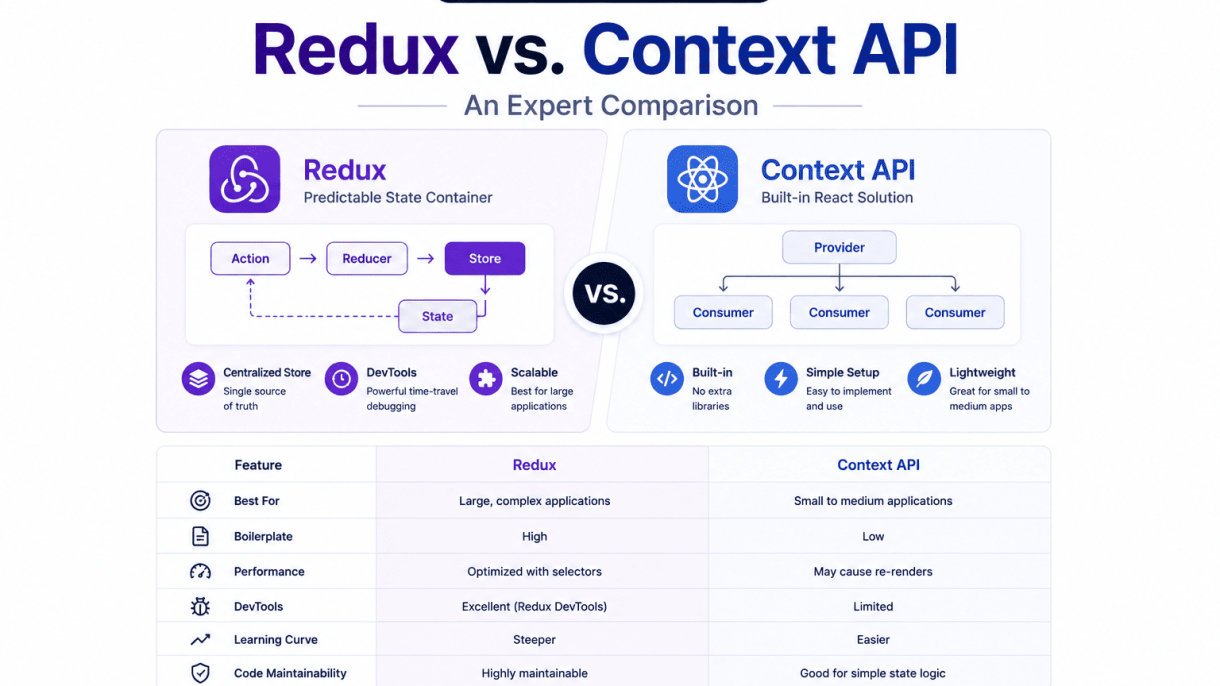

Introduction to State Management in React
State management is the backbone of any dynamic React application, dictating how data flows, updates, and renders across components. As applications grow in complexity, managing state locally within individual components becomes increasingly untenable. The core challenge lies in maintaining a predictable, debuggable data flow while avoiding deeply nested prop chains—commonly known as prop drilling—that make code brittle and hard to maintain. This is where centralized state solutions like Redux and the Context API come into play, offering structured approaches to sharing and synchronizing state across an entire component tree. Understanding when and why to adopt these tools is essential for building scalable, maintainable React applications.
Why Centralized State Management Matters
Centralized state management addresses a fundamental problem in React: the need for multiple, unrelated components to access and update the same piece of data. Without a central store, developers resort to lifting state up to common ancestors and passing it down through props. While this works for small apps, it creates a tangled web of dependencies as the app scales. A centralized state solution offers several concrete benefits:
- Single source of truth: All state resides in one predictable location, reducing inconsistencies and making debugging straightforward.
- Predictable updates: Changes to state follow defined patterns (e.g., reducers or context providers), ensuring data flow is traceable and side effects are minimized.
- Component decoupling: Components no longer need to know the structure of the entire tree to access data; they simply connect to the store or consume a context.
- Improved testability: State logic can be tested independently of UI components, leading to more reliable code.
- Performance optimization: Centralized stores often include built-in mechanisms (e.g., Redux selectors or Context memoization) to prevent unnecessary re-renders.
These advantages become critical when managing user authentication, shopping cart data, theme preferences, or real-time updates across dozens of components.
Common Pitfalls of Local State Only
Relying exclusively on local state—using useState or useReducer within individual components—can lead to several recurring issues as an application matures:
| Pitfall | Description | Impact |
|---|---|---|
| Prop drilling | Passing state through multiple intermediate components that do not use the data themselves. | Code becomes verbose and fragile; refactoring requires changes across many files. |
| State duplication | Multiple components maintain separate copies of the same logical state. | Leads to synchronization bugs and inconsistent UI. |
| Unclear data ownership | No single component is responsible for managing shared state. | Difficult to trace where updates originate; debugging becomes time-consuming. |
| Re-render cascades | State changes in a high-level component trigger re-renders in many unrelated children. | Performance degrades, especially in deeply nested trees. |
| Scaling difficulty | Adding new features often requires restructuring the component hierarchy. | Development slows; the codebase becomes rigid. |
These pitfalls are not theoretical—they emerge naturally when teams add features like user preferences, multi-step forms, or collaborative editing without a centralized strategy.
When to Consider External State Solutions
External state solutions—such as Redux, Zustand, or the built-in Context API—should be evaluated when your application exhibits one or more of the following characteristics:
- Multiple components across distant branches of the tree need the same data. For example, a header, sidebar, and footer all need user authentication status.
- State updates are frequent and complex. Real-time dashboards, collaborative editors, or live chat features benefit from predictable update patterns.
- The application has distinct global state that persists across routes. Theme settings, language preferences, or cached API responses are good candidates.
- You need fine-grained control over re-renders. Redux’s selector pattern or Context’s multiple providers can prevent unnecessary updates that local state alone cannot avoid.
- The team size or codebase complexity justifies formal state architecture. Larger teams benefit from the constraints and conventions that external solutions enforce.
It is important to note that external solutions add conceptual overhead and boilerplate. For simple apps with limited shared state, React’s built-in useState and prop passing remain perfectly adequate. The decision to adopt Redux or Context API should always be driven by actual pain points, not by trend or speculation.
What Is the Context API?
React’s Context API is a built-in feature designed to share global data across a component tree without manually passing props through every level. It solves the “prop drilling” problem, where data must be threaded through intermediate components that do not need it themselves. The Context API provides a way to broadcast values—such as themes, user authentication status, or locale preferences—to any descendant component that subscribes to them, making it a lightweight alternative to external state management libraries for simpler use cases. It operates by creating a context object, which holds the data, and then using two key components: the Provider, which supplies the data, and the Consumer, which accesses it.
Provider and Consumer Pattern
The Provider and Consumer pattern is the foundation of the Context API. The Provider component wraps a part of the component tree and makes a value available to all descendants. It accepts a value prop, which can be any JavaScript data type—an object, array, string, or function. Any component nested inside the Provider can access that value via the Consumer or the useContext hook. The Consumer component uses a render-prop pattern, where a function is passed as a child to receive the context value. This approach is explicit but can lead to deeply nested code when used extensively. Here is a practical example demonstrating the pattern:
import React, { createContext } from 'react';

// Create a context with a default value
const ThemeContext = createContext('light');

function App() {
  return (
    <ThemeContext.Provider value="dark">
      <Toolbar />
    </ThemeContext.Provider>
  );
}

function Toolbar() {
  return (
    <div>
      <ThemeContext.Consumer>
        {theme => <p>Current theme: {theme}</p>}
      </ThemeContext.Consumer>
    </div>
  );
}
In this example, the Provider passes "dark" to the ThemeContext, and the Consumer in Toolbar renders it. This pattern works well for small applications or isolated contexts but can become verbose as the number of contexts grows.
Using useContext Hook for Simplicity
The useContext hook, introduced in React 16.8, simplifies consuming context values by eliminating the need for the Consumer component and its render-prop syntax. Instead, you call useContext directly inside a functional component, passing the context object as an argument. This hook returns the current context value, making code more readable and reducing boilerplate. For example, the previous Toolbar component can be rewritten as:
import React, { useContext } from 'react';

function Toolbar() {
  const theme = useContext(ThemeContext);
  return <p>Current theme: {theme}</p>;
}
This approach is preferred in modern React development because it keeps components cleaner and aligns with functional programming patterns. When using useContext, ensure the component is within a matching Provider, or the default value from createContext will be used.
Typical Use Cases for Context API
The Context API is best suited for global data that does not change frequently or is read-heavy. Common scenarios include:
- Theming: Providing a theme object (light/dark mode) to all components.
- Authentication: Sharing user login status, tokens, or profile data across the app.
- Localization: Passing locale strings or translation functions to support multiple languages.
- UI State: Managing a sidebar open/close state or a modal visibility flag.
However, the Context API has limitations. It is not optimized for high-frequency updates—every context value change re-renders all consuming components, which can cause performance issues in large applications with dynamic data. For such cases, libraries like Redux offer more granular control. The Context API excels in small to medium-sized projects where simplicity and zero external dependencies are priorities.
What Is Redux?
Redux is a predictable state container for JavaScript applications, most commonly used with React but framework-agnostic. It centralizes application state in a single object, enforcing strict rules for how state can be read and updated. This predictability stems from three core principles: a single source of truth, state is read-only, and changes are made through pure functions. By decoupling state management from the UI layer, Redux enables consistent behavior across environments, easier debugging, and features like time-travel debugging. Its architecture, while initially verbose, provides a robust foundation for applications where state interactions are complex, asynchronous, or shared across many components.
The Redux Store and Reducers
The Redux store is a plain JavaScript object that holds the entire application state. It is created using the createStore function (or configureStore in Redux Toolkit), which requires a reducer function. The store has three core methods: getState() for reading the current state, dispatch(action) for sending actions, and subscribe(listener) for reacting to changes. Reducers are pure functions that take the current state and an action object as arguments, then return a new state object without mutating the previous state. They follow the pattern (state, action) => newState. A common practice is to combine multiple reducers using combineReducers, each managing a slice of the global state. For example:
- User reducer: manages profile, authentication flags.
- Cart reducer: tracks items, quantities, totals.
- UI reducer: controls modals, loading spinners, sidebar visibility.
Each reducer only handles the actions relevant to its slice, keeping logic modular and testable.
Actions and Dispatch Mechanism
Actions are plain JavaScript objects that describe an event that should change state. The only requirement is a type property, typically a string constant like 'ADD_TODO'. Actions can also carry a payload with data needed for the update. To trigger a state change, the store’s dispatch method is called with the action object. The dispatch mechanism follows unidirectional data flow: a user interaction or event creates an action, which is dispatched to the store, the store passes the action and current state to the root reducer, the reducer computes a new state, and the store notifies subscribed components. This one-way loop makes data flow easy to trace. In React, the useDispatch hook from React-Redux provides access to dispatch inside functional components. For clarity, action creators—functions that return action objects—are commonly used to encapsulate action creation logic.
Middleware and Side Effects (e.g., Redux Thunk)
By default, Redux dispatch is synchronous. Middleware intercepts dispatched actions before they reach the reducer, enabling side effects like API calls, logging, or asynchronous flows. Redux Thunk is the most popular middleware for handling async actions. It allows action creators to return a function (a “thunk”) instead of an action object. This function receives dispatch and getState as arguments, enabling it to perform async operations and dispatch multiple actions over time. For instance, a thunk for fetching user data might dispatch a loading action, await the API response, then dispatch a success or failure action. Other middleware options include Redux Saga (using generator functions for complex async workflows) and Redux Observable (based on RxJS observables). Middleware is applied when creating the store via applyMiddleware or configureStore.
| Feature | Redux (with Redux Toolkit) | Context API |
|---|---|---|
| State container | Single centralized store | Multiple providers, each scoped |
| Data flow | Unidirectional via dispatch → reducer | Unidirectional via provider value updates |
| Performance | Optimized with selectors and memoization; only re-renders subscribed components | Can cause unnecessary re-renders without careful memoization (useMemo, useCallback) |
| Middleware support | Built-in middleware system (Thunk, Saga, custom) | None natively; requires custom wrapper logic |
| DevTools | Dedicated Redux DevTools with time-travel debugging | No built-in DevTools; relies on React DevTools |
| Boilerplate | Higher initial code (actions, reducers, store setup) | Minimal for simple state; grows with complexity |
Performance Characteristics of Context API
Re-render Behavior and Unnecessary Updates
The Context API, while elegantly simple for small to medium applications, has a fundamental performance characteristic that can become problematic as an app scales: any time a context value changes, all components that consume that context will re-render, regardless of whether the specific piece of data they use has changed. This is because React’s context propagation mechanism does not perform fine-grained change detection; it triggers a re-render for every consumer when the provider’s value reference changes. In a large component tree with many context consumers, this can lead to cascading, unnecessary updates that degrade frame rates and user experience.
Common scenarios where this becomes a bottleneck include:
- Frequently updated state: A context holding real-time data (e.g., mouse position, websocket feed) will cause all consumers to re-render on every update.
- Large consumer trees: Deeply nested components that each consume the context amplify the cost of a single state change.
- Co-located unrelated data: When a single context object holds both frequently and infrequently changing values, the infrequent consumers pay the re-render cost unnecessarily.
To illustrate, consider a simple counter context. Every time the counter increments, any component consuming this context—even one that only reads a static user name stored in the same context—will re-render:
const AppContext = React.createContext();

function AppProvider({ children }) {
  const [count, setCount] = useState(0);
  const [userName] = useState('Alice'); // static value

  // Every setCount triggers re-render of all consumers
  return (
    <AppContext.Provider value={{ count, userName }}>
      {children}
    </AppContext.Provider>
  );
}
Context Splitting for Optimization
One of the most effective strategies to mitigate unnecessary re-renders is context splitting: instead of storing all related state in a single context, break it into multiple, smaller contexts based on update frequency or logical domain. This ensures that a change in one context only re-renders the consumers that truly depend on that specific slice of state.
For example, separate frequently updated data from static or rarely changed data:
- CountContext – holds only the counter state and its updater function.
- UserContext – holds user profile data that changes infrequently.
Components that only need user data will never re-render when the counter updates. This granularity can dramatically reduce the render footprint in large applications. A practical guideline is to create a new context for every distinct “concern” that has a different update cadence.
useMemo and useCallback Mitigations
Beyond context splitting, two React hooks—useMemo and useCallback—can further optimize Context API performance by stabilizing value references and preventing unnecessary re-renders of child components.
useMemo should be used to memoize the context value object itself. Without it, every render of the provider component creates a new object reference, causing all consumers to re-render even if the actual data hasn’t changed:
const contextValue = useMemo(() => ({ count, increment }), [count]);
useCallback is essential for stabilizing function references passed through context. If a function like increment is recreated on every render, it can break memoization in child components that use React.memo:
const increment = useCallback(() => setCount(c => c + 1), []);
These hooks are not a silver bullet—they add overhead and complexity—but when combined with context splitting, they form a robust optimization strategy. The key trade-off is between the cost of memoization and the cost of re-renders; in practice, for contexts with more than a handful of consumers, the investment pays off.
Performance Characteristics of Redux
Redux is engineered for performance in large-scale applications through several built-in mechanisms that prevent unnecessary re-renders and optimize data access patterns. The library’s design philosophy emphasizes predictable state updates and efficient component re-rendering, making it a strong contender for complex state management scenarios. Understanding these performance characteristics is crucial when comparing Redux to the Context API, as they directly impact application responsiveness and resource utilization.
Reselect and Memoized Selectors
Reselect is a companion library for Redux that provides a mechanism for creating memoized selector functions. These selectors compute derived data from the Redux store, allowing components to access only the specific pieces of state they need. Memoization ensures that the selector only recalculates when its input state changes, preventing unnecessary computations on every render. The key advantages include:
- Derived data caching: Selectors store the last computed result and return it directly if inputs remain unchanged.
- Composable selectors: Smaller selectors can be combined to build complex data transformations without performance penalties.
- Reduced component re-renders: Components only update when the selected state slice actually changes, not when unrelated state updates occur.
- Granular control: Developers can create selectors that return stable references (e.g., using
createSelector), which is critical for reference equality checks in React.
For example, a typical memoized selector for a user list might look like this: it takes the raw users array from the store and returns only active users sorted by name. Without Reselect, every component subscribed to the users slice would re-render whenever any user property changed, even if the active user list remained identical.
connect vs. useSelector Performance
The connect function (from react-redux) and the useSelector hook (introduced in React-Redux v7) both provide access to the Redux store, but they differ in performance characteristics and usage patterns. The following table summarizes key differences:
| Feature | connect (Higher-Order Component) | useSelector (Hook) |
|---|---|---|
| Rendering behavior | Uses shallow equality on mapStateToProps output | Uses strict reference equality by default |
| Custom equality | Not directly supported; requires manual optimization | Supports custom equality function as second argument |
| Component structure | Wraps component, creating an additional layer | Directly inside functional component |
| Performance with large state trees | Efficient due to built-in shallow equality checks | Can cause unnecessary re-renders if not memoized properly |
| Compatibility with class components | Yes | No (functional components only) |
connect performs automatic shallow equality comparison on the result of mapStateToProps, meaning if the returned object has the same references as the previous one, the wrapped component will not re-render. In contrast, useSelector uses strict reference equality (===) by default, which can lead to re-renders if the selector returns a new object or array on each call. Developers can mitigate this by using Reselect’s memoized selectors with useSelector or by providing a custom equality function. For most use cases, useSelector with proper memoization performs comparably to connect, but connect remains advantageous for class components or when automatic shallow comparison is desired without additional boilerplate.
Normalizing State Shape for Speed
Normalizing the Redux state shape is a critical optimization technique that directly impacts performance. A normalized state organizes data as a flat dictionary of entities rather than deeply nested structures, which provides several performance benefits:
- Faster lookups: Accessing an entity by ID becomes O(1) instead of O(n) when searching nested arrays.
- Efficient updates: Updating a single entity only requires changing one location in the state, avoiding deep copies of nested objects.
- Reduced re-renders: Components that subscribe to specific entity IDs only re-render when that entity changes, not when sibling or parent entities update.
- Simpler selectors: Memoized selectors work more effectively with flat structures because they can return stable references to individual entities.
A common normalization pattern uses normalizr or manual techniques to transform nested API responses into a shape like { entities: { users: { byId: {}, allIds: [] } } }. This approach is particularly beneficial for applications with frequent updates to individual items, such as real-time collaboration tools or data-heavy dashboards. When combined with memoized selectors, normalized state ensures that even large state trees remain performant under heavy load.
Scalability and Maintainability
When evaluating React state management solutions for long-term projects, scalability and maintainability are paramount. Redux and the Context API differ significantly in how they accommodate growing team sizes, increasing feature counts, and complex state logic. Redux provides a structured, opinionated framework that enforces separation of concerns, while Context API offers simplicity that can become a liability as an application expands.
Code Organization with Redux Slices
Redux scales effectively through its slice pattern, which divides the global state into logical, self-contained modules. Each slice contains its own reducer, actions, and selectors, making it straightforward to assign ownership to individual developers or teams. For example, an e-commerce application might have slices for cart, user, products, and orders:
// cartSlice.js
import { createSlice } from '@reduxjs/toolkit';

const cartSlice = createSlice({
  name: 'cart',
  initialState: { items: [], total: 0 },
  reducers: {
    addItem: (state, action) => {
      state.items.push(action.payload);
      state.total += action.payload.price;
    },
    removeItem: (state, action) => {
      state.items = state.items.filter(item => item.id !== action.payload.id);
      state.total -= action.payload.price;
    },
  },
});

export const { addItem, removeItem } = cartSlice.actions;
export default cartSlice.reducer;
This modularity enables parallel development, clear dependency boundaries, and easier code reviews. Redux Toolkit further enhances maintainability by reducing boilerplate and enforcing immutable update patterns through Immer. Key benefits for scalability include:
- Feature isolation – Each slice handles its own state without cross-contamination.
- Predictable data flow – Unidirectional updates via dispatched actions simplify debugging.
- Middleware support – Tools like Redux Thunk or Saga handle side effects without cluttering components.
- DevTools integration – Time-travel debugging and action logging become invaluable with many features.
Context API in Large Codebases
The Context API, while excellent for small to medium applications, presents challenges as codebases grow. Without built-in modularity, developers often create multiple contexts for different domains, leading to a tangled hierarchy of providers. For instance, a large application might require separate contexts for authentication, theme, locale, and user preferences, resulting in deeply nested provider trees that are hard to reason about:
// Provider nesting becomes unwieldy
function AppProviders({ children }) {
  return (
    <AuthProvider>
      <ThemeProvider>
        <LocaleProvider>
          <UserPreferencesProvider>
            {children}
          </UserPreferencesProvider>
        </LocaleProvider>
      </ThemeProvider>
    </AuthProvider>
  );
}
Common maintainability issues with Context API at scale include:
- Unnecessary re-renders – Any context value change forces all consuming components to re-render, even if they only use a subset of the data.
- No built-in state splitting – Developers must manually implement patterns like useReducer or create multiple contexts to avoid performance bottlenecks.
- Difficult testing – Mocking deeply nested contexts requires extensive wrapping in test utilities.
- Limited tooling – No dedicated DevTools for tracking context changes or debugging state flows.
Testing and Debugging Considerations
Redux excels in testing and debugging due to its predictable architecture. Reducers are pure functions that can be unit-tested in isolation without rendering components. Integration tests can dispatch actions and assert on state changes using a mock store. For debugging, the Redux DevTools browser extension provides time-travel debugging, action replay, and state diffing, which is crucial for tracking complex state mutations across many features.
Context API testing requires wrapping components in provider components, making tests more verbose. Debugging relies on React DevTools, which shows provider values but lacks action history or state snapshots. For large teams, the lack of structured debugging tools increases time spent reproducing and fixing bugs. A practical comparison table highlights these differences:
| Aspect | Redux | Context API |
|---|---|---|
| Unit testing reducers | Straightforward, pure functions | Not applicable (no reducers) |
| Integration testing | Mock store with actions | Wrap components in providers |
| Debugging tools | Redux DevTools with time travel | React DevTools only |
| Error tracking | Middleware for error logging | Manual try-catch in providers |
In summary, Redux provides a robust foundation for scalability and maintainability through structured code organization, modular slices, and advanced debugging capabilities. The Context API remains suitable for simpler state needs but introduces friction as team size and feature complexity increase.
Learning Curve and Developer Experience
When evaluating React State Management: Redux vs. Context API, the learning curve and developer experience often dictate which solution a team adopts. Redux demands a deeper initial investment due to its formal architecture, while Context API offers a gentler entry point for developers already familiar with React’s hooks. Below, we break down the key factors influencing this trade-off.
Redux Boilerplate vs. Context Simplicity
Redux historically required significant boilerplate: action types, action creators, reducers, store configuration, and middleware setup. Even with Redux Toolkit reducing this overhead, developers must learn concepts like immutability, pure functions, and the unidirectional data flow. In contrast, Context API leverages React’s built-in createContext and useContext hooks, requiring no additional libraries. A simple context setup involves only a provider component and a consumer hook, which feels natural to developers already using useState or useReducer. However, this simplicity can become deceptive when managing complex state, as Context lacks built-in mechanisms for side effects or normalized data, often leading to ad-hoc patterns that increase cognitive load over time.
| Aspect | Redux (with Toolkit) | Context API |
|---|---|---|
| Setup steps | Install packages, create slice, configure store, wrap app | Create context, define provider, wrap app |
| Concepts to learn | Actions, reducers, middleware, selectors, thunks | Context, provider, useContext hook |
| Boilerplate per feature | ~10–15 lines (slice definition) | ~5–8 lines (provider + hook) |
| Learning time (estimate) | 1–3 days for basics; weeks for advanced patterns | 1–2 hours for basic use |
DevTools and Debugging Capabilities
Redux offers a mature DevTools ecosystem, including a browser extension with time-travel debugging, action logging, state diffing, and the ability to dispatch actions manually. This transforms debugging from guesswork into a forensic process—developers can replay past states and inspect every mutation. Context API lacks official DevTools support. Debugging requires manual logging, React DevTools profiling (which shows re-renders but not state changes), or third-party libraries like use-context-selector that add complexity. For teams prioritizing rapid issue diagnosis, Redux’s DevTools provide a clear advantage, especially in large applications with dozens of state changes per interaction.
Community Resources and Ecosystem
Redux benefits from a decade of community growth: thousands of tutorials, Stack Overflow answers, conference talks, and production-tested libraries like Redux Saga, Redux Observable, and Reselect. The official documentation is comprehensive, with recipes for common patterns. Context API, while well-documented by React’s official guide, has fewer advanced resources. Most tutorials cover basic use cases, leaving developers to invent solutions for performance optimization or cross-cutting concerns. The ecosystem around Context is thinner—there are no dedicated middleware libraries or form validation tools designed specifically for it. For teams needing reliable, battle-tested patterns, Redux’s community support reduces long-term risk, whereas Context API may require more in-house problem-solving for non-trivial scenarios.
When to Use Context API Over Redux
Choosing between React’s built-in Context API and a dedicated library like Redux often comes down to application complexity and update patterns. While Redux provides a robust, centralized store with middleware and devtools, Context API offers a lighter, simpler solution for specific use cases. Understanding when Context API is sufficient—or even preferable—can save development time, reduce bundle size, and avoid over-engineering. Below are the key scenarios where Context API shines over Redux.
Small to Medium Application Scope
For applications with a limited number of components and a straightforward state tree, Context API eliminates the boilerplate and learning curve associated with Redux. In small to medium apps, the state typically involves fewer than 10–15 shared values, such as user authentication status, language preference, or a few UI flags. Context API allows you to define a provider and consume state directly without creating actions, reducers, or a store configuration. This keeps the codebase lean and maintainable. For example, a personal blog or a small e-commerce site with fewer than 20 components rarely benefits from the strict structure of Redux. The overhead of setting up Redux in such cases can outweigh its advantages, especially when team size is small and rapid iteration is prioritized.
Low-Frequency State Changes
Context API performs best when state updates occur infrequently—such as theme toggling, language switching, or sidebar visibility. These updates happen on user action (e.g., clicking a button) and do not involve high-frequency re-renders. Because Context API triggers a re-render of all consumers whenever the context value changes, using it for high-frequency updates (like real-time mouse coordinates or form input changes) can lead to performance degradation. In contrast, low-frequency changes are well-suited: the re-render cost is minimal and predictable. For instance, a theme toggle that changes a global color palette affects only a few styling-related components, and the update occurs once per user interaction. This pattern is exactly what Context API was designed for—simple, occasional state sharing without the need for memoization or selectors.
Rapid Prototyping and Simple Sharing
When building a proof-of-concept or a prototype, Context API accelerates development by removing configuration steps. You can wrap a provider around a component tree and immediately share state without defining action types, reducers, or middleware. This is especially useful for hackathons, MVP launches, or internal tools where speed matters over scalability. Similarly, for simple sharing of a single piece of data—like a user ID across sibling components—Context API provides a direct, readable solution. In these cases, the added structure of Redux becomes unnecessary complexity. However, note that if the prototype grows into a larger application with complex state interactions, migrating to Redux later is a common and manageable step.
| Scenario | Context API | Redux |
|---|---|---|
| Small to medium app scope | Sufficient, minimal boilerplate | Overkill, adds unnecessary complexity |
| Low-frequency state changes | Excellent performance, simple to implement | Possible but adds overhead |
| Rapid prototyping | Ideal, fast setup with no extra libraries | Slower setup, better for long-term projects |
| High-frequency updates | Can cause performance issues | Better with middleware and memoization |
| Complex state logic | Not recommended | Structured and scalable |
In summary, Context API is the preferable choice for React state management when the application scope is small, state changes are infrequent, or rapid prototyping is the goal. These scenarios align with the library’s strengths: simplicity, zero dependencies, and direct integration with React’s component model. By reserving Redux for larger, more complex applications, developers can keep their codebases efficient and focused on the task at hand.
When to Use Redux Over Context API
Choosing between Redux and the Context API for React state management depends on the specific demands of your application. While the Context API excels in simplicity for small to medium-sized apps, Redux provides a robust, predictable architecture that becomes essential under certain conditions. Below are the precise scenarios where Redux is the superior choice.
Complex State Logic and Side Effects
Redux shines when your state logic involves intricate dependencies, cross-cutting concerns, or asynchronous side effects. Unlike the Context API, which requires manual management of state updates and side effects within components or custom hooks, Redux enforces a unidirectional data flow through pure reducers. This makes it easier to reason about complex state transitions.
When you need to handle side effects like API calls, caching, or websocket connections, Redux middleware such as Redux Thunk or Redux Saga provides a dedicated layer. For example, fetching user data with Redux Thunk looks like this:
// Redux Thunk action creator
export const fetchUser = (userId) => async (dispatch) => {
  dispatch({ type: 'FETCH_USER_REQUEST' });
  try {
    const response = await fetch(`/api/users/${userId}`);
    const data = await response.json();
    dispatch({ type: 'FETCH_USER_SUCCESS', payload: data });
  } catch (error) {
    dispatch({ type: 'FETCH_USER_FAILURE', error });
  }
};
The Context API lacks built-in support for such patterns, often leading to scattered logic across components or complex custom hooks. Use Redux when your state dependencies are deep, such as when updating one piece of state triggers recalculations in multiple unrelated parts of the store.
High-Frequency State Updates
Applications requiring rapid, frequent state updates—such as real-time dashboards, collaborative editing tools, or gaming interfaces—benefit significantly from Redux. The Context API triggers a re-render of all consumers whenever the context value changes, even if only a small portion of the state updates. This can cause performance bottlenecks in high-frequency scenarios.
Redux mitigates this through its store subscription model and the useSelector hook, which only re-renders components when their selected slice of state changes. Additionally, libraries like reselect enable memoized selectors to prevent unnecessary recalculations. The following table summarizes the performance characteristics:
| Aspect | Redux | Context API |
|---|---|---|
| Re-render scope | Only subscribed components | All context consumers |
| Optimization tools | Memoized selectors, middleware | Manual useMemo, useCallback |
| Ideal update frequency | High (e.g., 60 FPS) | Low to moderate |
Choose Redux when your app processes state changes at rates above 30 updates per second, or when you need fine-grained control over re-renders.
Enterprise-Scale Collaboration Requirements
For large teams working on complex applications, Redux offers structural advantages that the Context API cannot match. Redux enforces a strict separation of concerns through actions, reducers, and the store, making it easier for multiple developers to work on different state domains without conflicts. Its DevTools extension provides time-travel debugging, action logging, and state inspection, which are invaluable for debugging in production-like environments.
Redux also supports middleware for logging, crash reporting, and analytics—features critical for enterprise applications. Consider using Redux when:
- Your team has more than five developers contributing to state logic.
- You need to maintain a clear audit trail of state changes.
- The application requires integration with external tools like Redux Persist for offline support.
- You anticipate scaling to multiple micro-frontends or module federations.
In summary, reserve Redux for scenarios demanding predictable state management with complex interactions, high performance, and collaborative scalability. The Context API remains a lightweight alternative for simpler needs, but Redux provides the architectural rigor that enterprise-grade React applications require.
Hybrid Approaches and Modern Alternatives
While the debate between Redux and the Context API often frames them as binary choices, many production applications benefit from hybrid strategies that blend their strengths. Additionally, a new generation of state management libraries has emerged, offering more granular control and simpler APIs than either Redux or raw Context. Understanding these options allows developers to tailor solutions to specific app complexity and performance requirements.
Context API with useReducer for Localized State
For localized state—such as the data within a single feature, form, or complex component tree—combining the Context API with useReducer provides a lightweight alternative to Redux. This pattern avoids global state overhead while still benefiting from a reducer’s predictable state transitions.
- Structure: A
useReducerhook manages state within a feature, and a Context provider makes the state and dispatch function available to descendant components without prop drilling. - When to use: Ideal for medium-complexity features like a multi-step checkout wizard, a dashboard with multiple filters, or a complex form with undo/redo capabilities.
- Limitations: Context still triggers re-renders on all consumers when the context value changes, even if only a subset of the state is consumed. For high-frequency updates (e.g., real-time typing), this can cause performance issues.
This approach is a pragmatic middle ground: it avoids the boilerplate of Redux for isolated features while providing more structure than plain useState.
State Management Libraries: Zustand and Jotai
Zustand and Jotai represent a shift toward minimal, hook-based state management that avoids the provider hierarchy of Context and the action/reducer ceremony of Redux.
| Feature | Zustand | Jotai |
|---|---|---|
| Core Concept | Single store with mutable state via set |
Atomic atoms, each holding a piece of state |
| Boilerplate | Minimal; no actions or reducers required | Very minimal; atoms created with atom() |
| Re-rendering | Fine-grained via selector functions | Automatic per-atom subscription |
| Learning Curve | Low; similar to useState but global |
Low; intuitive for simple state |
| Best Use Case | Global state that needs minimal structure | Modular, composable state across components |
Zustand excels when you want a global store without Redux’s boilerplate—simply call create and use the returned hook. Jotai’s atomic model shines in complex dependency graphs where state pieces are combined or derived, as atoms can reference each other without creating a monolithic store.
Recoil and Atomic State Patterns
Recoil, developed by Meta, pioneered the atomic state pattern in React. Unlike Context or Redux, Recoil defines state as discrete atoms and derived selectors, enabling automatic dependency tracking and efficient re-rendering.
- Atoms: Units of state that components can read and write directly via
useRecoilState. Atoms are independent, so only subscribing components re-render when that specific atom changes. - Selectors: Pure functions that compute derived state from atoms or other selectors. They automatically cache results and only recompute when dependencies change.
- Performance: Recoil avoids the Context re-render problem entirely because components subscribe only to the atoms they consume. This makes it suitable for highly interactive apps with frequent state updates.
- Trade-offs: Recoil requires a
RecoilRootprovider, and its API surface is larger than Zustand or Jotai. It also has a more opinionated mental model, which may be overkill for simpler applications.
Recoil is best reserved for applications where state is deeply interconnected, such as collaborative tools, data dashboards, or apps with complex undo/redo logic. Its atomic pattern provides a clear, maintainable structure for state that would otherwise become tangled in Context or Redux.
Frequently Asked Questions
What is the main difference between Redux and Context API?
Redux is a standalone state management library that provides a predictable state container with a unidirectional data flow, middleware support, and devtools. Context API is a built-in React feature for passing data through the component tree without prop drilling. Redux is better for complex, large-scale applications with frequent updates, while Context API is simpler and sufficient for small to medium apps or global theming.
When should I use Redux over Context API?
Use Redux when your app has complex state logic, requires middleware for side effects (like API calls), needs time-travel debugging, or involves frequent updates across many components. Redux also shines in large teams where strict patterns and devtools help maintain consistency. Context API is ideal for simpler needs like user authentication, theme, or locale settings where updates are infrequent.
Does Context API replace Redux?
No, Context API does not replace Redux. While both solve prop drilling, Redux offers a robust architecture with middleware, enhancers, and a centralized store that scales better. Context API can cause unnecessary re-renders and lacks built-in tools for side effects. For advanced state management, Redux or similar libraries (like Zustand or MobX) are recommended.
Can I use Redux and Context API together?
Yes, they can be used together. For example, you might use Context API for global theming or user authentication and Redux for complex business logic. However, mixing them can add complexity. In most cases, it's better to choose one primary state management solution per app to maintain consistency.
How does performance compare between Redux and Context API?
Redux generally performs better for frequent updates because it uses a single store with selectors to prevent unnecessary re-renders. Context API, when used with a provider, causes all consumers to re-render even if only part of the context value changes. This can be mitigated with memoization (useMemo) but still may lead to performance issues in large apps.
Which is easier to learn: Redux or Context API?
Context API is easier to learn because it is built into React and has a simpler API (createContext, useContext). Redux has a steeper learning curve due to concepts like actions, reducers, middleware, and immutable updates. However, Redux Toolkit simplifies Redux significantly, making it more accessible.
What are the alternatives to Redux and Context API?
Popular alternatives include Zustand (lightweight, simple), MobX (reactive, less boilerplate), Recoil (experimental, Facebook), and Jotai (atomic state). Each has trade-offs. For server state, consider React Query or SWR. The choice depends on your app's size, complexity, and team preferences.
Is Context API suitable for large-scale applications?
Context API is generally not recommended for large-scale applications with frequent state updates due to re-render performance issues. For large apps, Redux or other specialized libraries provide better scalability, middleware, and debugging tools. However, Context API can still be used for low-frequency global states like themes or user preferences.
Sources and further reading
- Redux – A Predictable State Container for JavaScript Apps
- Context API – React Documentation
- Redux Toolkit – Official Redux Toolkit Documentation
- React Hooks – useReducer
- React Performance Optimization – Re-rendering and Memoization
- Redux Style Guide – Best Practices
- Zustand – A Small, Fast State Management Solution
- MobX – Simple, Scalable State Management
- Recoil – A State Management Library for React
- React Query – TanStack Query Documentation
Need help with this topic?
Send us your details and we will contact you.