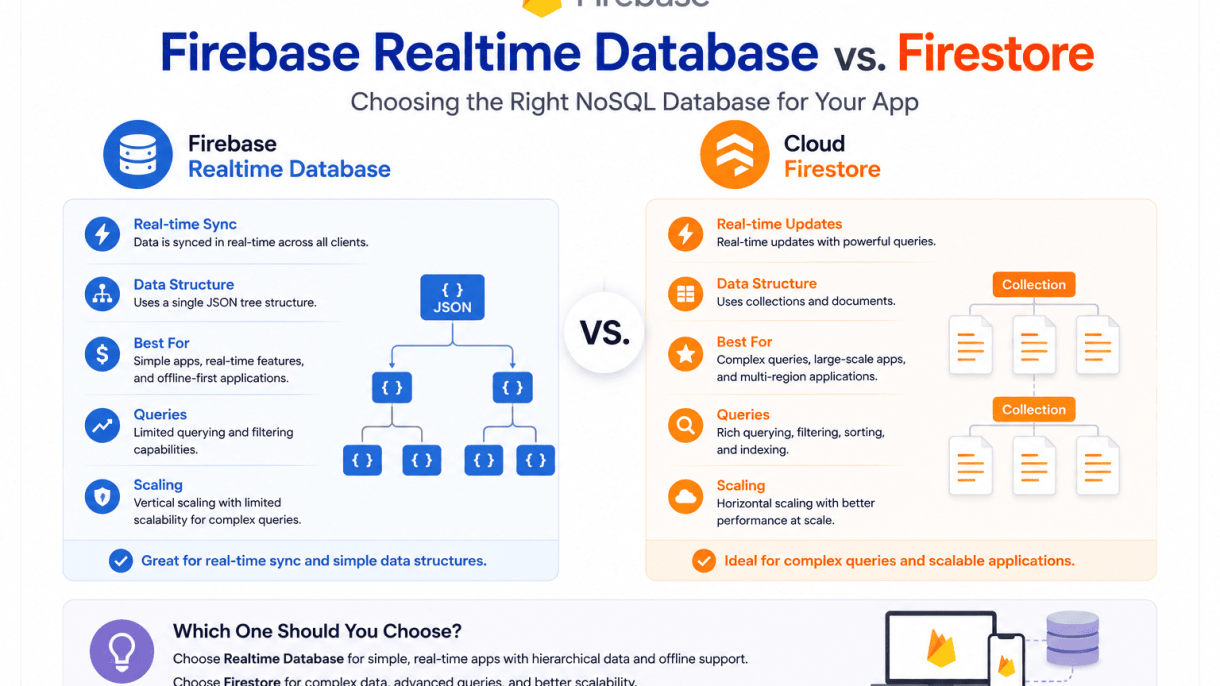

Introduction to Firebase Realtime Database and Firestore
Within the Firebase ecosystem, two primary NoSQL, cloud-hosted databases serve mobile and web applications: Firebase Realtime Database and Cloud Firestore. Both are designed to synchronize data in real time across clients, scale automatically, and integrate seamlessly with other Firebase services like Authentication and Cloud Functions. However, they differ fundamentally in data modeling, querying capabilities, and pricing structure. Understanding these differences is crucial for selecting the right database for your app’s specific requirements.
What is Firebase Realtime Database?
Firebase Realtime Database is the original NoSQL database from Firebase, launched in 2012. It stores data as a single JSON tree, where every piece of data is a node that can be accessed and updated in real time. Key characteristics include:
- Data structure: A hierarchical JSON tree. Data is denormalized and nested, making it efficient for simple, flat data models.
- Real-time synchronization: Every connected client receives updates instantly when data changes, with minimal latency.
- Offline support: Built-in local caching allows apps to read and write data even when offline, with automatic syncing upon reconnection.
- Querying: Limited filtering and sorting. You can filter by a single property or order by a key, but complex queries (e.g., combining multiple filters) are not supported.
- Scalability: Best suited for apps with relatively simple data relationships and moderate scaling needs. It can handle thousands of concurrent users but may degrade with deeply nested data.
- Pricing: Based on bandwidth and storage, with a free tier. No per-operation costs.
What is Firestore?
Cloud Firestore is Firebase’s newer, more feature-rich NoSQL database, released in 2017. It uses a document-collection model, offering greater flexibility and powerful querying. Key characteristics include:
- Data structure: Collections of documents, each containing key-value pairs. Subcollections allow for hierarchical data without nesting depth limits.
- Real-time synchronization: Supports real-time listeners similar to Realtime Database, but with more granular control (e.g., listening to specific documents or queries).
- Offline support: Robust offline persistence for both reads and writes, with conflict resolution strategies.
- Querying: Advanced querying capabilities: compound filters (e.g., where age > 25 AND city == “London”), composite indexes, and sorting on multiple fields.
- Scalability: Automatically scales to millions of concurrent connections and terabytes of data, with strong performance even for complex queries.
- Pricing: Charged per read, write, and delete operation, plus storage and bandwidth. This can be cost-effective for apps with low write volumes but expensive for high-throughput operations.
Key Similarities Between the Two
Despite their differences, Firebase Realtime Database and Firestore share several core traits that make them both viable options within the Firebase ecosystem:
| Feature | Shared Capability |
|---|---|
| Real-time updates | Both provide real-time listeners that push data changes to clients instantly. |
| Offline support | Both cache data locally, allowing apps to function offline and sync when connectivity returns. |
| Serverless & cloud-hosted | No server management required; auto-scaling and security rules are managed by Firebase. |
| Integration with Firebase services | Both integrate with Firebase Authentication, Cloud Functions, and Analytics. |
| NoSQL data model | Both store data in a schema-less, non-relational format, ideal for rapid development. |
| Cross-platform SDKs | Both offer native SDKs for iOS, Android, Web, and Unity. |
Choosing between them depends on your app’s data complexity, query requirements, and budget. For simple, low-latency chat apps or real-time dashboards, Realtime Database excels. For apps requiring complex queries, hierarchical data, or massive scalability, Firestore is the stronger choice.
Data Model and Structure Differences
Understanding how Firebase Realtime Database and Firestore organize data is critical for choosing the right database for your app. While both are NoSQL solutions from Firebase, their data models differ fundamentally, affecting how you structure, query, and scale your application. The core distinction lies in their hierarchical organization: Realtime Database uses a single JSON tree, whereas Firestore employs a collection-document model with subcollections.
Realtime Database: JSON Tree Hierarchy
Firebase Realtime Database stores all data as one large JSON tree. Every piece of information is a node in this tree, with nested objects representing related data. For example, a chat app might store messages like this:
{
  "messages": {
    "-Nabc123": {
      "userId": "user1",
      "text": "Hello!",
      "timestamp": 1700000000
    },
    "-Ndef456": {
      "userId": "user2",
      "text": "Hi there!",
      "timestamp": 1700000001
    }
  }
}
In this model, data is deeply nested, and you access it by specifying the exact path (e.g., /messages/-Nabc123/text). This simplicity makes real-time synchronization fast, but it comes with trade-offs:
- Denormalization is common: To avoid deep nesting that slows queries, you often duplicate data across the tree.
- No schema enforcement: You can store any structure at any path, leading to potential inconsistency in larger projects.
- Limited querying: You can only filter or sort by one property at a time, and only at a single depth level.
The JSON tree is ideal for simple, flat data structures where real-time updates are paramount, but it becomes unwieldy for complex relational data.
Firestore: Collections, Documents, and Subcollections
Firestore organizes data into collections (containers of documents) and documents (individual records with key-value pairs). Documents can also contain subcollections, creating a hierarchical but flexible structure. The same chat app data in Firestore might look like:
messages (collection)
  - (document ID: "abc123")
    - userId: "user1"
    - text: "Hello!"
    - timestamp: 1700000000
  - (document ID: "def456")
    - userId: "user2"
    - text: "Hi there!"
    - timestamp: 1700000001
Key characteristics of this model include:
- Strong data typing: Each document has a defined schema with fields like strings, numbers, arrays, and maps.
- Subcollections for depth: You can nest subcollections within documents (e.g., a
usersdocument could have apostssubcollection), allowing for more natural relational modeling without deep nesting. - Atomic operations: Documents can be updated, deleted, or read individually, and batch writes are supported.
Firestore’s model encourages a more structured approach, making it easier to maintain data integrity and scale complex applications.
Impact on Querying and Data Relationships
The data model directly influences how you query and manage relationships. In Realtime Database, queries are limited to simple filtering at a single node level. For example, to get messages from a specific user, you must structure the tree to allow that query, often by duplicating data under a user-messages path. This can lead to data redundancy and complexity.
Firestore, by contrast, supports compound queries with multiple filters and sorting on different fields, all within a single collection or subcollection. For instance, you can query all messages from a user sorted by timestamp in one operation:
db.collection("messages")
  .whereEqualTo("userId", "user1")
  .orderBy("timestamp", Query.Direction.DESCENDING)
  .get();
For data relationships, Realtime Database relies on manual references (e.g., storing user IDs as strings) and client-side joins. Firestore provides more robust support through reference data types and subcollections, enabling you to model one-to-many and many-to-many relationships more naturally. Consider this comparison:
| Feature | Realtime Database | Firestore |
|---|---|---|
| Querying depth | Single level only | Multi-field and compound queries |
| Data relationships | Manual references, client-side joins | Reference types, subcollections |
| Scaling complex queries | Requires denormalization | Built-in indexing |
In summary, choose Realtime Database for simple, flat data with minimal query needs and maximum real-time performance. Opt for Firestore when your app requires complex queries, structured data, and scalable relationships.
Querying Capabilities and Flexibility
When comparing Firebase Realtime Database vs. Firestore, querying capabilities represent one of the most significant differentiators. The choice between them often hinges on whether your app requires simple real-time lookups or complex, filtered data retrieval across multiple fields. Firestore offers a far more mature and flexible query model, while Realtime Database prioritizes speed and simplicity at the cost of query expressiveness.
Realtime Database: Limited Filtering and Sorting
Firebase Realtime Database provides basic querying through a combination of orderByChild, equalTo, startAt, endAt, and limitToFirst or limitToLast. These operations allow you to filter on a single field and sort results, but they have strict limitations:
- Single-field filtering only: You cannot combine filters on different fields in a single query. For example, filtering by
statusanddatesimultaneously requires client-side processing. - No compound queries: Queries are limited to one
orderByclause and one range or equality filter. Any additional conditions must be applied manually after fetching data. - Data denormalization often required: To work around these limits, developers frequently duplicate data or structure it to fit query patterns (e.g., using composite keys like
userID_timestamp). - Performance degrades with deep nesting: Filtering on deeply nested paths can slow down queries, as Realtime Database must traverse the entire subtree.
This model works well for simple chat applications or live dashboards where queries are straightforward and predictable. However, for apps needing multi-criteria searches—like “find all orders from user X placed after 2024-01-01 with status ‘shipped’—Realtime Database falls short.
Firestore: Advanced Querying with Compound Filters
Firestore was designed from the ground up to support powerful, scalable queries. It allows you to combine multiple equality and range filters on different fields in a single query, known as compound queries. Key capabilities include:
- Compound equality filters: Combine
whereclauses on multiple fields with==operators, e.g.,where("status", "==", "active").where("region", "==", "US"). - Range and inequality filters: Use
<,<=,>,>=, and!=on a single field alongside equality filters on others, as long as the range field is the first in the composite index. - Array membership and
inqueries: Filter documents where an array field contains a specific value, or where a field matches any value in a list (up to 10 values). - Ordering and pagination: Sort results by any indexed field and implement cursor-based pagination using
startAfterandendBefore. - Collection group queries: Query across all subcollections with the same name, enabling powerful hierarchical data retrieval.
For instance, you can run a query like: where("category", "==", "electronics").where("price", ">=", 100).orderBy("price", "desc").limit(20)—all in a single, efficient operation. This makes Firestore far superior for applications with complex filtering needs, such as e-commerce, analytics dashboards, or social feeds.
Indexing Requirements and Performance Implications
Both databases use indexes to support queries, but their approaches differ drastically, impacting performance and developer effort.
| Aspect | Firebase Realtime Database | Firestore |
|---|---|---|
| Index creation | Automatic for all data; no manual configuration. | Automatic for simple single-field queries; composite indexes required for compound queries (auto-generated or manually defined). |
| Index scope | Global index per location; all children are indexed by default. | Per-field and per-query composite indexes; collection group indexes for subcollections. |
| Query performance | Linear with data size for unindexed queries; fast for indexed fields, but no parallel filtering. | Sub-linear for all indexed queries; compound queries use merged indexes for constant-time lookups. |
| Index size limits | No explicit limit, but deep nesting increases index size and query latency. | Maximum 200 composite indexes per database; each index limited to 8 fields. |
| Write overhead | Index updated on every write; no additional cost for composite indexes. | Each index updated on writes; composite indexes increase write latency and cost slightly. |
| Developer control | Minimal; indexes are automatically managed. | Full control; developers define composite indexes via the Firebase console or CLI, with error feedback for missing indexes. |
In Realtime Database, the lack of composite indexes means any query combining multiple fields must be handled client-side, leading to potential bandwidth waste and slower performance for large datasets. Firestore’s indexing model, while requiring upfront planning for compound queries, ensures that complex queries remain fast and scalable—even with millions of documents. The trade-off is that missing composite indexes cause queries to fail at runtime, prompting developers to add them. Once created, Firestore’s indexes are automatically maintained and optimized, providing consistent query performance without manual tuning.
Ultimately, if your app demands rich, multi-dimensional queries, Firestore’s advanced indexing and query engine are essential. For simpler, single-field lookups where development simplicity is paramount, Realtime Database’s automatic indexing may suffice—but you sacrifice query flexibility.
Scalability and Performance Considerations
When choosing between Firebase Realtime Database and Firestore, understanding how each handles growth and performance is critical for long-term app success. Both databases are serverless, but their scaling models differ significantly, affecting latency, operational complexity, and cost as your user base expands. This section examines the core scalability mechanisms and performance characteristics of each solution.
Realtime Database: Scaling Limits and Manual Sharding
Firebase Realtime Database operates as a single, monolithic JSON tree. This architecture imposes hard limits that require careful planning. The database supports up to 200,000 simultaneous connections and 1,000 writes per second on a single instance. Beyond these thresholds, performance degrades due to contention on the single write endpoint.
To scale past these limits, you must implement manual sharding. This involves splitting your data across multiple Realtime Database instances, each with a unique URL. The application logic must route reads and writes to the correct shard based on a shard key (e.g., user ID or geographic region). This approach increases development and operational overhead.
- Connection limit: 200,000 concurrent users per database instance.
- Write throughput: ~1,000 writes per second maximum.
- Sharding requirement: Manual, requiring custom routing logic.
- Data model: Single JSON tree, no built-in partitioning.
For applications expecting rapid growth beyond these limits, Realtime Database demands early architectural decisions to avoid costly refactoring later.
Firestore: Automatic Horizontal Scaling
Firestore uses a document-collection model that scales horizontally without manual intervention. It automatically partitions data across multiple nodes based on collection and document IDs. This enables near-linear scaling as data volume and traffic increase. Firestore handles up to 1 million concurrent connections and 10,000 writes per second per database, with no single-point-of-write bottleneck.
Automatic scaling works best when you design your data to avoid hot spots. For example, using monotonically increasing document IDs (like timestamps) in a single collection can cause write contention on the last partition. Firestore mitigates this by recommending distributed ID patterns, such as using random suffixes or hash-based keys. The following code example shows how to generate a distributed document ID in JavaScript:
// Generate a distributed document ID to avoid hot spots
function generateDistributedId() {
  const timestamp = Date.now().toString(36);
  const randomSuffix = Math.random().toString(36).substring(2, 8);
  return `${timestamp}-${randomSuffix}`;
}

// Usage in a Firestore write operation
const docRef = await db.collection('events').doc(generateDistributedId());
await docRef.set({ eventType: 'click', userId: 'user123' });
Firestore also supports automatic index management for queries, which reduces performance degradation as data grows, though composite indexes must be defined in advance.
Latency and Regional Replication Differences
Latency characteristics differ due to replication models. Realtime Database provides real-time synchronization with sub-200ms latency for small payloads within the same region, but it does not offer multi-region replication. All data resides in a single geographic location, leading to higher latency for users far from that region.
Firestore offers multi-region replication (e.g., nam5 in the US, eur3 in Europe) with strong consistency via Paxos-based replication. This reduces latency for globally distributed users but adds 10-50ms overhead for writes compared to single-region Realtime Database. Reads benefit from regional endpoints, typically achieving 100-300ms latency for most global locations.
| Characteristic | Realtime Database | Firestore |
|---|---|---|
| Replication | Single-region only | Multi-region (optional) |
| Write latency (p99) | ~50-150ms (single region) | ~100-300ms (multi-region) |
| Read latency (global) | 200-500ms (remote users) | 100-300ms (regional endpoints) |
| Real-time sync | Native WebSocket support | Via SDK (similar latency) |
For latency-sensitive applications with a global audience, Firestore’s multi-region setup provides more predictable performance, while Realtime Database excels in low-latency, single-region scenarios with fewer concurrent users.
Real-Time Synchronization and Offline Support
When evaluating Firebase Realtime Database vs. Firestore for your app, real-time synchronization and offline support often become deciding factors. Both databases offer live data updates, but they differ significantly in how they handle connections, data structure, and offline behavior. Understanding these nuances helps you match the database to your app’s specific user experience and reliability needs.
Realtime Database: Native Real-Time Sync
Firebase Realtime Database was built from the ground up for real-time synchronization. Its core design uses a single, persistent WebSocket connection between the client and server. When any data changes—whether from another user or a server-side update—the entire affected subtree is pushed to all connected clients instantly. This makes it ideal for applications like live chat, collaborative editing, or multiplayer game states where every millisecond matters.
- Connection model: One continuous WebSocket; no polling overhead.
- Data granularity: Synchronizes entire JSON subtrees, which can be efficient for shallow structures but may over-fetch on deep nested data.
- Offline support: Provides on-disk persistence for the entire database snapshot (up to 200 MB on mobile). Writes are queued locally and synced when connectivity returns.
- Conflict handling: Uses a “last write wins” strategy, which is simple but can overwrite concurrent edits.
Firestore: Real-Time Listeners and Offline Persistence
Firestore takes a more flexible approach to real-time updates. Instead of a single connection, it uses a gRPC-based streaming protocol that supports multiple listeners per document or query. You attach snapshot listeners to specific data paths, and only those paths receive updates. This granularity reduces bandwidth and avoids unnecessary data transfer.
- Connection model: Multiple gRPC streams; supports multiplexing for efficiency.
- Data granularity: Listens at the document level or on query results; updates are scoped and precise.
- Offline persistence: Enabled by default for mobile and web clients. Caches all data the client has read or written, allowing full read and write functionality offline. When reconnected, Firestore performs a multi-version concurrency control (MVCC) sync.
- Conflict handling: Uses “last write wins” per field, not per document. This allows multiple users to edit different fields in the same document without overwriting each other’s work.
Firestore also supports real-time updates with offline writes seamlessly. If a user makes changes while offline, the local cache is updated immediately, and the listener fires locally. Once the device reconnects, the server reconciles the changes, and any remote modifications trigger additional listener callbacks.
Handling Conflicts and Data Consistency
Conflict resolution is where the two databases diverge most sharply, especially in multi-user scenarios.
| Aspect | Realtime Database | Firestore |
|---|---|---|
| Write conflict strategy | Last write wins (entire node) | Last write wins (per field) |
| Transaction support | Yes, but only on single nodes | Yes, with atomic read-modify-write on documents |
| Offline conflict detection | None; last write wins on reconnect | Detects conflicts via server timestamps and rejects stale writes |
| Data consistency model | Eventual consistency (strong for single node) | Strong consistency for single-document reads and queries |
Realtime Database’s node-level conflict handling means that if two users write to different fields within a deeply nested node, one write can completely overwrite the other. You must implement custom conflict resolution (e.g., using onDisconnect handlers or priority-based merging) to avoid data loss. Firestore’s field-level conflict handling is more graceful—concurrent edits to separate fields merge safely, and its server-side timestamps provide a reliable ordering mechanism.
For apps that require strong consistency across multiple documents (e.g., a banking app), Firestore’s transaction support is superior. Realtime Database transactions work only on a single location, making multi-path updates error-prone. Firestore allows batched writes and transactions that span multiple documents, ensuring atomicity even with offline writes queued.
Security and Data Validation
When comparing Firebase Realtime Database vs. Firestore, security and data validation are critical factors that influence how you protect user data and enforce business logic. Both databases use declarative security rules to control read and write access, but their approaches differ significantly in granularity, structure, and validation capabilities. Understanding these differences helps you choose the right NoSQL database for your app’s security requirements.
Realtime Database: Cascading Security Rules
Firebase Realtime Database employs a hierarchical, cascading security rule model. Rules are defined in a JSON-like structure that mirrors the database tree. Access permissions flow downward: if a rule grants read or write access at a parent node, it automatically applies to all child nodes unless explicitly overridden. This cascading behavior simplifies rule management for deeply nested data but can lead to unintended access if not carefully scoped.
Key characteristics of Realtime Database security rules:
- Cascading by default: A rule at
/usersaffects all subpaths like/users/{uid}/profile. - No conditional field-level rules: Validation is limited to structural checks using
.validaterules, which are evaluated after write access is granted. - Performance overhead: Cascading rules can slow down queries on large datasets because the server evaluates rules for every accessed node.
- Example rule snippet:
{
  "rules": {
    "users": {
      "$uid": {
        ".read": "$uid === auth.uid",
        ".write": "$uid === auth.uid",
        ".validate": "newData.child('email').isString() && newData.child('age').isNumber()"
      }
    }
  }
}
This rule grants access only to the authenticated user’s own node and validates that email is a string and age is a number. However, it does not prevent a user from writing arbitrary fields beyond those two.
Firestore: Granular Security and Validation Rules
Firestore provides more granular and expressive security rules using a custom rule language that supports condition-based access at the document and field level. Unlike Realtime Database, Firestore rules do not cascade automatically; each document path must be explicitly matched. This prevents accidental over-permissioning and allows for precise control.
Firestore also offers built-in data validation through allow conditions that can check document fields, request properties, and even compare data across documents using get() and exists() functions. This makes it possible to enforce complex business logic without additional backend code.
Key features of Firestore security rules:
- Non-cascading: Each document path must be explicitly matched using wildcards like
{document=**}for recursive access. - Field-level validation: You can restrict writes to specific fields using
request.resource.datacomparisons. - Cross-document queries: Rules can reference other documents, enabling role-based access or inventory checks.
- Example rule snippet:
rules_version = '2';
service cloud.firestore {
  match /databases/{database}/documents {
    match /users/{userId} {
      allow read, write: if request.auth != null && request.auth.uid == userId;
      allow create: if request.resource.data.email is string
                    && request.resource.data.age is number
                    && request.resource.data.keys().hasAll(['email', 'age']);
    }
  }
}
This rule ensures the authenticated user can only access their own document, and it validates that the document contains exactly the email and age fields with correct types during creation.
Integration with Firebase Authentication
Both databases integrate seamlessly with Firebase Authentication, using the auth object in security rules to identify the authenticated user. The key difference lies in how they expose and handle authentication state:
| Feature | Realtime Database | Firestore |
|---|---|---|
| Auth variable in rules | auth.uid, auth.token (custom claims) |
request.auth.uid, request.auth.token |
| Anonymous auth support | Yes, via auth !== null checks |
Yes, same approach |
| Custom claims access | Directly via auth.token.claimName |
Same, but with request.auth.token.claimName |
| Role-based access example | Check root.child('admins/'+auth.uid).exists() |
Use get(/databases/$(database)/documents/admins/$(request.auth.uid)).data.role == 'admin' |
In practice, Firestore’s ability to reference other documents for role checks makes it more flexible for apps with complex permission hierarchies, while Realtime Database’s simpler rule syntax may suffice for straightforward user-scoped access. Both databases require the client SDK to be initialized with Firebase Authentication before security rules can enforce user identity.
Pricing Models and Cost Implications
Understanding the pricing structures of Firebase Realtime Database and Firestore is critical for managing app expenses, especially as your user base scales. While both services offer a free tier, their billing models differ fundamentally: Realtime Database charges primarily on bandwidth and storage, whereas Firestore bills per document operation (reads, writes, and deletes) plus storage. These differences can lead to vastly different costs depending on your app’s usage patterns, making a direct comparison essential for the Firebase Realtime Database vs. Firestore decision.
Realtime Database Pricing: Bandwidth and Storage
Realtime Database pricing is straightforward but can be unpredictable for apps with high data transfer. Costs are driven by two main factors:
- Data storage: You pay for the total amount of data stored in your database, measured in gigabytes. This includes all nodes and their values.
- Data transfer (bandwidth): You are charged for the amount of data downloaded from the database, including synchronization traffic. This is often the largest cost contributor for real-time apps where clients frequently retrieve data.
The free tier (Spark plan) includes 1 GB of stored data and 10 GB of downloaded data per month. Beyond that, you pay per GB for both storage and bandwidth. For example, if your app frequently syncs large JSON trees or streams updates to many users, bandwidth costs can escalate quickly, even if the stored data remains modest.
Firestore Pricing: Document Reads, Writes, and Deletes
Firestore uses a more granular, operation-based pricing model. You are charged for every database action, plus storage and network egress:
- Document reads: Each time a client fetches a document (including queries that return results), it counts as a read. Listening to real-time updates also counts as reads for each document change delivered.
- Document writes: Creating or updating a document incurs a write cost. Each write operation is billed individually, even if you update multiple fields in a single document.
- Document deletes: Deleting a document counts as a delete operation.
- Storage and network egress: You also pay for stored data and outgoing bandwidth, similar to Realtime Database, but these costs are typically lower than the operation fees for most apps.
The free tier includes 50,000 document reads, 20,000 writes, and 20,000 deletes per day, along with 1 GB of stored data. Beyond that, you pay per 100,000 reads, writes, or deletes. This model rewards apps that minimize unnecessary operations, such as by caching data or batching writes.
Cost Comparison for Common App Scenarios
To illustrate which pricing model suits different applications, consider the following scenarios:
| App Scenario | Realtime Database Cost Driver | Firestore Cost Driver | Likely Cheaper Option |
|---|---|---|---|
| Chat app with frequent updates to many users | High bandwidth from syncing all messages to all clients | High read counts for each message delivered to each user | Firestore (if writes are batched and reads are limited) |
| Dashboard app that reads large datasets rarely | Low bandwidth unless data is large; storage cost moderate | Low reads but each read may involve many documents | Realtime Database (if data is small and infrequently accessed) |
| IoT sensor app with frequent small writes | Low bandwidth per write, but storage grows with data volume | High write costs due to many individual document writes | Realtime Database (if writes are numerous but data is small) |
| Social media feed with many reads per user | High bandwidth from syncing feeds to many clients | High read costs from fetching feed documents | Depends on caching; Firestore can be cheaper with efficient queries |
In general, Realtime Database tends to be more cost-effective for apps with small, frequent writes and limited bandwidth usage, such as simple multiplayer games or collaborative tools. Firestore often wins for apps with many reads but fewer writes, like content-heavy apps or user profiles, where caching and pagination can reduce read counts. Always use the Firebase Pricing Calculator to estimate costs based on your specific traffic patterns, as real-world usage can deviate from these general trends.
Ecosystem Integration and Tooling
The decision between Firebase Realtime Database and Firestore extends beyond data modeling and querying. Each database integrates with the broader Firebase ecosystem in distinct ways, affecting authentication flows, server-side logic, client development, and local testing. Understanding these differences helps you choose the database that aligns with your app’s architecture and tooling preferences.
Integration with Firebase Authentication and Cloud Functions
Both databases integrate seamlessly with Firebase Authentication, allowing you to enforce security rules based on user identity. However, their mechanisms differ. Realtime Database uses a JSON-like security rule language that validates data at the path level, while Firestore uses a more expressive rule syntax that supports cross-document queries and granular field-level access. For Cloud Functions, both databases trigger functions on data changes. Realtime Database triggers on onWrite, onCreate, onUpdate, and onDelete events, similar to Firestore. A key difference: Realtime Database triggers provide the entire data snapshot at the modified path, while Firestore triggers offer both the document snapshot before and after the change, which is more useful for auditing or diff-based logic. Firestore also supports triggers on collection groups, enabling functions to respond to changes across multiple collections with the same subcollection name.
Client SDK Availability and Language Support
Both databases offer client SDKs for iOS, Android, Web, and C++. Firestore additionally provides SDKs for Unity and Flutter, making it more accessible for game developers and cross-platform apps. Realtime Database lacks native Unity support, though community solutions exist. For server-side development, Firestore has Node.js, Python, Go, Java, and PHP admin SDKs, while Realtime Database supports Node.js, Python, Go, and Java. Firestore’s REST and gRPC APIs are more feature-rich, supporting streaming listeners and transactions, whereas Realtime Database’s REST API is limited to simple CRUD operations. The table below summarizes key SDK and language differences.
| Feature | Firebase Realtime Database | Firestore |
|---|---|---|
| Web SDK | Yes (v9 modular) | Yes (v9 modular) |
| iOS/Android SDK | Yes | Yes |
| Unity SDK | No (community only) | Yes (official) |
| Flutter SDK | Yes (via firebase_database) | Yes (via cloud_firestore) |
| Admin SDK (Node.js) | Yes | Yes |
| Admin SDK (Python) | Yes | Yes |
| Admin SDK (Go) | Yes | Yes |
| Admin SDK (Java) | Yes | Yes |
| Admin SDK (PHP) | No | Yes |
| REST API | Yes (limited) | Yes (full CRUD + streaming) |
| gRPC API | No | Yes |
Emulator Suite and Local Development
Firebase Emulator Suite supports both Realtime Database and Firestore, but the experience differs. The Realtime Database emulator provides a local, in-memory instance that mimics the production database, supporting security rule simulation and data persistence across sessions. Firestore’s emulator is more advanced: it supports offline persistence, real-time listeners, and the full query surface, including compound queries and collection group queries. Both emulators integrate with the Firebase Local Emulator Suite UI, which allows you to view and edit data manually. A notable advantage for Firestore: its emulator can import and export data in JSON format, facilitating seeding and testing. Realtime Database’s emulator lacks this import/export feature, requiring manual data insertion or custom scripts. For security rule testing, both emulators allow rule validation during development, but Firestore’s emulator provides more detailed error messages for rule failures, speeding up debugging. Overall, if your development workflow relies heavily on local testing with complex queries, Firestore’s emulator offers a richer, more production-like environment.
Use Case Scenarios: When to Choose Which
Selecting between Firebase Realtime Database and Firestore hinges on your app’s specific data access patterns, scaling needs, and query complexity. Both are NoSQL databases, but they prioritize different trade-offs. The Realtime Database excels at low-latency, simple synchronization, while Firestore offers richer querying, automatic scaling, and stronger consistency. Below, we examine three critical scenarios to guide your decision.
Best Fit for Realtime Database: Lightweight Sync Apps
The Realtime Database is ideal for applications where the primary requirement is instantaneous, bidirectional synchronization of small, frequently updated data sets. Its single JSON tree structure and websocket-like connection enable real-time updates with minimal overhead. Typical use cases include:
- Real-time chat applications where message delivery latency must be under 100ms.
- Collaborative tools like shared whiteboards or live document cursors.
- IoT sensor dashboards broadcasting small telemetry readings (e.g., temperature, GPS) every few seconds.
- Multiplayer game state for simple turn-based or real-time movement sync.
However, the Realtime Database has notable limitations: it does not support multi-key queries, compound indexing, or advanced filtering. Data denormalization is often required, and scaling beyond 100,000 concurrent connections may need sharding. For lightweight sync, its simplicity and speed are unmatched.
Best Fit for Firestore: Complex Queries and Large Datasets
Firestore is the better choice when your app requires structured data, complex querying, or horizontal scaling across large, unpredictable user bases. Its document-collection model supports compound queries, range filters, and automatic indexing. Key scenarios include:
- E-commerce product catalogs requiring filtering by category, price range, and availability.
- Social media feeds with aggregation, pagination, and real-time updates on user activity.
- Analytics dashboards needing to query across millions of records with sub-second response times.
- Multi-tenant SaaS platforms where data isolation and complex access controls are critical.
Firestore’s queries scale linearly with dataset size, and its strong consistency ensures that reads after writes reflect the latest data. For example, to fetch all products under $50 in a specific category, you would write:
db.collection("products")
  .whereEqualTo("category", "electronics")
  .whereLessThanOrEqualTo("price", 50)
  .orderBy("price")
  .get()
Firestore also supports atomic transactions and batched writes, making it suitable for financial or inventory systems.
Hybrid Approaches and Migration Considerations
Many production apps combine both databases to leverage their strengths. A common hybrid pattern uses the Realtime Database for ephemeral, low-latency state (e.g., online presence indicators, typing notifications) while Firestore handles persistent, queryable data (e.g., user profiles, message archives). This approach minimizes latency for sync-heavy features while maintaining robust querying for other app components.
When migrating from Realtime Database to Firestore, consider the following:
| Aspect | Realtime Database | Firestore |
|---|---|---|
| Data model | Single JSON tree | Document-collection hierarchy |
| Query support | Basic filtering, no compound queries | Compound queries, range filters, aggregations |
| Scaling | Manual sharding needed beyond 100k connections | Automatic horizontal scaling |
| Pricing | Bandwidth and storage based | Reads, writes, deletes, and storage based |
Migration strategies include dual-writes during a transition phase, using Cloud Functions to synchronize data between databases, or gradually moving specific features. For example, you might keep real-time game state in Realtime Database while migrating user authentication records to Firestore. Testing query performance and data consistency under load is essential before a full cutover.
Conclusion: Making Your Decision
Choosing between Firebase Realtime Database and Firestore is not a matter of which database is universally better; it is a decision about which tool aligns with your app’s specific needs. Both are powerful NoSQL solutions from Google’s Firebase ecosystem, but they excel in different scenarios. By understanding their core trade-offs—latency vs. query flexibility, simplicity vs. scaling, and pricing models—you can select the database that will serve your users and your development team most effectively. Below, we break down the final considerations to guide your choice.
Recap of Strengths and Weaknesses
To crystallize your decision, here is a concise comparison of the primary strengths and weaknesses of each database:
| Database | Strengths | Weaknesses |
|---|---|---|
| Firebase Realtime Database |
|
|
| Cloud Firestore |
|
|
Factors to Consider Based on App Type
Your app’s core functionality should drive your choice. Use the following guidelines to match your use case:
- Real-time collaboration apps (e.g., chat, multiplayer games, live whiteboards): Choose Firebase Realtime Database for its sub-millisecond latency and simple event-driven updates. Firestore can work but adds overhead for constant small updates.
- Data-heavy applications (e.g., e-commerce, content management, dashboards): Choose Firestore for its advanced querying, filtering, and ability to handle large, complex datasets with many fields and relationships.
- Mobile-first apps with offline needs: Both databases offer offline support, but Firestore provides more robust offline persistence with automatic caching and conflict resolution. Realtime Database is simpler but less flexible for complex offline data.
- Prototyping and small-scale apps: Realtime Database is faster to set up and easier to iterate on, especially for developers new to Firebase. Its flat pricing (based on bandwidth and storage) can be more predictable for small projects.
- Enterprise or multi-platform apps: Firestore’s strong consistency, automatic scaling, and multi-region replication make it better suited for production-grade applications that require reliability and growth.
Next Steps: Testing and Prototyping
Before committing to a final choice, take these practical steps to validate your decision:
- Build a minimal prototype using both databases for a core feature of your app. For example, create a simple chat or data list in both to compare latency and development experience.
- Simulate real-world traffic using Firebase’s test console or load-testing tools to observe performance under concurrent reads and writes.
- Evaluate your data access patterns: Write out the queries your app will need most often. If most queries are simple key-value lookups or real-time subscriptions, Realtime Database may suffice. If you need compound filters, sorting, or aggregation, Firestore is the better fit.
- Review the pricing calculator on the Firebase website. Estimate your expected read/write volumes and storage needs to compare costs. Firestore’s per-operation pricing can become expensive for high-frequency updates, while Realtime Database’s bandwidth-based pricing may be more predictable for constant small changes.
- Consider a hybrid approach if your app has mixed needs. For instance, use Realtime Database for real-time features (e.g., notifications or presence) and Firestore for persistent data storage and complex queries. This approach adds complexity but can leverage the strengths of both.
Ultimately, the right database is the one that minimizes trade-offs for your specific app. Start with a prototype, test with real data, and iterate. Both Firebase Realtime Database and Firestore are mature, well-supported options—your choice will shape your app’s performance, scalability, and developer experience for years to come.
Frequently Asked Questions
What is the main difference between Firebase Realtime Database and Firestore?
The main difference lies in data modeling and querying capabilities. Firebase Realtime Database stores data as a large JSON tree, which can lead to complex nesting and limited querying (only filtering and ordering on a single property). Firestore uses a more structured approach with collections and documents, supporting advanced queries, compound indexes, and multi-field filtering. Firestore also offers better scalability and automatic multi-region replication, while Realtime Database is simpler for small, real-time collaborative apps.
Which is better for real-time updates: Firebase Realtime Database or Firestore?
Both offer real-time synchronization via listeners. Realtime Database is optimized for low-latency updates and is ideal for highly interactive apps like chat or collaborative tools, as it streams data instantly. Firestore also supports real-time listeners with sub-millisecond latency, but its query capabilities are broader. For apps requiring complex queries and scalability, Firestore is better; for simple, high-frequency updates, Realtime Database may be more efficient.
How do pricing models differ between Firebase Realtime Database and Firestore?
Realtime Database charges based on bandwidth and storage, with no per-operation cost. Firestore charges for reads, writes, deletes, and storage, and has a free tier (50K reads, 20K writes, 20K deletes per day). For apps with many small operations, Firestore can be cheaper; for apps with large data transfers, Realtime Database may be more cost-effective. Both have usage-based pricing beyond free tiers.
Can I use both Firebase Realtime Database and Firestore in the same app?
Yes, you can use both databases in the same Firebase project. This is common when you want to leverage Firestore for structured data and complex queries while using Realtime Database for low-latency, high-frequency updates like presence or chat. However, they are separate systems, so you must manage data synchronization manually or via Cloud Functions if needed.
Which database offers better querying capabilities?
Firestore offers significantly better querying capabilities. It supports compound queries, range filters, sorting, and indexing across multiple fields. Realtime Database only allows filtering and ordering on a single property and does not support compound queries. For apps that need to search or filter by multiple criteria, Firestore is the clear choice.
How does scalability compare between Firebase Realtime Database and Firestore?
Firestore is designed for automatic horizontal scaling, handling millions of concurrent connections with strong consistency in multi-region deployments. Realtime Database is limited to a single region and can struggle with very high traffic due to its single-node architecture, though it still supports thousands of concurrent users. For large-scale apps, Firestore is recommended.
What are the security models for each database?
Both use Firebase Security Rules, but their structures differ. Realtime Database rules are based on JSON paths and can be complex for nested data. Firestore rules are more intuitive, using collections, documents, and conditions based on document fields. Firestore also supports granular access control and can integrate with Firebase Authentication more seamlessly.
Which database is easier to learn for beginners?
Firebase Realtime Database is often considered easier for beginners due to its simple JSON tree structure and straightforward real-time listeners. However, its lack of advanced querying can become limiting. Firestore has a steeper learning curve because of its collection/document model and more powerful queries, but it provides better long-term flexibility and scalability.
Sources and further reading
- Firebase Realtime Database Documentation
- Firestore Documentation
- Choose a Firebase Database: Realtime Database vs. Firestore
- Firebase Pricing – Realtime Database
- Firebase Pricing – Firestore
- Firebase Security Rules Overview
- Realtime Database vs Firestore: Which to Use? (Google I/O 2019)
- Firebase Realtime Database: Data Modeling
- Firestore: Data Model
- Firestore: Real-time Updates with Listeners
Need help with this topic?
Send us your details and we will contact you.