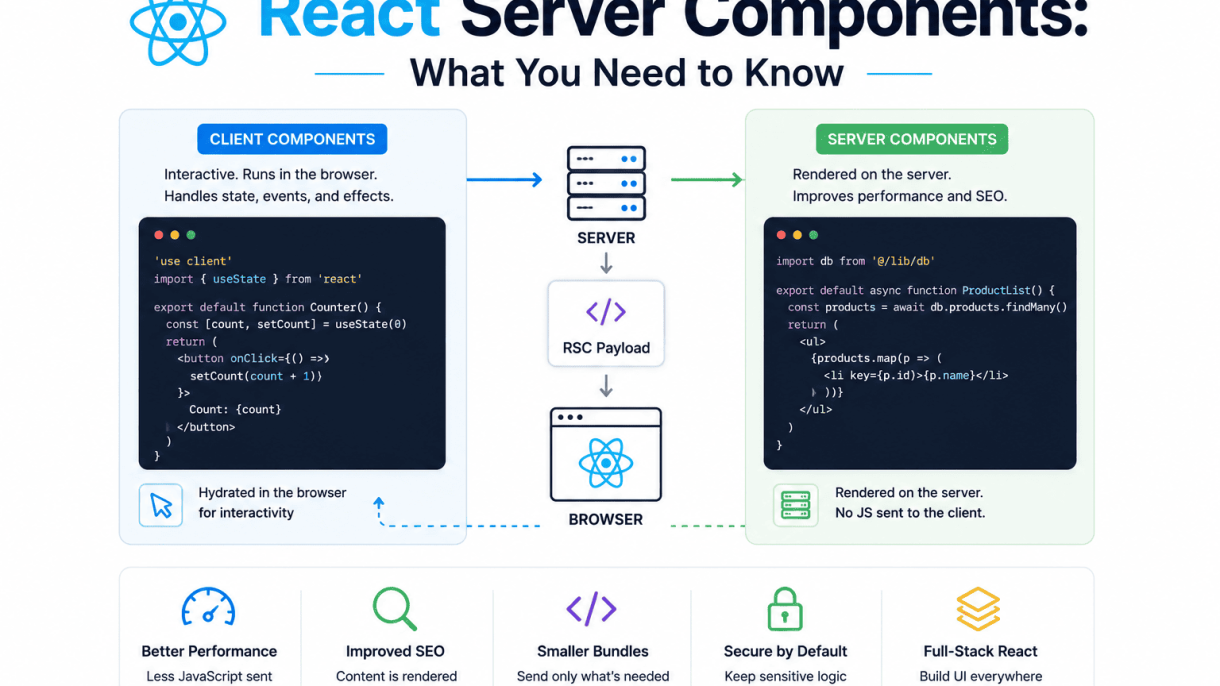

Introduction to React Server Components
React Server Components (RSC) represent a fundamental shift in how developers build React applications, moving away from the traditional paradigm where all components run exclusively in the browser. Instead, RSC allows components to execute on the server, sending only their rendered output to the client. This change addresses long-standing challenges in modern web development, such as large JavaScript bundles, slow initial page loads, and complex data-fetching patterns. By leveraging the server’s capabilities, RSC enables faster performance, reduced client-side processing, and a more efficient architecture for building dynamic, data-driven interfaces.
What Are React Server Components?
React Server Components are components that run on the server during the request-response cycle, not in the browser. Unlike traditional React components, they are never sent to the client as JavaScript code. Instead, the server renders them into a serializable format—a special streamable payload—that the client uses to update the DOM. Key characteristics include:
- Server-only execution: They have access to server-side resources like databases, file systems, and APIs without exposing sensitive logic to the client.
- Zero client bundle impact: Their code is excluded from the JavaScript bundle delivered to the browser, reducing load times and memory usage.
- Direct data access: They can fetch data at the server level, eliminating the need for client-side data fetching libraries or useEffect hooks for initial data.
- Streaming support: The server can send component output incrementally, allowing the client to display content as it arrives.
Importantly, Server Components cannot use hooks like useState or useEffect, nor can they handle user interactions—those responsibilities belong to Client Components.
Why Server Components Were Introduced
React Server Components were introduced to solve several persistent problems in client-heavy React applications:
| Problem | How RSC Addresses It |
|---|---|
| Large JavaScript bundles | Server Components contribute zero bytes to the client bundle, reducing download and parse times. |
| Slow initial page loads | Server-rendered content arrives as HTML or a stream, improving Time to Interactive (TTI) and Largest Contentful Paint (LCP). |
| Complex data fetching | Data is fetched directly on the server, removing the need for client-side waterfalls or state management for initial data. |
| Security risks | Sensitive logic (e.g., API keys, database queries) stays on the server, never exposed to the client. |
| Poor performance on low-end devices | Heavy computation is offloaded to the server, reducing client workload. |
These improvements align with modern web performance goals, where reducing client-side JavaScript is critical for user experience, especially on mobile and slower networks.
Key Differences from Client Components
Understanding the distinction between Server and Client Components is essential for adopting RSC. Here are the primary differences:
- Execution environment: Server Components run only on the server; Client Components run in the browser after hydration.
- State and interactivity: Server Components cannot use React state, effects, or event handlers; Client Components support the full React API, including useState, useEffect, and onClick.
- Bundle size: Server Components add no JavaScript to the client; Client Components contribute their code to the bundle.
- Data fetching: Server Components can directly query databases or APIs; Client Components typically rely on useEffect, SWR, or React Query for client-side fetching.
- Rendering timing: Server Components render at request time (or build time for static generation); Client Components render in the browser after the initial page load.
- File convention: In frameworks like Next.js, Server Components are the default (no special extension needed), while Client Components require a
"use client"directive at the top of the file.
By combining both types, developers can build applications that are both fast and interactive—using Server Components for static or data-heavy sections and Client Components for interactive UI elements.
How React Server Components Work
React Server Components (RSC) fundamentally alter the rendering pipeline by shifting component execution from the client to the server. This approach reduces the JavaScript bundle sent to the browser, improves initial page load performance, and enables direct access to server-side resources such as databases and file systems. Understanding the technical mechanics of this pipeline is essential for developers seeking to leverage RSC effectively in production applications.
Server-Side Execution Model
In the RSC model, components are explicitly designated as server components by default in frameworks like Next.js. When a request arrives, the server executes the component tree from the root down. Each server component runs in a Node.js or server runtime environment, where it can perform asynchronous operations such as fetching data from a database, reading configuration files, or calling internal APIs. Unlike client components, server components never re-render on the client; their output is static and serialized once.
The execution model follows a strict ordering:
- Root component execution: The server begins at the top-level component and resolves all dependencies.
- Asynchronous resolution: Server components can be async functions, allowing them to await data before continuing.
- Client component boundaries: When a server component encounters a client component in the tree, it pauses execution, sends the serialized server output, and hands off interactivity to the client.
This model ensures that heavy computation and data fetching occur only once on the server, drastically reducing client-side workload.
Serialization and Data Flow
After server components execute, their output must be transmitted to the client in a format that React can reconstruct. The server serializes the rendered component tree into a specialized binary format known as the React Server Component Payload. This payload is not HTML; it is a compact, streamable representation that includes:
- Serialized props and component references
- Placeholder markers for client components
- Static HTML fragments for initial render
The data flow proceeds as follows:
- Server serialization: The server converts the component tree into a stream of JSON-like chunks, preserving references to client component imports.
- Client deserialization: The React runtime on the client reads the payload, reconstructs the component tree, and renders it into the DOM.
- Client component hydration: Any client components within the tree are hydrated with their event handlers and state, becoming interactive.
Notably, server components cannot pass functions or complex objects to client components because these cannot be serialized. Only JSON-serializable data, React elements, and component references are allowed across the boundary.
Integration with React Suspense
RSC integrates deeply with React Suspense to enable streaming and progressive rendering. When a server component uses Suspense, the server can send the client a fallback UI immediately while waiting for asynchronous data to resolve. This allows the page to become interactive faster without blocking on the slowest data source.
Practical example: a server component that fetches user data can be wrapped in Suspense:
// UserProfile.server.js
import { Suspense } from 'react';

async function UserBio({ userId }) {
  const bio = await db.query(`SELECT bio FROM users WHERE id = ${userId}`);
  return <p>{bio}</p>;
}

export default function UserProfile({ userId }) {
  return (
    <Suspense fallback={<div>Loading biography...</div>}>
      <UserBio userId={userId} />
    </Suspense>
  );
}
In this example, the server streams the outer component structure immediately, while the UserBio component waits for the database query. The client sees the fallback until the serialized payload for UserBio arrives. This pattern reduces time-to-first-byte and improves perceived performance, especially for pages with multiple independent data sources.
By combining server-side execution, serialized payloads, and Suspense boundaries, RSC provides a robust framework for building performant, data-rich web applications with minimal client-side overhead.
Benefits of Using React Server Components
React Server Components (RSC) represent a paradigm shift in how developers build React applications, offering tangible improvements in both performance and developer experience. By rendering components on the server rather than the client, RSC reduces the amount of JavaScript shipped to the browser, simplifies data fetching, and accelerates initial page loads. These benefits are especially critical for modern web applications that must balance rich interactivity with fast delivery.
Smaller Client-Side JavaScript Bundles
One of the most immediate advantages of React Server Components is the dramatic reduction in client-side JavaScript bundle size. Because server components execute exclusively on the server, their code—including dependencies, logic, and rendering—never reaches the browser. This means heavy libraries for data parsing, template rendering, or server-side computation can be used without penalizing the client. For example, a component that formats dates using a library like date-fns can run entirely on the server, sending only the resulting HTML to the client. The result is smaller bundles, faster parsing and execution times, and improved performance on low-powered devices or slow networks.
Key bundle size impacts include:
- Elimination of server-only dependencies from client bundles.
- Reduced JavaScript payload for pages with mostly static or data-driven content.
- Lower memory usage on the client, as server components do not hydrate.
Direct Access to Backend Resources
React Server Components provide seamless, direct access to backend resources such as databases, file systems, and internal APIs without exposing sensitive logic or credentials to the client. Developers can write data-fetching code that runs securely on the server, eliminating the need for separate API endpoints or client-side state management for server data. This simplifies the architecture by reducing the number of network requests and the complexity of caching and revalidation. For instance, a server component can directly query a database using an ORM or execute a file read operation, then render the result—all without exposing connection strings or business logic to the browser. This direct access also reduces latency by avoiding round trips through an intermediary API layer.
Benefits of direct backend access include:
- Simplified data fetching: no need to build and maintain REST or GraphQL endpoints for server-only data.
- Enhanced security: sensitive operations and credentials remain on the server.
- Reduced client-side code: no fetch calls or state management for server data.
Improved Initial Page Load Performance
React Server Components significantly improve initial page load performance by sending fully rendered HTML from the server to the client. This eliminates the need for the browser to download, parse, and execute JavaScript before displaying content. Users see meaningful content sooner, which improves perceived performance and metrics like Largest Contentful Paint (LCP). Additionally, server components can stream HTML incrementally, allowing the browser to render content as it arrives rather than waiting for the entire page to be ready. This is particularly beneficial for pages with large or dynamic data sets, where traditional client-side rendering would require multiple round trips for data and JavaScript.
The following table compares key performance characteristics of traditional client-side rendering versus React Server Components:
| Metric | Client-Side Rendering (CSR) | React Server Components (RSC) |
|---|---|---|
| Initial HTML delivery | Empty or minimal shell; content rendered after JavaScript loads | Fully rendered HTML streamed from server |
| JavaScript bundle size | Includes all component code and dependencies | Only client components and interactivity code |
| Time to first paint | Delayed until JavaScript executes | Immediate upon HTML arrival |
| Data fetching overhead | Requires client-side API calls and state management | Direct server-side data access; no extra requests |
| Hydration requirement | Full hydration of all components | Only interactive client components hydrate |
By combining these three benefits—smaller bundles, direct backend access, and improved initial load performance—React Server Components enable developers to build faster, more secure, and more maintainable applications without sacrificing the rich interactivity that React provides for client-side interactions.
When to Use Server Components vs. Client Components
Choosing between React Server Components and Client Components depends on two primary factors: the interactivity needs of your UI and the nature of the data it requires. Server Components execute exclusively on the server, sending only rendered HTML to the client, while Client Components run in the browser and can handle user interactions, state, and effects. Understanding when to use each—and how to combine them—is essential for building performant, maintainable applications.
Use Cases for Server Components
Server Components are ideal for tasks that do not require client-side interactivity. They excel in scenarios where you want to reduce JavaScript bundle size and improve initial load performance. Common use cases include:
- Fetching and rendering static or dynamic data from databases, APIs, or file systems, without exposing fetch logic to the client.
- Displaying content that rarely changes, such as blog posts, product descriptions, or documentation pages.
- Rendering large lists or tables where client-side interactivity (e.g., sorting, filtering) is handled separately.
- Accessing sensitive data or backend resources (e.g., environment variables, file I/O) securely on the server.
- Pre-rendering SEO-critical content that needs to be fully available to search engine crawlers.
For example, a Server Component that fetches a user profile from a database might look like this:
// UserProfile.server.js
export default async function UserProfile({ userId }) {
  const user = await db.users.findUnique({ where: { id: userId } });
  return (
    <div>
      <h3>{user.name}</h3>
      <p>Email: {user.email}</p>
    </div>
  );
}
Note that this component uses async/await directly—a feature exclusive to Server Components—and never sends the fetch logic to the client.
Use Cases for Client Components
Client Components are necessary whenever your UI requires browser APIs, user events, or React hooks such as useState, useEffect, or useContext. They are the right choice for:
- Interactive elements like buttons, forms, modals, and dropdowns that respond to clicks, typing, or other user input.
- Dynamic state management where data changes based on user actions (e.g., shopping cart counters, toggle switches).
- Animations and visual effects that rely on browser timers or CSS transitions triggered by state.
- Third-party libraries that require the DOM (e.g., charting tools, date pickers, maps).
- Real-time updates via WebSockets or event listeners that need to run in the browser.
A simple Client Component for a counter might be:
// Counter.client.js
'use client';
import { useState } from 'react';

export default function Counter() {
  const [count, setCount] = useState(0);
  return (
    <button onClick={() => setCount(count + 1)}>
      Count: {count}
    </button>
  );
}
The 'use client' directive tells React to compile this component for the browser, enabling hooks and event handlers.
Mixing Server and Client Components in the Same App
One of the most powerful features of React Server Components is the ability to seamlessly mix both types within a single application. You can nest Server Components inside Client Components, and vice versa, as long as you follow a key rule: Client Components cannot directly import Server Components. Instead, you pass Server Components as children or props to Client Components.
Consider a product page where the static description (Server Component) is wrapped inside an interactive “Add to Cart” button (Client Component):
// ProductPage.server.js
import ProductDescription from './ProductDescription.server';
import AddToCart from './AddToCart.client';

export default function ProductPage({ productId }) {
  return (
    <div>
      <ProductDescription productId={productId} />
      <AddToCart>
        <ProductDescription productId={productId} />
      </AddToCart>
    </div>
  );
}
Here, ProductDescription is a Server Component rendered on the server, while AddToCart is a Client Component that receives the server-rendered content as its children. This pattern keeps the interactive wrapper lightweight while the static content remains server-optimized.
By strategically choosing component types and composing them correctly, you can minimize client-side JavaScript, improve time-to-interactive, and maintain a rich user experience. Start by identifying the most static parts of your UI and making them Server Components, then wrap only the interactive areas with Client Components.
Data Fetching in Server Components
Data fetching in React Server Components leverages the server environment to directly access data sources, reducing client-side overhead and improving performance. Unlike client components that rely on useEffect or external state management libraries for data retrieval, server components can use native JavaScript async/await patterns directly in the component body. This approach eliminates the need for loading states, waterfalls, and client-side hydration delays commonly associated with data fetching. The server executes the data fetching logic during the render phase, sending only the final, markup-ready output to the client. This paradigm shift demands a clear understanding of best practices to maximize efficiency and avoid common mistakes.
Async Component Pattern for Data Fetching
The core pattern for data fetching in server components is the async component. A server component is declared as an async function, allowing the use of await directly within its body. The component awaits the data, processes it, and returns JSX that includes the resolved data. This pattern is straightforward but requires careful structuring to avoid blocking the entire component tree.
- Direct await in component body: Fetch data at the top level of the component, before any conditional logic or loops, to keep the code readable and predictable.
- Use
Promise.allfor parallel requests: When fetching multiple independent data sources, usePromise.allto avoid sequential waiting. For example:const [user, posts] = await Promise.all([fetchUser(), fetchPosts()]). - Keep data fetching close to usage: Fetch data in the component that directly needs it, rather than in a parent component and passing it down via props. This improves maintainability and allows for easier caching.
- Handle errors gracefully: Wrap async operations in try/catch blocks or use
error.tsxboundaries in frameworks like Next.js. Return fallback UI or error messages instead of crashing the page.
A simple example of an async server component:
async function UserProfile({ userId }) {
  const user = await db.users.findById(userId);
  return <div>{user.name}</div>;
}
Caching and Deduplication Strategies
Server components inherently benefit from server-side caching, but explicit strategies are needed to optimize performance and avoid redundant requests. The key is to leverage the server’s ability to cache data across multiple renders and requests.
| Strategy | Description | Use Case |
|---|---|---|
| Request deduplication | Automatically deduplicates identical fetch requests made during the same render pass. Frameworks like Next.js handle this natively for fetch calls. |
Multiple components fetching the same user data in a single page render. |
| Static data caching | Cache data at build time or request time using framework features (e.g., unstable_cache in Next.js). Data is cached until manually invalidated. |
Blog posts, product catalogs that change infrequently. |
| Time-based revalidation | Set a TTL (time-to-live) for cached data. After the TTL expires, the data is re-fetched on the next request. | News feeds, comment counts that require periodic updates. |
| On-demand revalidation | Invalidate cache programmatically (e.g., after a database mutation) to ensure fresh data is served. | User profile updates, shopping cart modifications. |
For deduplication, always use the native fetch API when possible, as frameworks optimize it by default. For custom data sources (e.g., database queries), wrap them in a caching layer like React.cache() or a third-party solution like react-query on the server.
Avoiding Common Pitfalls with Server Data
Working with server components introduces specific pitfalls that can degrade performance or cause unexpected behavior. Awareness of these issues is essential for robust applications.
- Accidental serialization of non-serializable data: Server components cannot pass functions, class instances, or circular references to client components. Ensure all data passed via props is plain JSON-serializable objects, arrays, strings, numbers, booleans, or
null. - Over-fetching data: Fetching entire database records when only a few fields are needed increases payload size and server load. Use projections in database queries or select specific fields in your fetch logic.
- Ignoring the server runtime environment: Accessing browser-only APIs (e.g.,
window,document) inside a server component will cause errors. Always check that your data fetching code is environment-agnostic or use conditional checks. - Nested async components causing waterfalls: If a parent component awaits data before rendering a child async component, the child’s data fetching is delayed. Use
Promise.allat the highest level or restructure to fetch data in parallel where possible. - Not handling empty or null data: Always check for empty arrays, null values, or missing fields before rendering. Return fallback UI (e.g., “No results found”) to avoid runtime errors or blank sections.
By adhering to these patterns and strategies, developers can harness the full power of React Server Components for efficient, scalable data fetching that improves both user experience and server resource utilization.
State Management and Interactivity
React Server Components fundamentally change how developers approach state and interactivity in React applications. Unlike traditional client-side components, server components never re-render on the client and have no access to browser APIs. This architectural shift requires a clear understanding of where state lives and how to manage interactive elements across the server-client boundary.
Stateless Nature of Server Components
Server components are inherently stateless. They execute exclusively on the server, generate static or dynamic HTML, and send that output to the client without any JavaScript bundle for the component itself. This means:
- No
useState,useReducer, oruseEffecthooks are allowed. - No browser-specific APIs like
window,document, orlocalStorageare accessible. - No event handlers (onClick, onSubmit, etc.) can be attached directly.
- State is either absent or managed externally, such as through URL parameters, cookies, or database queries.
This stateless design reduces client-side JavaScript, improves initial load performance, and simplifies data fetching by colocating it with rendering logic. However, it also means that any dynamic behavior must be delegated to client components.
Passing Server Data to Client Components
To bridge the gap between server components and interactive elements, you pass data from server components to client components as props. This is a one-way, serializable data flow. The server component fetches or computes data, then passes it to a client component that can manage state and handle user interactions.
Example: A server component fetches a list of products and passes it to a client component for filtering:
// ServerComponent.jsx (Server Component)
import ClientProductList from './ClientProductList';

export default async function ServerProductPage() {
  const products = await fetch('https://api.example.com/products').then(res => res.json());
  return <ClientProductList initialProducts={products} />;
}

// ClientProductList.jsx (Client Component)
'use client';
import { useState } from 'react';

export default function ClientProductList({ initialProducts }) {
  const [filter, setFilter] = useState('');
  const filtered = initialProducts.filter(p => p.name.includes(filter));
  return (
    <div>
      <input value={filter} onChange={e => setFilter(e.target.value)} placeholder="Search products" />
      <ul>{filtered.map(p => <li key={p.id}>{p.name}</li>)}</ul>
    </div>
  );
}
Key points when passing server data:
- Props must be serializable (no functions, classes, or symbols).
- Data flows one way: server → client.
- Client components can modify the data locally (e.g., filtering, sorting) but cannot mutate the server source.
- For real-time updates, combine with server actions or streaming.
Using Client Components for Interactivity
All interactive elements—buttons, forms, input fields, animations, and third-party UI libraries—must live inside client components. The 'use client' directive marks the boundary where server rendering stops and client-side interactivity begins. Best practices include:
- Keep client components as small as possible, isolating only the interactive parts.
- Use server components for static or data-heavy sections (e.g., product lists, article content).
- Prefer URL-based state (search params, path) over client state when possible, as it remains accessible to server components.
- For complex state logic, consider using
useReduceror a lightweight state library within client boundaries.
By understanding the stateless nature of server components, mastering the data-passing pattern, and strategically placing client components for interactivity, you can build performant React applications that balance server-side efficiency with rich user experiences.
Working with Third-Party Libraries
Integrating third-party libraries into a React Server Components architecture requires a clear understanding of the execution boundary between server and client. While many npm packages work seamlessly, those that depend on browser APIs, state, or event handlers must be handled deliberately. The following sections provide practical guidance for navigating library compatibility in frameworks like Next.js.
Library Compatibility and ‘use client’ Directive
The fundamental rule is that any component or hook using client-side features—such as useState, useEffect, onClick, or browser-only APIs like window or document—must be marked with the 'use client' directive at the top of its file. This directive tells the bundler to treat that module as a Client Component boundary.
When evaluating a third-party library, check its source for the following indicators:
- Direct DOM access: Libraries that manipulate the DOM (e.g., charting, drag-and-drop, rich text editors) almost always require client-side execution.
- React hooks: Any library that exports hooks like
useState,useReducer,useEffect, oruseContextis client-only. - Event handlers: Components that accept
onClick,onChange, or similar props are inherently client-side.
If a library does not include 'use client' and does not use browser APIs, it may work as a Server Component. However, many popular UI libraries (e.g., Material UI, Ant Design, Chakra UI) rely on client-side context and state, so you must wrap them accordingly.
Wrapping Client Libraries for Server Use
To use a client-only library inside a Server Component, you must create a wrapper file that imports the library and declares the 'use client' directive. This wrapper becomes the client boundary, while the parent Server Component remains server-rendered.
Example pattern for wrapping a client library:
// components/ClientButton.tsx
'use client';
import { Button } from 'some-ui-library';

export default function ClientButton({ children, onClick }) {
  return <Button onClick={onClick}>{children}</Button>;
}
Then, in your Server Component:
// app/page.tsx (Server Component)
import ClientButton from './components/ClientButton';

export default function Page() {
  return (
    <div>
      <h2>Welcome</h2>
      <ClientButton onClick={() => console.log('clicked')}>
        Click Me
      </ClientButton>
    </div>
  );
}
This approach preserves server-side benefits—reduced bundle size, direct database access, and caching—while allowing interactive elements where needed. For libraries that export multiple components, create a barrel file with 'use client' at the top and re-export only the client components you need.
Common Libraries That Work Out of the Box
Several popular libraries are designed to work with React Server Components without modification. The table below lists common categories and examples:
| Category | Library | Works as Server Component? |
|---|---|---|
| Date/Time | date-fns | Yes (pure functions) |
| Data Fetching | urql, Apollo Client (with server directives) | Yes (when used in Server Components) |
| Utility | lodash-es, ramda | Yes (no DOM dependencies) |
| Markdown | react-markdown | Yes (server-safe rendering) |
| CSS-in-JS | styled-components (with Next.js config) | Partially (requires client wrapper) |
For libraries not listed, always test by importing them directly into a Server Component. If you encounter an error about useState or useEffect being used in a Server Component, you know the library requires a client wrapper. In contrast, libraries that export only functions or server-safe components integrate without extra effort.
Performance Considerations and Optimization
Adopting React Server Components (RSC) shifts performance optimization from purely client-side concerns to a server-client hybrid model. To fully realize the benefits—smaller bundles, faster initial loads, and improved perceived performance—developers must evaluate specific metrics and apply targeted techniques. This section covers the key areas of bundle measurement, streaming, and round-trip minimization, providing a practical framework for performance tuning.
Measuring Bundle Size and Time to Interactive
One of the primary promises of RSC is a reduction in JavaScript bundle size, which directly impacts Time to Interactive (TTI). Server Components execute on the server and send only serialized output (not component code) to the client. This eliminates large portions of client-side JavaScript for components that do not require interactivity. To measure this effectively:
- Bundle analysis tools: Use tools like
webpack-bundle-analyzerorvite-plugin-visualizerto compare client bundle size before and after migrating components to server components. Focus on the reduction in kilobyte weight for non-interactive UI elements (e.g., headers, product lists, static content). - TTI measurement: Monitor TTI via Lighthouse or Web Vitals in a staging environment. A well-optimized RSC application should show a measurable decrease in TTI, as less JavaScript must be parsed and executed on initial load. Target a TTI reduction of at least 20% for pages dominated by static or server-fetched content.
- Client component isolation: Ensure that only truly interactive components (e.g., buttons, forms, sliders) are marked as client components (
'use client'). Every unnecessary client component adds to the bundle. Use a component tree audit to verify that no server-only logic leaks into client bundles.
Streaming and Progressive Rendering
RSC enables streaming HTML from the server, allowing the browser to render content progressively as it arrives. This technique improves perceived performance and reduces the time to first paint. Key considerations:
- Immediate shell delivery: Use streaming to send the page shell (layout, navigation, critical styling) immediately, while slower data-fetching components (e.g., user-specific recommendations) stream in later. This ensures users see meaningful content within 1–2 seconds.
- Suspend boundaries: Wrap components that depend on async data fetching in
boundaries. This allows the server to stream fallback UI (e.g., loading skeletons) while awaiting data, preventing the entire page from blocking. - Critical data prioritization: Order your server component tree so that high-priority content (e.g., main article text, primary images) is fetched and streamed first. Low-priority content (e.g., related links, analytics widgets) can be deferred. Use
next/dynamicorlazyfor client components that are not immediately needed.
Avoiding Unnecessary Server Round-Trips
While RSC reduces client-side JavaScript, each server component fetch incurs a network round-trip. Over-fetching or poorly structured data requests can negate performance gains. Employ these strategies:
- Co-locate data fetching: Fetch data directly within the server component that needs it, rather than fetching in a parent and passing props. This reduces the number of serialization steps and avoids redundant requests.
- Batch requests: Use a single server component to fetch all data for a logical section (e.g., a product page), rather than multiple nested server components each making separate API calls. This minimizes round-trips.
- Cache aggressively: Leverage server-side caching (e.g., React’s
cachefunction or Next.js’sfetchcache) to avoid re-fetching identical data across multiple requests. For dynamic data, use revalidation strategies (e.g., time-based or on-demand) to balance freshness with performance.
| Technique | Primary Benefit | Potential Pitfall |
|---|---|---|
| Bundle size reduction via server components | Lower TTI and initial load time | Overusing client components negates benefit |
| Streaming with Suspense boundaries | Faster perceived performance | Improper boundary placement can cause layout shifts |
| Co-located data fetching | Fewer round-trips, simpler logic | Can lead to duplicate fetches if not cached |
| Server-side caching | Reduced latency for repeated data | Stale data if revalidation is misconfigured |
React Server Components: What You Need to Know
Building a Server-Rendered Blog List
A common real-world use for React Server Components is rendering a list of blog posts directly from a database, without sending any JavaScript for the list itself to the client. In this pattern, the server component fetches data and renders HTML on the server. The client receives only the final markup, reducing bundle size and improving initial load time.
Example: Server Component for a Blog List
// BlogList.server.js
import db from './database';

export default async function BlogList() {
  const posts = await db.query('SELECT title, slug, excerpt FROM posts ORDER BY created_at DESC LIMIT 10');

  return (
    <ul>
      {posts.map(post => (
        <li key={post.slug}>
          <a href={`/blog/${post.slug}`}>{post.title}</a>
          <p>{post.excerpt}</p>
        </li>
      ))}
    </ul>
  );
}
This component runs only on the server. It queries the database, iterates over results, and returns a static list of links. No client-side JavaScript is needed for rendering the list, making it ideal for content-heavy pages where SEO and performance are priorities.
Creating a Dashboard with Mixed Components
Dashboards often combine static data (like summary cards) with interactive elements (like charts or filters). React Server Components excel here because you can mix server and client components seamlessly. The server handles data fetching and rendering of static sections, while client components handle interactivity.
Example: Dashboard Structure
- Server Component: Renders total users, revenue, and recent orders from a database. These cards are pure HTML with no client-side logic.
- Client Component: A chart component (e.g., using Recharts) that receives pre-fetched data as props and runs interactively in the browser.
- Server Component: A table of recent transactions that can be static or paginated server-side.
Key pattern: The server component fetches all necessary data and passes it as props to client components. This keeps data fetching centralized on the server, reducing client requests and improving security.
// Dashboard.page.js (Server Component)
import SummaryCards from './SummaryCards.server';
import RevenueChart from './RevenueChart.client';
import RecentOrders from './RecentOrders.server';

export default async function Dashboard() {
  const [summaryData, chartData, orders] = await fetchAllData();

  return (
    <div>
      <SummaryCards data={summaryData} />
      <RevenueChart data={chartData} />
      <RecentOrders orders={orders} />
    </div>
  );
}
This approach keeps the dashboard fast and maintainable, with server components handling the heavy lifting and client components only for truly interactive features.
Error Handling and Loading States
React Server Components support error boundaries and loading states through patterns that work across server and client boundaries. The most common approach is wrapping server components in a client-side error boundary and using React’s use hook or streaming Suspense for loading states.
Error Handling Strategy:
- Wrap server components in a client-side error boundary that catches errors during rendering or data fetching.
- Use
try/catchinside server components to handle database failures gracefully, returning fallback UI. - For streaming, use
<Suspense>with a fallback component that renders while the server component is being fetched.
Example: Error Boundary and Loading State
// Client component wrapping server content
'use client';
import { Suspense } from 'react';
import ErrorBoundary from './ErrorBoundary';
import BlogList from './BlogList.server';
import LoadingSkeleton from './LoadingSkeleton';

export default function BlogPage() {
  return (
    <ErrorBoundary fallback={<p>Failed to load blog posts.</p>}>
      <Suspense fallback={<LoadingSkeleton />}>
        <BlogList />
      </Suspense>
    </ErrorBoundary>
  );
}
Loading States Summary Table
| Method | Use Case | Implementation |
|---|---|---|
| Suspense with fallback | Streaming server components | Wrap server component in <Suspense> |
| Error boundary | Catch rendering errors | Wrap with client-side error boundary |
| try/catch in server | Handle data fetch failures | Return error UI from server component |
These patterns ensure that your server-rendered content degrades gracefully, providing a robust user experience even when data sources fail or network requests are slow.
Common Pitfalls and How to Avoid Them
Adopting React Server Components introduces a paradigm shift in how developers think about component boundaries and data fetching. While the benefits are substantial, common mistakes can undermine performance and developer experience. This guide addresses three frequent pitfalls and provides actionable solutions.
Incorrect Use of Hooks in Server Components
A fundamental rule is that server components cannot use hooks like useState, useEffect, or useContext. These hooks rely on client-side interactivity and the browser environment. Attempting to use them in a server component will throw an error at build or runtime.
How to avoid this:
- Identify components that require state, side effects, or browser APIs. Convert them to client components by adding
"use client"at the top of the file. - Keep server components for static rendering, data fetching, and layout. Use client components only for interactive UI elements.
- Use a clear naming convention, such as suffixing client components with
Client(e.g.,SearchBarClient). - If you need dynamic behavior in a server-rendered tree, extract the interactive part into its own client component and nest it inside the server component.
Overusing Client Components
Many developers, accustomed to client-side rendering, default to making every component a client component. This defeats the performance advantages of server components—larger JavaScript bundles, slower initial loads, and reduced server-side rendering benefits.
How to avoid this:
- Start every component as a server component by default. Only add
"use client"when you explicitly need interactivity. - Audit your component tree regularly. Look for components that render static content, fetch data from a database, or use server-side APIs—these should remain server components.
- Use the client boundary pattern: push client directives as far down the tree as possible. For example, a page layout can be a server component, while only a small button or form within it is a client component.
- Consider using React Server Actions for form submissions and mutations instead of client-side handlers.
Debugging Server-Side Errors
Errors in server components can be harder to diagnose because they occur on the server, not in the browser console. Common issues include incorrect data fetching, missing environment variables, or serialization problems when passing props from server to client components.
How to avoid this:
- Enable detailed error logging in your framework (e.g., Next.js
NEXT_PUBLIC_VERBOSE_ERRORS=true). - Use structured logging with tools like
console.errorin server components during development—these appear in the terminal, not the browser. - Check that all props passed from server to client components are serializable. Functions, Symbols, or circular references will cause errors.
- Create a simple test component to isolate server-side logic: render static text first, then add data fetching gradually.
| Pitfall | Primary Symptom | Quick Fix |
|---|---|---|
| Hooks in server components | Build/compile error | Move hook usage to client component |
| Overusing client components | Large bundle size, slow load | Convert static parts back to server components |
| Server-side errors | Blank page or cryptic error | Check terminal logs, serializable props |
By anticipating these common pitfalls and applying the outlined strategies, you can adopt React Server Components with confidence, reaping their performance benefits while maintaining a smooth development workflow.
Frequently Asked Questions
What are React Server Components?
React Server Components (RSC) are a new type of component introduced in React 18 that render exclusively on the server. Unlike client components, they have no client-side JavaScript bundle and cannot use state, effects, or browser APIs. They allow you to fetch data directly from databases or APIs, reduce the amount of JavaScript sent to the client, and improve initial page load performance. They work alongside client components, which handle interactivity, to create a hybrid rendering model that optimizes both server and client resources.
How do React Server Components differ from client components?
React Server Components run entirely on the server and send only the rendered HTML to the client, resulting in zero client-side JavaScript for those components. They cannot use hooks like useState, useEffect, or browser-specific APIs. Client components, on the other hand, run in the browser, support interactivity, state, and side effects, and require JavaScript to be downloaded. The two types can be composed together: a server component can import and render client components, enabling a seamless blend of static and dynamic content.
What are the main benefits of using React Server Components?
React Server Components offer several key benefits: reduced JavaScript bundle size (since server components are excluded from client bundles), faster initial page loads (because rendering happens on the server), improved data fetching efficiency (direct access to databases and backend services without API layers), automatic code splitting, and better performance for data-heavy pages. They also enable streaming and progressive rendering, allowing users to see content as it becomes available. These benefits are especially pronounced in applications with large datasets or complex server-side logic.
Can React Server Components use hooks or state?
No, React Server Components cannot use hooks such as useState, useEffect, useReducer, or context. They also cannot use browser APIs like localStorage or window. This is because they are executed on the server, which lacks a browser environment. To manage state or add interactivity, you must wrap interactive parts in client components by adding the 'use client' directive at the top of the file. Server components are ideal for static content, data fetching, and layout, while client components handle dynamic behavior.
How do you integrate React Server Components with Next.js?
Next.js 13+ has built-in support for React Server Components. By default, all components in the App Router are server components. To use a client component, you add the 'use client' directive. Server components can fetch data directly with async/await, access server-side resources, and pass props to client components. Next.js also supports streaming with Suspense boundaries, allowing parts of a page to load progressively. This integration simplifies data fetching and reduces client-side JavaScript, making Next.js applications faster and more efficient.
What data fetching patterns work best with React Server Components?
React Server Components encourage direct data fetching within the component using async/await, without the need for useEffect or external data fetching libraries. You can fetch data from databases, APIs, or file systems directly on the server. This eliminates the client-server waterfall and reduces latency. For shared data, you can use server-side caching or React's cache() function. When combining server and client components, pass fetched data as props to client components, keeping data fetching and rendering logic separate for maintainability.
Are React Server Components production-ready?
Yes, React Server Components are production-ready as of React 18 and are actively used in frameworks like Next.js (since version 13) and other React-based frameworks. They have been stable and widely adopted for building high-performance web applications. However, they require a compatible framework or custom server setup. The React team continues to improve the feature, and it is recommended for new projects that can benefit from server-side rendering and reduced client JavaScript. Always refer to the official React documentation for the latest guidance.
What are the limitations of React Server Components?
React Server Components have some limitations: they cannot use browser APIs, state, or lifecycle methods, which means interactive UIs must be delegated to client components. They also require a server environment (Node.js or similar) and are not suitable for fully static sites without a server. Debugging can be more complex because errors occur on the server. Additionally, they may introduce higher server load for rendering. Despite these limitations, the benefits often outweigh the drawbacks for applications that need fast initial loads and efficient data handling.
Sources and further reading
- React Server Components – React Documentation
- Introducing React Server Components – React Blog
- Next.js App Router Documentation
- React 18 Release Notes
- RSC: The What, Why, and How – Vercel Blog
- Streaming Server Rendering with Suspense – React Docs
- Data Fetching Patterns in Next.js
- How React Server Components Work – LogRocket
- Using Server Components in Next.js – Vercel Docs
- React Server Components: A Comprehensive Guide – freeCodeCamp
Need help with this topic?
Send us your details and we will contact you.