
Introduction: Setting the Stage for Your Decision
Every website begins with a single, pivotal question: Should you build it with WordPress or write it from scratch with custom code? This is not a trivial choice; it is a strategic fork in the road that influences your project’s timeline, flexibility, long-term costs, and even your ability to scale. The debate between WordPress and custom code is often framed as a battle of convenience versus control, but the reality is far more nuanced. Your decision must align with your specific project goals, budget constraints, and the technical expertise available to you or your team.
WordPress, as a content management system (CMS), powers over 40% of all websites on the internet. It offers a prebuilt ecosystem of themes, plugins, and a user-friendly dashboard that allows non-developers to manage content with relative ease. On the other end of the spectrum, a custom-coded website is built from the ground up using languages like HTML, CSS, JavaScript, and server-side frameworks such as PHP, Python, or Ruby on Rails. This approach gives you complete ownership over every line of code, enabling unique designs and functionalities that no off-the-shelf solution can replicate.
The key is to understand that neither option is inherently superior. WordPress excels in speed of deployment, community support, and lower initial costs for standard websites like blogs, portfolios, and small business sites. Custom code shines when you need a highly specialized, performance-optimized, or security-critical application, such as a custom SaaS platform, a complex e-commerce store with unique logic, or a site that must integrate deeply with proprietary APIs. By the end of this introduction, you should recognize that your choice is not about technology alone—it is about matching the tool to the job at hand, and doing so with full awareness of the trade-offs involved.
Understanding the Core Differences Between WordPress and Custom Code
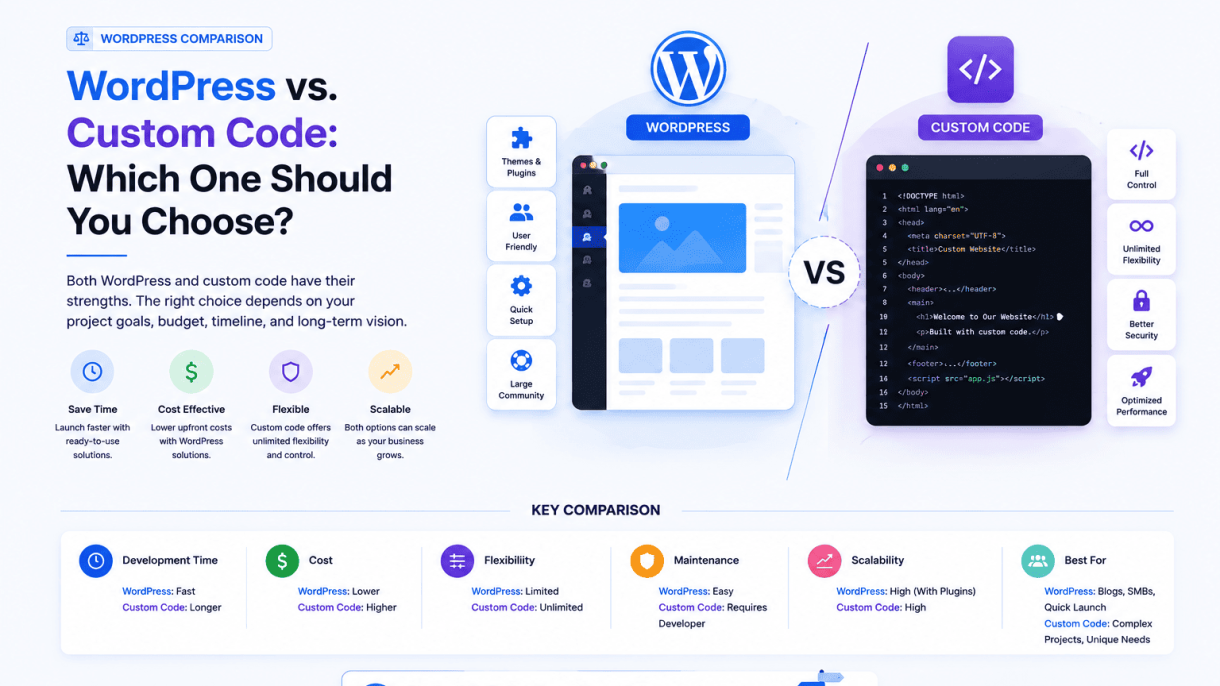
To make an informed decision, you must first grasp the fundamental architectural and operational distinctions between these two approaches. Below is a comparison table that highlights the key differences across several critical dimensions:
| Dimension | WordPress | Custom Code |
|---|---|---|
| Development Speed | Fast, especially with pre-built themes and plugins (days to weeks) | Slow, requires full planning, design, and coding (weeks to months) |
| Customization Flexibility | Moderate; limited by plugin capabilities and theme frameworks | Unlimited; you control every aspect of the code and design |
| Learning Curve | Low for content editors; moderate for developers who must learn WordPress APIs | High; requires proficiency in multiple programming languages and frameworks |
| Maintenance Burden | Ongoing: updates for core, themes, plugins can break functionality | Lower once built, but requires developer oversight for security and feature updates |
| Security Risks | Higher due to third-party components; requires constant vigilance | Lower if code is well-written; fewer attack vectors |
| Performance Potential | Can be optimized, but often includes bloat from unnecessary features | Highly optimized; only includes what you need |
| Cost (Initial) | Low to moderate (hosting, premium themes/plugins) | High (developer hours, design, testing) |
| Cost (Long-Term) | Recurring: subscriptions, maintenance, potential rebuilds | Lower if stable; occasional updates and security audits |
Beyond the table, consider the ecosystem. WordPress relies on a vast marketplace of third-party components. While this accelerates development, it also introduces dependency risks. A plugin that is abandoned by its developer can leave your site vulnerable or broken. Custom code, by contrast, is self-contained. You own every piece, which means you are never at the mercy of an external vendor’s roadmap. However, this ownership also means you must have the in-house expertise or budget to maintain it. Understanding these trade-offs is the first step toward a confident decision.
Why This Decision Matters for Your Online Presence
Your website is often the first impression your business makes on potential customers. It is a 24/7 digital storefront, a portfolio, a lead-generation engine, or a platform for community engagement. Choosing the wrong foundation can lead to a cascade of problems: slow load times that hurt search engine rankings, security breaches that erode trust, or an inflexible architecture that stifles growth. Conversely, the right choice can streamline operations, reduce technical debt, and provide a competitive edge.
Consider the following scenarios:
- Scalability: A custom-coded site can be designed to handle millions of users with minimal overhead, while a WordPress site may require extensive caching and server tuning to achieve the same performance. If you anticipate rapid growth, custom code gives you more control over the infrastructure.
- User Experience: Custom code allows you to craft a unique, pixel-perfect interface without the constraints of a theme framework. WordPress can also achieve this, but often requires significant custom development that negates its initial speed advantage.
- SEO and Speed: Search engines prioritize fast, mobile-friendly sites. Custom code can be lean and optimized from the start, while WordPress sites often require optimization plugins and careful asset management to avoid bloat.
- Security: If your site handles sensitive data (e.g., payment information, personal health records), custom code reduces the attack surface. WordPress’s popularity makes it a frequent target for automated attacks, and its plugin ecosystem introduces additional vulnerabilities.
Ultimately, this decision is not just about technology—it is about risk management, resource allocation, and long-term vision. A poorly chosen platform can cost you more in downtime, lost sales, and developer hours than the initial savings of a quick setup. By aligning your choice with your business objectives, you ensure that your online presence is a reliable asset rather than a liability.
Who This Article Is For: Business Owners, Developers, and Marketers
This article is crafted for three distinct audiences, each with unique priorities and concerns:
- Business Owners: You are focused on return on investment, time to market, and total cost of ownership. You need a website that supports your revenue goals without draining your budget. You may not be technical, but you must understand the implications of your choice on hiring, maintenance, and future expansion. This article will help you ask the right questions of your development team or agency.
- Developers: You are the technical backbone of the project. You care about code quality, maintainability, performance, and security. You may be evaluating whether to recommend WordPress to a client or to advocate for a custom solution. This article provides a balanced framework to weigh the pros and cons, considering both your own expertise and the client’s long-term needs.
- Marketers: Your domain is content strategy, user engagement, and conversion optimization. You need a platform that allows you to publish quickly, A/B test landing pages, and integrate with analytics and CRM tools. You may prefer WordPress for its ease of content management, but you also need to ensure that the underlying architecture does not hinder your campaigns. This article will help you understand the constraints and possibilities of each approach from a marketing perspective.
Whether you are the decision-maker, the builder, or the promoter, the insights in this article will empower you to navigate the WordPress vs. custom code debate with clarity. The goal is not to declare a winner, but to equip you with the knowledge to choose the right tool for your unique situation.
WordPress: Strengths and Ideal Use Cases
When evaluating WordPress vs. Custom Code: Which One Should You Choose?, understanding the strengths of WordPress is critical for making an informed decision. WordPress powers over 40% of all websites on the internet, a testament to its versatility and reliability. Its primary advantages lie in accessibility, speed of development, and a vast ecosystem that reduces the need for specialized technical knowledge. For content-heavy sites, blogs, and small-to-medium businesses, WordPress often emerges as the pragmatic choice, offering a balance between functionality and cost-effectiveness that custom code struggles to match for many common use cases.
Ease of Use and Rapid Deployment with WordPress
WordPress is designed with non-technical users in mind. Its intuitive dashboard allows you to create, edit, and manage pages or posts without writing a single line of code. The visual editor, combined with a drag-and-drop page builder (such as Elementor or Gutenberg), makes it possible to design complex layouts in minutes. This ease of use translates directly into rapid deployment:
- Minimal learning curve: Most users can publish their first post or page within an hour of installation.
- Pre-built themes: Thousands of free and premium themes provide ready-made designs for blogs, e-commerce, portfolios, and more. You can activate a theme and have a functional site in under 30 minutes.
- One-click updates: Core WordPress, themes, and plugins can all be updated with a single click, ensuring security and stability without manual intervention.
- Built-in content management: Features like categories, tags, revisions, and media libraries are standard, eliminating the need to build these from scratch.
For a small business owner or blogger, this means you can focus on content and marketing rather than on backend development. The time saved during deployment is significant—a custom-coded site of similar complexity could take weeks to build, whereas a WordPress site can be operational in days or even hours.
Leveraging Plugins and Themes for Functionality
The true power of WordPress lies in its plugin and theme ecosystem. With over 60,000 free plugins in the official repository and thousands more premium options, you can add virtually any feature without custom development. This extensibility is a key differentiator in the WordPress vs. Custom Code: Which One Should You Choose? debate. Here is a breakdown of common functionalities and how WordPress handles them:
| Functionality | WordPress Solution | Custom Code Equivalent |
|---|---|---|
| Search Engine Optimization | Yoast SEO or Rank Math plugin | Build custom meta tags, sitemaps, and schema |
| E-commerce | WooCommerce plugin | Develop a full shopping cart system |
| Contact Forms | Contact Form 7 or WPForms | Write PHP/JavaScript form handler |
| Security & Backups | Wordfence, UpdraftPlus | Implement server-side security scripts |
| Performance Caching | W3 Total Cache or WP Rocket | Configure server-level caching manually |
| Social Media Integration | Social Snap or Monarch | Code API connections for each platform |
This plugin-driven approach offers several benefits:
- Cost efficiency: Many essential plugins are free or low-cost, reducing the need for expensive developer hours.
- Proven reliability: Popular plugins are tested by thousands of users and regularly updated for security and compatibility.
- Flexibility: You can mix and match plugins to create a tailored solution. For example, combine WooCommerce with a membership plugin and a booking plugin to create a multi-functional site.
- Community support: Extensive documentation, forums, and tutorials exist for virtually every plugin, making troubleshooting accessible.
Themes further accelerate design. A well-coded theme like Astra or GeneratePress is lightweight, responsive, and customizable via the Customizer. You can change colors, fonts, layouts, and headers without touching code. For more advanced customization, child themes allow safe modifications that won’t break after updates.
Best Scenarios for Choosing WordPress
WordPress is not a one-size-fits-all solution, but it excels in specific contexts. Here are the ideal use cases where its strengths align with project requirements:
- Content-heavy websites and blogs: If your primary goal is to publish and organize large amounts of text, images, or video, WordPress is unmatched. Its built-in taxonomy system (categories, tags) and RSS feeds make content discovery easy. Examples include news portals, personal blogs, and magazine-style sites.
- Small-to-medium business websites: For most local businesses, a WordPress site provides everything needed: a professional homepage, service pages, a contact form, a blog for SEO, and integration with Google Maps or social media. The low upfront cost and ease of maintenance make it ideal for companies with limited technical staff.
- E-commerce stores with standard needs: WooCommerce powers over 30% of all online stores. If you need to sell physical or digital products, manage inventory, process payments, and handle shipping, WooCommerce is a robust, scalable solution. Custom code would be overkill unless you have unique requirements like complex subscription models or niche payment gateways.
- Membership sites and online courses: Plugins like MemberPress, LearnDash, or LifterLMS turn WordPress into a full-fledged learning management system. You can create content drip feeds, quizzes, and payment tiers without custom development.
- Portfolios and creative showcases: Artists, photographers, and designers can use WordPress themes built specifically for visual portfolios. Features like lightbox galleries, slider integrations, and image optimization are just a plugin away.
- Community and forum sites: BuddyPress or bbPress add social networking features like user profiles, activity streams, and discussion forums. This is significantly faster than building a custom community platform.
However, WordPress may not be the best choice if your project requires extreme performance optimization, highly specialized data handling, or a completely unique user interface that cannot be achieved through themes and plugins. In such cases, custom code offers more control. But for the vast majority of websites—especially those focused on content, standard business functions, or rapid scaling—WordPress provides a proven, efficient, and user-friendly foundation that reduces risk and accelerates time to market.
Custom Code: Strengths and Ideal Use Cases
When the out-of-the-box constraints of a content management system or page builder begin to chafe, custom code emerges as a powerful alternative. Building a website from scratch—using languages like HTML, CSS, JavaScript, PHP, or Python—offers a level of control that no template or plugin can match. For projects where performance, security, or unique functionality are non-negotiable, custom development is often the superior choice. Below, we explore the core strengths of custom code and the specific scenarios where it truly shines.
Unlimited Design and Functionality Control
The primary advantage of custom code is total creative and technical freedom. Unlike WordPress, which relies on themes and plugins that impose structural limits, a custom-coded site allows you to build exactly what you envision, down to the last pixel. This control manifests in several critical ways:
- Unique user interfaces: You are not constrained by template hierarchies or pre-built layouts. Every element—from navigation menus to interactive animations—can be designed from the ground up to match your brand and user experience goals.
- Tailored functionality: Need a complex booking system, a proprietary data visualization tool, or a custom e-commerce checkout flow? With custom code, you write the logic yourself, avoiding the bloat and compatibility issues that often come with stacking multiple WordPress plugins.
- Database and backend flexibility: You can choose any database architecture (SQL, NoSQL, or a hybrid) and integrate with any third-party API directly. This is essential for projects that must sync with legacy systems, IoT devices, or specialized software.
- No feature bloat: WordPress themes and plugins often include features you do not need, slowing down the site and increasing attack surface. Custom code includes only what you require, keeping the codebase lean and purposeful.
For example, a bespoke SaaS platform or an interactive data dashboard for a research institute would be nearly impossible to build cleanly within WordPress without resorting to heavy customization that undermines maintainability. Custom code lets you architect the system precisely around your requirements.
Performance Optimization and Scalability Advantages
Performance is a domain where custom code consistently outperforms WordPress, especially for high-traffic or resource-intensive projects. By writing optimized, minimal code, developers can achieve faster load times, lower server resource usage, and superior scalability. Key factors include:
| Factor | Custom Code | WordPress (Typical) |
|---|---|---|
| Code bloat | None; only required code is present | Often includes unused theme/plugin code, scripts, and stylesheets |
| Database queries | Optimized, minimal queries; often uses caching layers | Many default queries (e.g., for widgets, menus, meta data); plugin overhead |
| HTTP requests | Can bundle and minify assets precisely; fewer external dependencies | Often loads multiple CSS/JS files from themes and plugins; external font/script calls |
| Server load | Lower memory and CPU usage per request; easier to fine-tune | Higher baseline load due to WordPress core, theme, and plugin processing |
| Caching strategy | Full control over edge caching, CDN rules, and object caching | Relies on caching plugins; can conflict with dynamic features |
Scalability is another area where custom code excels. Because you control the entire stack, you can implement horizontal scaling (adding more servers) or vertical scaling (upgrading server resources) with minimal friction. For example, a custom-coded API can be designed to handle millions of requests per day by using asynchronous processing, load balancers, and efficient data indexing—all without the overhead of a CMS framework. This makes custom code the go-to choice for high-traffic e-commerce platforms, real-time applications, or enterprise-level portals.
When Custom Code Is the Right Fit
Custom code is not the right choice for every project—it requires more time, budget, and technical expertise upfront. However, it becomes the optimal solution in several clear scenarios:
- High-traffic or mission-critical websites: For sites expecting millions of visitors per month (e.g., news outlets, SaaS dashboards, or large e-commerce stores), custom code provides the performance headroom and reliability needed to avoid downtime and slow load times.
- Complex, unique functionality: If your project requires a specialized algorithm, a custom data pipeline, or integration with proprietary hardware, building from scratch avoids the limitations and security risks of plugin-heavy workarounds.
- Strict security or compliance requirements: Industries like finance, healthcare, or defense often mandate minimal attack surface, audit trails, and control over every line of code. Custom code allows you to implement security measures (e.g., input validation, encryption, access controls) without relying on third-party plugins that may introduce vulnerabilities.
- Long-term maintainability and ownership: When you own the entire codebase, you are not dependent on a CMS provider’s update cycle or plugin developer’s support. This is crucial for projects that must operate for years without major rewrites.
- Custom APIs or microservices: If your site acts as a backend for mobile apps, IoT devices, or other web services, custom code lets you design lightweight APIs with precise endpoints, authentication, and rate limiting—something WordPress struggles with without additional plugins.
In summary, custom code is the right fit when you need absolute control over design, performance, and security, and when the project’s complexity or traffic volume justifies the higher initial investment. It is not a one-size-fits-all solution, but for the right use cases, it delivers results that no CMS can match.
Cost Comparison: Upfront and Long-Term Expenses
When deciding between WordPress and custom code, understanding the full financial picture is critical. The initial price tag often misleads buyers, while hidden costs can accumulate over time. This section breaks down the upfront and recurring expenses for both approaches, helping you see beyond the sticker shock and plan for the long haul.
Initial Development Costs: WordPress vs. Custom Code
The most obvious difference appears at the start. WordPress typically offers a lower barrier to entry, while custom code demands a significant upfront investment. Here’s how they compare:
- WordPress: The core software is free. You can install it on cheap shared hosting ($3–$10 per month) and use a free theme. However, a professional, custom-designed WordPress site with a premium theme ($30–$100) and essential plugins (e.g., SEO, security, caching) can cost $500–$3,000 for a simple brochure site. For a complex e-commerce or membership site with custom functionality, development costs range from $5,000 to $20,000, especially if you hire a developer to build custom themes or plugins.
- Custom Code: Building from scratch with HTML, CSS, JavaScript, and a backend framework (e.g., Django, Ruby on Rails, or Node.js) requires a skilled developer. A basic static website can start at $3,000–$10,000. A dynamic, database-driven site with user authentication, payment processing, or API integrations can easily cost $15,000–$50,000 or more. The complexity of your requirements directly drives the price.
Key takeaway: WordPress wins on upfront cost for simple to moderately complex sites. Custom code is a premium option for projects with unique, complex requirements that WordPress cannot handle efficiently.
Recurring Expenses: Hosting, Plugins, and Support
After launch, both options incur ongoing costs. These can significantly alter the total cost over time.
| Expense Category | WordPress | Custom Code |
|---|---|---|
| Hosting | Shared hosting: $5–$25/month. Managed WordPress hosting (faster, more secure): $20–$100/month. High-traffic sites may need VPS or dedicated servers: $50–$500/month. | VPS or dedicated servers: $30–$300/month. Cloud hosting (AWS, DigitalOcean, etc.) scales with traffic: $20–$500+ per month. You manage server configuration or pay for managed services. |
| Plugins & Themes | Premium plugins (e.g., WooCommerce, Yoast SEO, Elementor Pro) cost $30–$200/year each. Many sites use 5–15 plugins, totaling $150–$1,000/year. Theme updates: $30–$100/year. | No plugin costs. You pay for third-party APIs (e.g., Stripe, SendGrid, Google Maps) which can cost $0–$500+/month depending on usage. |
| Maintenance & Support | Ongoing updates for core, themes, and plugins. Security monitoring, backups, and troubleshooting. Freelancer or agency: $50–$200/month for basic care. For complex sites: $300–$1,000/month. | Bug fixes, security patches, and feature enhancements. Requires a developer familiar with the codebase. Retainer: $100–$500/month for light maintenance; $500–$2,000/month for active development and support. |
| Security & Backups | Security plugins (e.g., Sucuri, Wordfence): $100–$300/year. Backup services (e.g., UpdraftPlus, VaultPress): $50–$200/year. SSL certificates: free (Let’s Encrypt) or $10–$100/year. | SSL certificates: free or $10–$100/year. Security audits, penetration testing, and firewall management may be included in developer retainer or cost $500–$5,000 per engagement. |
Hidden fees to watch for:
- WordPress: Premium plugin subscription price hikes, unexpected compatibility issues after updates, and costs for migrating to new hosting as traffic grows.
- Custom Code: Developer onboarding time for new team members, dependency on a single developer or agency, and costs for refactoring legacy code.
For a typical small business site, WordPress recurring costs range from $1,000–$3,000 per year. Custom code sites often run $2,000–$8,000 per year for similar maintenance, though this can drop if the site is static and rarely updated.
Total Cost of Ownership: A Five-Year Perspective
To make a fair comparison, we project total costs over five years for a mid-complexity site (e.g., a small e-commerce store with 50 products, user accounts, and a blog).
Scenario assumptions:
- WordPress: Initial development: $10,000. Premium plugins: $500/year. Managed hosting: $75/month ($900/year). Maintenance & support retainer: $200/month ($2,400/year).
- Custom Code: Initial development: $25,000. Cloud hosting (scalable): $100/month ($1,200/year). Third-party APIs: $200/year. Maintenance & support retainer: $400/month ($4,800/year).
| Cost Category | WordPress (5-Year Total) | Custom Code (5-Year Total) |
|---|---|---|
| Initial Development | $10,000 | $25,000 |
| Hosting | $4,500 ($900 × 5) | $6,000 ($1,200 × 5) |
| Plugins / APIs | $2,500 ($500 × 5) | $1,000 ($200 × 5) |
| Maintenance & Support | $12,000 ($2,400 × 5) | $24,000 ($4,800 × 5) |
| Total (5 Years) | $29,000 | $56,000 |
Observations:
- WordPress is nearly 50% cheaper over five years for this scenario. The lower initial cost and moderate recurring expenses keep the total down.
- Custom code costs more upfront and in maintenance, but offers full control, no forced updates, and potentially lower long-term technical debt if well-architected.
- If your site requires heavy customization or high traffic (e.g., 500,000+ monthly visitors), custom code may scale more efficiently, reducing hosting and maintenance costs relative to WordPress, which often needs expensive caching and optimization layers.
When custom code becomes more cost-effective:
- You need a unique feature that WordPress plugins cannot provide without extensive customization.
- Your site handles sensitive data (e.g., healthcare, finance) requiring strict security compliance.
- You have an in-house development team that can maintain the codebase without external retainers.
- Your project has a long lifespan (10+ years) with minimal changes, avoiding recurring plugin subscriptions.
When WordPress remains the better financial choice:
- You have a limited budget and need a site quickly.
- Your requirements fit standard WordPress functionality (blogs, portfolios, small stores).
- You or your team are comfortable managing updates and security.
- You expect to scale gradually and can invest in performance plugins as needed.
Ultimately, the total cost of ownership depends on your specific needs, traffic, and team capabilities. WordPress offers predictable, moderate costs for most common use cases. Custom code demands higher investment but can deliver lower long-term expenses for specialized, high-performance projects. Calculate your own five-year projection using realistic numbers for your situation to make an informed decision.
Development Time and Learning Curve
When deciding between WordPress and custom code, the time it takes to get a website live and the technical expertise required are often the most decisive factors. For business owners, freelancers, and even agencies, these elements directly affect budget, staffing, and launch deadlines. One approach prioritizes speed and accessibility, while the other demands patience and specialized skill. Understanding the timeline and learning curve for each path will help you align your project with your available resources.
Launching Quickly with WordPress: A Week or Less
WordPress is renowned for its ability to produce a functional, presentable website in a remarkably short period. A user with no coding experience can install WordPress via a hosting control panel, choose a pre-built theme, and have a basic site live within a single afternoon. For more polished results, a one-week timeline is realistic for many small business sites, blogs, or portfolios. This speed is driven by several built-in advantages:
- Pre-built themes: Thousands of free and premium themes provide ready-made layouts for nearly every industry. Installing and customizing a theme through the WordPress Customizer takes hours, not days.
- Plugin ecosystem: Complex features like contact forms, e-commerce, SEO optimization, and social media integration are available as plugins. A user can add a fully functional contact form in under five minutes without writing a single line of code.
- Visual editors: The block editor (Gutenberg) and page builders like Elementor or Beaver Builder allow drag-and-drop creation of pages. This eliminates the need to hand-code HTML and CSS for layout adjustments.
- Managed hosting setups: Many hosting providers offer one-click WordPress installations, automated updates, and staging environments, further reducing setup time.
For a typical informational site, the development cycle often follows this compressed schedule:
| Day | Task |
|---|---|
| 1 | Domain purchase, hosting setup, and WordPress installation. |
| 2 | Theme selection and basic customization (logo, colors, fonts). |
| 3 | Install essential plugins (SEO, security, caching, forms). |
| 4 | Create core pages (Home, About, Services, Contact). |
| 5 | Add content, images, and test functionality. |
| 6-7 | Final review, mobile optimization, and launch. |
This rapid timeline is ideal for projects where time-to-market is critical, such as launching a promotional campaign, testing a business idea, or establishing an online presence for a local service provider. The key trade-off is that the site depends on third-party themes and plugins, which may introduce bloat, compatibility issues, or limited customization control.
Custom Development Timelines and Planning
Building a website with custom code—whether using a framework like Laravel, React, or a static site generator—requires a fundamentally different approach to time management. Unlike WordPress, where a site can be assembled from pre-made parts, custom development involves creating every component from scratch. This process is inherently slower and more deliberate. A simple custom site might take four to eight weeks, while a complex web application can span six months or more.
The timeline for a custom project typically unfolds in distinct phases:
- Planning and architecture (1-2 weeks): This stage involves defining data models, user flows, API endpoints, and page templates. Developers must create a technical blueprint before writing any code.
- Frontend development (2-4 weeks): Building the user interface with HTML, CSS, and JavaScript. Responsive design, accessibility, and cross-browser testing are all manual tasks.
- Backend development (2-4 weeks): Writing server-side logic, setting up databases, implementing authentication, and creating admin panels. This includes handling security, performance optimization, and error handling.
- Integration and testing (1-2 weeks): Connecting frontend to backend, testing all features, fixing bugs, and conducting load tests.
- Deployment and launch (1 week): Configuring servers, setting up CDNs, implementing SSL, and performing a final production audit.
Custom development also demands thorough planning because changes made late in the process are costly. For example, adding a blog feature to a custom site mid-development might require new database tables, API routes, and a content management interface. In contrast, WordPress can add the same feature with a single plugin click. The longer timeline is not a disadvantage if your project requires unique functionality, strict performance requirements, or a highly tailored user experience, but it does require a larger upfront investment of time and money.
Skill Requirements: Non-Technical Users vs. Developers
The learning curve for each approach diverges sharply based on the user’s technical background. WordPress is designed to be accessible to non-technical users, while custom code demands professional-level programming expertise. Here is a breakdown of the skills needed for each:
What a non-technical user needs for WordPress:
- Basic computer literacy: Ability to navigate a dashboard, upload files, and use a text editor.
- Familiarity with the WordPress admin interface: Understanding how to create posts, manage menus, and install plugins.
- Willingness to learn theme and plugin settings: Most configuration is done through graphical user interfaces, not code.
- Problem-solving skills for common issues: Troubleshooting plugin conflicts or theme errors often involves searching forums and reading documentation.
With these skills, a non-technical user can launch a fully functional site independently. However, advanced customization—such as modifying theme templates or writing custom functions—still requires some knowledge of PHP, HTML, and CSS. For users who want to avoid code entirely, page builders and child themes provide a no-code path to deeper customization.
What a developer needs for custom code:
- Proficiency in at least one programming language: Common choices include PHP (Laravel), Python (Django), JavaScript (Node.js), or Go.
- Strong understanding of HTML, CSS, and JavaScript: Frontend development is essential, even for backend-focused projects.
- Database management skills: Writing SQL queries, designing schemas, and optimizing database performance.
- Version control experience: Using Git to manage code changes, collaborate with others, and roll back errors.
- Knowledge of security best practices: Protecting against SQL injection, XSS attacks, and CSRF vulnerabilities.
- Server administration or DevOps skills: Configuring web servers (Nginx, Apache), setting up CI/CD pipelines, and managing cloud infrastructure.
Custom development is not a viable option for someone without programming experience. Even a simple custom site requires a developer to handle routing, database connections, and responsive design. The learning curve for mastering these skills is measured in years, not weeks. For organizations with dedicated development teams or the budget to hire experienced professionals, custom code offers complete control and scalability. For solo entrepreneurs or small teams without technical resources, WordPress dramatically lowers the barrier to entry.
In summary, the choice between WordPress and custom code hinges on your available time and skill set. WordPress enables rapid launches with minimal technical knowledge, making it ideal for non-developers and time-sensitive projects. Custom code demands significant time and expertise but provides unmatched flexibility and performance for complex, bespoke applications. Assessing your team’s capabilities and project timeline honestly will guide you toward the right approach.
Security and Maintenance Considerations
When deciding between WordPress and a custom-coded solution, security and maintenance are critical factors that influence long-term costs, risk exposure, and operational overhead. Both approaches present distinct trade-offs: WordPress offers convenience through a vast ecosystem but introduces shared vulnerabilities, while custom code provides control but demands rigorous internal discipline. Understanding these differences helps you align your choice with your project’s tolerance for risk and available resources.
WordPress Security: Plugins, Core Updates, and Best Practices
WordPress powers over 40% of all websites, making it a prime target for automated attacks and exploit scripts. Its security posture relies on three primary layers: the core platform, third-party plugins and themes, and user-configurable settings.
Core Updates are released regularly to patch known vulnerabilities. WordPress automatically applies minor security releases, but major version updates require manual approval or can be automated via hosting tools. Staying current with core updates is non-negotiable—outdated installations are the most common entry point for attackers.
Plugin and theme vulnerabilities represent the greatest risk. Because anyone can publish plugins, quality varies widely. A single poorly coded plugin can expose your entire site to SQL injection, cross-site scripting, or privilege escalation. To mitigate this:
- Only install plugins from trusted sources (the official WordPress repository, reputable marketplaces, or well-known developers).
- Remove unused plugins and themes—they still present attack surfaces even when deactivated.
- Use a security plugin (e.g., Wordfence, Sucuri) to add firewall rules, malware scanning, and login attempt limits.
- Enable two-factor authentication for all administrator accounts.
- Regularly audit user roles and permissions; grant only the minimum access needed.
Best practices extend beyond software choices. Use strong, unique passwords and change default admin usernames. Implement HTTPS via a valid SSL certificate. Configure proper file permissions on your server (e.g., 755 for directories, 644 for files). Regularly back up your database and files to an off-site location, and test restoration procedures at least quarterly.
Despite these measures, WordPress’s popularity means zero-day exploits are discovered frequently. The platform’s security model is reactive—patches arrive after vulnerabilities are reported, leaving a window of exposure. For high-stakes sites (e.g., e-commerce handling payment data), additional layers like web application firewalls (WAFs) and continuous monitoring are essential.
Custom Code Security: Fewer Vulnerabilities, More Responsibility
Custom-coded solutions—built from scratch with frameworks like Laravel, Django, or a plain PHP/Node.js stack—offer a fundamentally different security profile. Because the codebase is unique, it is not subject to mass-scanning attacks that target known WordPress patterns. However, this advantage comes with significant trade-offs.
Attack surface reduction: A custom site has no third-party plugins, themes, or core updates to manage. Every line of code is written by your team, eliminating the risk of a compromised dependency. This drastically reduces the number of potential entry points. Additionally, you can enforce strict input validation, parameterized queries, and custom authentication logic from the ground up, avoiding the generic patterns that attackers exploit in WordPress.
Increased developer responsibility: The security of a custom site rests entirely on the competence of your development team. Common pitfalls include:
- SQL injection due to improper database query handling.
- Cross-site scripting (XSS) from unsanitized user input.
- Insecure session management or authentication bypass.
- Exposure of sensitive configuration files or API keys.
- Lack of proper error handling that reveals stack traces to users.
To mitigate these risks, custom development must follow secure coding standards from day one. This includes using prepared statements for all database interactions, implementing CSRF tokens on forms, enforcing HTTPS, and conducting regular code reviews. Automated tools like static application security testing (SAST) and dependency scanners (for any third-party libraries used) should be part of the CI/CD pipeline.
Audit and compliance advantages: Custom code allows you to build to exact compliance requirements (e.g., PCI DSS, HIPAA, GDPR) without relying on third-party plugins that may not meet those standards. You have full visibility into every data flow and authentication step, which simplifies security audits and penetration testing.
The trade-off is clear: custom code offers a smaller, more controllable attack surface, but demands a higher level of expertise and ongoing vigilance. A single mistake by a developer can create a vulnerability as severe as any plugin exploit.
Long-Term Maintenance: Who Manages Updates and Fixes?
Maintenance is where the practical differences between WordPress and custom code become most apparent. The ongoing effort required to keep a site secure, functional, and up-to-date varies dramatically between the two approaches.
WordPress maintenance is largely automated but requires regular attention. Key tasks include:
| Task | Frequency | Responsibility |
|---|---|---|
| Apply core updates | Monthly (major); as released (minor) | Site administrator or hosting provider |
| Update plugins and themes | Weekly to monthly | Site administrator |
| Test compatibility after updates | After each update | Site administrator or developer |
| Monitor for security advisories | Ongoing | Site administrator or security plugin |
| Backup database and files | Daily to weekly | Hosting provider or plugin |
| Audit user accounts and permissions | Quarterly | Site administrator |
Because WordPress sites rely on multiple moving parts, an update to one plugin can break another. This “dependency cascade” means you must test each update in a staging environment before applying it to production. Many site owners outsource this to managed WordPress hosting services, which handle core updates, server-level caching, and basic security monitoring for a monthly fee.
Custom code maintenance is more predictable but requires specialized skills. There are no third-party updates to manage—only your own codebase. However, you must still:
- Update any third-party libraries or frameworks used (e.g., Laravel, React, Symfony). These dependencies can introduce vulnerabilities if neglected.
- Patch any security issues discovered in your own code through audits or penetration tests.
- Keep the server environment (PHP version, database software, web server) up to date, as outdated server software can expose vulnerabilities.
- Adapt to changes in APIs, payment gateways, or other external services your site integrates with.
- Maintain comprehensive documentation so that future developers can understand and modify the code safely.
Custom code maintenance typically requires a dedicated developer or team with knowledge of the specific stack. Unlike WordPress, where a site administrator can handle updates with minimal technical skill, custom code demands ongoing developer time. This can be a significant cost for smaller organizations.
Long-term cost comparison: WordPress sites often have lower upfront development costs but higher ongoing maintenance due to plugin updates, compatibility testing, and security monitoring. Custom-coded sites have higher initial development costs but can have lower maintenance overhead if the codebase is well-designed and dependencies are minimal. However, if the custom site relies on many third-party libraries, maintenance costs can approach those of a WordPress site.
Ultimately, the choice depends on your team’s capacity. If you have in-house developers who can commit to ongoing maintenance, custom code offers control and a reduced attack surface. If you prefer a managed environment with automated updates and a large support community, WordPress provides a proven, albeit more exposed, path.
SEO and Performance: Which Platform Delivers Better Results?
When evaluating WordPress versus custom code, the twin pillars of search engine optimization (SEO) and performance often tip the scales. Both approaches can achieve strong rankings and fast load times, but they differ fundamentally in how you get there. WordPress offers a streamlined, plugin-driven path, while custom code demands hands-on control from the ground up. Understanding these trade-offs is essential for making a choice that aligns with your technical resources, budget, and long-term goals.
WordPress SEO: Plugins, Permalinks, and Content Management
WordPress was built with content management at its core, which naturally supports SEO best practices. Its permalink structure is highly customizable, allowing you to include post names, categories, or even custom taxonomies in URLs. This flexibility helps create clean, keyword-rich URLs that search engines favor. The platform also generates meta tags, sitemaps, and canonical URLs automatically when configured correctly.
The real power, however, lies in its plugin ecosystem. SEO plugins like Yoast SEO, Rank Math, and All in One SEO provide comprehensive tools for optimizing on-page elements. These plugins offer:
- Real-time content analysis for readability and keyword density
- Automatic XML sitemap generation and submission to search engines
- Schema markup integration for rich snippets (e.g., reviews, recipes, FAQs)
- Social media preview controls for Open Graph and Twitter Cards
- Redirect management to handle 404 errors and preserve link equity
Beyond plugins, WordPress excels at content management. Its block editor (Gutenberg) allows you to structure content with headings, lists, and multimedia without touching code. This semantic HTML structure helps search engines understand page hierarchy. Additionally, WordPress supports categories, tags, and custom post types, enabling you to organize content logically—a signal of site quality to algorithms.
One potential drawback is plugin bloat. Installing too many SEO or performance plugins can slow down your site and create conflicts. A lean, well-maintained WordPress setup with a lightweight theme and only essential plugins can rival custom code in SEO capability. Regular updates are mandatory to patch security vulnerabilities that could harm rankings.
Custom Code SEO: Clean Code and Full Control
Custom-coded websites offer absolute control over every SEO element, from the HTML structure to server responses. Developers can handcraft meta tags, headings, and schema markup without relying on third-party plugins. This reduces the risk of outdated or conflicting code that can hinder crawlers. Clean, semantic markup is easier for search engine bots to parse, potentially improving indexing efficiency.
With custom code, you can implement advanced SEO techniques that WordPress plugins may struggle to replicate. For example:
- Custom URL structures that follow exact keyword strategies without plugin overhead
- Fine-grained control over HTTP headers, including canonical tags and hreflang attributes
- Server-side rendering for single-page applications to ensure content is crawlable
- Optimized sitemaps that exclude low-value pages or dynamic parameters
- Direct integration with Google Search Console and analytics APIs for real-time data
However, this control comes at a cost. Without a content management system, updating pages often requires developer intervention. Adding new content or changing meta descriptions may involve editing template files, which can be slow and error-prone for non-technical teams. Custom code also lacks built-in content organization features like categories and tags, so you must build these structures from scratch.
SEO for custom sites demands disciplined development practices. Every page must be coded with SEO best practices in mind, and there is no plugin to catch mistakes like missing alt text or duplicate titles. For teams with strong technical SEO expertise, custom code can achieve superior results. For smaller teams or those without dedicated SEO resources, the plugin safety net of WordPress often wins out.
Performance Benchmarks: Speed and Core Web Vitals
Performance is a direct ranking factor through Google’s Core Web Vitals, which measure loading speed, interactivity, and visual stability. Both WordPress and custom code can achieve high scores, but the path to optimization differs significantly.
| Performance Aspect | WordPress | Custom Code |
|---|---|---|
| Initial Load Time | Moderate; depends on theme and plugins. Can be optimized with caching and CDN. | Fast; minimal overhead. Code is lean by design. |
| Largest Contentful Paint (LCP) | Often impacted by large plugins or unoptimized images. Plugins like WP Rocket help. | Easier to optimize by lazy-loading assets and using critical CSS. |
| First Input Delay (FID) | Can be affected by heavy JavaScript from plugins. Requires careful script management. | Lower by default; only necessary JavaScript is loaded. |
| Cumulative Layout Shift (CLS) | Common issue with dynamically loaded content (ads, embeds). Fixed with explicit dimensions. | Easier to control; layout is static unless designed otherwise. |
| Optimization Tools | Extensive: caching, image compression, minification plugins. | Manual: server-level caching, build tools, manual code optimization. |
WordPress performance depends heavily on hosting quality and plugin selection. A shared hosting plan with bloated themes can result in load times exceeding three seconds. However, with managed WordPress hosting (e.g., Kinsta, WP Engine), proper caching (e.g., Redis, page cache), and a lightweight theme (e.g., GeneratePress, Astra), WordPress can consistently achieve sub-second load times. Core Web Vitals can be optimized using plugins that defer JavaScript, preload key requests, and serve next-gen images.
Custom code websites start with a performance advantage because there is no CMS overhead. Every line of code serves a specific purpose. Developers can implement server-side caching, database query optimization, and asynchronous loading from the outset. For content-heavy sites, custom code can deliver faster time-to-first-byte (TTFB) by eliminating unnecessary database calls. However, this advantage diminishes if the custom site uses a heavy JavaScript framework or fails to implement caching properly.
One critical consideration is maintenance. WordPress updates can introduce performance regressions, requiring ongoing monitoring. Custom code, once optimized, remains stable unless new features are added. Yet, WordPress benefits from a vast community that continuously improves performance best practices—many of which are packaged into plugins. Custom code requires a developer to stay current with evolving web standards independently.
For most businesses, the performance gap between a well-optimized WordPress site and a well-built custom site is negligible. The deciding factor often comes down to resources: WordPress allows non-developers to manage performance tweaks, while custom code demands skilled developers for every optimization. If your team lacks deep technical expertise, WordPress with a performance-focused approach is the safer bet. If you have dedicated developers and need absolute control over every millisecond, custom code can edge ahead—but only with disciplined execution.
Scalability: Growing Your Site Over Time
When planning a website, scalability is a critical factor that determines how well your platform can handle increased traffic, content volume, and feature additions as your business or project evolves. Both WordPress and custom code approaches offer distinct pathways to scaling, but they differ significantly in cost, complexity, and flexibility. Understanding these differences helps you make an informed decision that aligns with your long-term growth strategy.
Scaling WordPress: Hosting, Caching, and CDN Strategies
WordPress, as a content management system, provides a relatively straightforward scalability path for most users, especially those starting with shared hosting and then upgrading as traffic grows. The ecosystem is built around several key strategies:
- Hosting Upgrades: Start with shared hosting, then move to managed WordPress hosting (e.g., WP Engine, Kinsta) or virtual private servers (VPS) for better resource allocation. High-traffic sites often require dedicated servers or cloud hosting solutions like AWS, Google Cloud, or DigitalOcean.
- Caching Layers: Implement page caching (e.g., WP Rocket, W3 Total Cache) to store static versions of pages, reducing database queries. Object caching (e.g., Redis, Memcached) further accelerates dynamic content by storing database query results in memory.
- Content Delivery Networks (CDNs): Use CDNs like Cloudflare, StackPath, or Bunny CDN to distribute static assets (images, CSS, JavaScript) across global servers, reducing latency for international visitors. This also offloads bandwidth from your origin server.
- Database Optimization: Regularly clean up post revisions, spam comments, and transients. Use tools like WP-Optimize or query monitoring plugins to identify slow queries. For massive databases, consider database sharding or read-replica setups.
- Plugin and Theme Efficiency: Choose lightweight, well-coded plugins and themes. Audit performance with tools like Query Monitor. Avoid bloated plugins that add unnecessary HTTP requests or database queries.
WordPress scales well for most content-heavy sites (blogs, e-commerce stores, news portals) because the core platform is optimized for common patterns. However, scaling beyond millions of monthly visitors often requires significant engineering investment, especially when customizing core behaviors or handling non-standard data structures.
Custom Code Scalability: Architecture and Custom Solutions
Custom-coded websites, built from scratch using frameworks like Laravel, Django, or Node.js, offer maximum control over scalability. The approach revolves around designing architecture that anticipates growth:
- Microservices Architecture: Break your application into independent services (e.g., user authentication, payment processing, content delivery). Each service can be scaled independently based on demand, using containers (Docker) and orchestration (Kubernetes).
- Database Optimization: Choose databases tailored to your data (e.g., PostgreSQL for complex queries, MongoDB for flexible documents, Elasticsearch for full-text search). Implement indexing, partitioning, and connection pooling from the start.
- Caching Strategies: Implement application-level caching (e.g., Redis, Varnish) and edge caching (CDN with dynamic content caching via worker scripts). Custom code allows fine-grained control over cache invalidation and TTLs.
- Load Balancing and Auto-Scaling: Deploy behind load balancers (e.g., NGINX, HAProxy) and configure auto-scaling groups in cloud environments. Custom code can handle session management via distributed stores (Redis, Memcached) rather than sticky sessions.
- Asynchronous Processing: Use message queues (RabbitMQ, Amazon SQS) to handle heavy tasks (image processing, email sending, data imports) without blocking user requests. This is harder to achieve in WordPress without custom plugins.
Custom code excels in scenarios where you need to handle unique data relationships, real-time features, or complex business logic. The trade-off is higher initial development cost and the need for specialized engineering talent to maintain and optimize the architecture.
Planning for Growth: Which Option Adapts Better?
Choosing between WordPress and custom code for scalability depends on your specific growth trajectory and technical resources. Consider the following comparison:
| Factor | WordPress | Custom Code |
|---|---|---|
| Initial Setup | Fast, low cost, pre-built plugins | Slow, high cost, full control |
| Traffic Handling | Good with caching/CDN; bottlenecks at extreme scale | Excellent with microservices and auto-scaling |
| Feature Addition | Easy via plugins; may conflict or bloat | Requires development; clean integration |
| Database Flexibility | Limited to MySQL/MariaDB; complex queries slow | Any database; optimized for specific needs |
| Maintenance Effort | Regular updates, plugin compatibility checks | Custom code updates, dependency management |
| Cost Over Time | Moderate (hosting, premium plugins, developers) | High (developers, infrastructure, monitoring) |
WordPress adapts better for sites that grow in a predictable pattern—more content, more users, standard e-commerce. The ecosystem provides proven solutions for scaling, and you can often achieve 100,000+ monthly visitors with a well-optimized setup. However, if your growth involves unconventional data models (e.g., a social network with complex user relationships), real-time updates (e.g., a live dashboard), or extreme traffic spikes (e.g., viral content), custom code offers superior adaptability.
For most small to medium businesses, WordPress provides a faster path to scale because you can iterate quickly using existing tools. Custom code becomes more advantageous when you have a dedicated engineering team and anticipate growth that requires deep architectural changes. A hybrid approach—using WordPress for content management with custom API endpoints for specific features—can also balance ease of use with scalability.
Ultimately, the best choice depends on your growth plan: if you expect steady, content-driven growth, WordPress is often sufficient. If you need to build a unique, high-performance platform from the ground up, custom code gives you the flexibility to adapt to any future demand.
Third-Party Integrations and Extensibility
When choosing between WordPress and custom code for your web project, the ability to integrate with external tools—such as customer relationship management (CRM) systems, payment gateways, email marketing platforms, and third-party APIs—often determines long-term viability. Both approaches offer distinct pathways to connect your site with the broader digital ecosystem, but they differ significantly in ease, depth, and control. Understanding these differences helps you align your choice with your business’s operational needs and growth trajectory.
WordPress Integrations: Plugins and REST API
WordPress excels in providing ready-made integration solutions through its vast plugin ecosystem. With over 60,000 plugins available in the official repository, plus thousands more from premium marketplaces, you can connect to virtually any popular service without writing code. For example, plugins like WooCommerce handle payment gateways (Stripe, PayPal, Square) out of the box, while tools like WPForms integrate with Mailchimp, HubSpot, and Salesforce for lead capture. This plug-and-play approach dramatically reduces setup time and technical overhead.
Beyond plugins, WordPress offers a built-in REST API that enables custom integrations. Since version 4.7, the WordPress REST API allows external applications to read, create, update, and delete content programmatically. This means you can connect your WordPress site to custom mobile apps, external databases, or specialized services that don’t have a plugin. The REST API follows standard HTTP methods and returns JSON, making it compatible with most modern development stacks. However, the default API endpoints are limited to core WordPress objects (posts, pages, users, comments, taxonomies, and media). For custom post types or advanced data structures, you often need to extend the API manually or use third-party plugins like “Custom Post Type UI” or “Advanced Custom Fields” to expose additional fields.
Key advantages of WordPress integrations:
- Speed of deployment: Most common integrations require only plugin installation and configuration, often completed in minutes.
- Community support: Popular plugins have extensive documentation, forums, and video tutorials.
- Maintenance: Plugin authors handle updates and compatibility with WordPress core releases.
- Cost efficiency: Many integration plugins are free or have affordable premium tiers.
Limitations to consider:
- Dependency on third-party code: Plugins can introduce security vulnerabilities, performance bloat, or conflicts with other plugins.
- Limited customization: Pre-built integrations may not support niche workflows or custom data mapping requirements.
- API rate limits: Some plugins may not handle high-volume API calls efficiently, requiring additional optimization.
For businesses that need standard integrations—like connecting a CRM, processing payments, or syncing email lists—WordPress provides a robust, low-code solution. The REST API further extends possibilities for developers who need bespoke connections without abandoning the WordPress ecosystem.
Custom Code Integrations: Tailored Connections and Flexibility
Custom code integrations offer unlimited flexibility because you build every connection from scratch using programming languages like PHP, JavaScript, Python, or Node.js, depending on your backend architecture. Instead of relying on pre-built plugins, you write custom API clients, webhooks, and middleware that communicate directly with external services. This approach allows you to handle data exactly how your business requires, without constraints imposed by third-party plugin limitations.
For example, if your business uses a niche CRM that lacks a WordPress plugin, custom code lets you authenticate via OAuth 2.0, map fields precisely, and handle error states with bespoke logic. Similarly, payment integrations can be built using Stripe’s or PayPal’s raw APIs, enabling custom checkout flows, subscription models with unique billing cycles, or multi-currency handling that surpasses what most plugins offer. Custom code also excels in real-time data synchronization—pushing inventory updates from a legacy ERP system to your website within milliseconds, rather than relying on cron jobs or manual syncs.
Key advantages of custom code integrations:
- Complete control: You define every aspect of the integration, from authentication to data transformation to error recovery.
- Performance optimization: Code can be written to minimize API calls, cache responses efficiently, and handle high concurrency.
- Security: No reliance on third-party code that may have vulnerabilities; you can implement security best practices tailored to your data.
- Scalability: Custom integrations can be designed to scale horizontally, using queues, asynchronous processing, and distributed systems.
Challenges to consider:
- Development time: Building a single integration can take days or weeks, depending on complexity and API documentation quality.
- Ongoing maintenance: When external APIs update their endpoints, authentication methods, or data schemas, you must update your code manually.
- Expertise required: You need skilled developers familiar with HTTP protocols, authentication flows (OAuth, API keys), and data serialization.
- Higher initial cost: Development hours and testing add up, especially for multiple integrations.
Custom code is ideal for businesses with unique operational workflows, high transaction volumes, or strict compliance requirements (e.g., HIPAA, PCI-DSS). It also suits projects that need to integrate with legacy systems or proprietary APIs that lack public plugins.
Comparing Extensibility for Business Needs
To determine which approach better serves your business, evaluate your current and future integration requirements across several dimensions. The table below summarizes key comparison points:
| Factor | WordPress (Plugins + REST API) | Custom Code |
|---|---|---|
| Time to integrate | Minutes to hours | Days to weeks |
| Cost per integration | Low (often free or under $200/year) | High (thousands of dollars in development) |
| Customization depth | Limited by plugin capabilities | Unlimited, with full control over logic |
| Maintenance burden | Shared with plugin authors | Entirely on your development team |
| Performance overhead | Potential bloat from multiple plugins | Optimized for specific use cases |
| Security risk | Higher due to third-party code | Controlled, but requires expertise |
| Future compatibility | Dependent on plugin updates | Dependent on your maintenance schedule |
| Learning curve | Low for common integrations | High, requiring specialized skills |
For most small to medium businesses, WordPress provides sufficient extensibility through its plugin ecosystem and REST API. If you need to connect to standard tools like Salesforce, Mailchimp, or Stripe, plugins offer reliable, well-tested solutions. The REST API further bridges gaps for custom integrations that don’t have a plugin, such as connecting to a proprietary inventory system or a custom mobile app backend.
However, businesses with complex, scalable, or mission-critical integration needs often benefit from custom code. For instance, an e-commerce platform handling thousands of orders per hour may require a custom payment integration that processes refunds, partial captures, and fraud checks without relying on a plugin’s abstraction layer. Similarly, a SaaS company syncing user data across multiple internal systems might need custom webhooks and data pipelines that WordPress plugins cannot support efficiently.
Another critical factor is the frequency of API changes. If you integrate with rapidly evolving services (e.g., social media platforms or emerging payment providers), custom code allows you to adapt quickly without waiting for plugin updates. Conversely, if you integrate with stable, mature services, WordPress plugins often keep pace with changes automatically.
Ultimately, the choice depends on your tolerance for trade-offs. WordPress offers speed and simplicity but sacrifices depth and control. Custom code delivers precision and performance but demands significant investment and expertise. A hybrid approach is sometimes optimal: use WordPress plugins for common integrations (email, analytics, basic payment) and custom code for specialized connections that drive your competitive advantage. This balances cost, speed, and flexibility, allowing you to scale integration complexity as your business grows.
Making the Final Decision: A Practical Framework
Choosing between WordPress and custom code is rarely a matter of which is “better” in absolute terms. Instead, it is a strategic decision that depends on your project’s unique constraints, goals, and resources. To cut through the noise, follow this practical framework that breaks down the decision into three clear steps. By the end, you will have a concrete answer tailored to your situation rather than a generic recommendation.
Assessing Your Project’s Complexity and Budget
Start by mapping the scope of your project against the financial resources available. Complexity and budget are the two most influential factors in this decision, and they often trade off against each other.
Step 1: Define your project’s functional requirements. List every feature your website must have. Be specific. For example:
- Do you need a blog with categories and tags?
- Do you require a membership system with tiered access?
- Will you integrate with third-party APIs (e.g., payment gateways, CRM software)?
- Do you need custom workflows, such as automated email sequences or dynamic content personalization?
Step 2: Evaluate budget constraints. Your budget should include not just initial development costs but also ongoing maintenance, hosting, security updates, and potential future upgrades. Use this table to map complexity to budget:
| Project Complexity | Budget Range (Estimate) | Typical Candidate |
|---|---|---|
| Low (e.g., 5-page brochure site, simple blog) | $500–$3,000 | WordPress with a pre-built theme |
| Medium (e.g., e-commerce store, membership portal) | $3,000–$15,000 | WordPress with custom plugins or moderate customization |
| High (e.g., SaaS platform, custom application) | $15,000–$50,000+ | Custom code (or hybrid approach) |
Step 3: Identify non-negotiable constraints. Ask yourself:
- Does the project have a hard deadline? WordPress can accelerate development if you use existing plugins and themes.
- Is there a strict performance requirement? Custom code can be optimized for speed, while WordPress may require additional caching and optimization layers.
- Do you need to scale rapidly? Custom code offers more control over server architecture and database queries, but WordPress can scale with proper hosting and caching.
Once you have a clear picture of complexity and budget, move to the next step: evaluating your team’s technical expertise.
Evaluating Your Team’s Technical Expertise
The capabilities of the people building and maintaining the website often determine the success of the project. Choose a technology that matches your team’s strengths, not one that forces you to hire expensive specialists or risk technical debt.
Assess your team’s skill profile. Create a simple inventory of your team’s technical abilities:
- No coding experience: If your team consists of marketers, content creators, or business owners, WordPress with a drag-and-drop page builder (e.g., Elementor, Beaver Builder) is the safest choice. Custom code would require hiring a developer for every change.
- Basic HTML/CSS knowledge: Your team can customize WordPress themes by editing stylesheets and templates. This is sufficient for most small to medium projects.
- Intermediate to advanced developers (PHP, JavaScript, database management): Your team can handle custom code or deeply customize WordPress. They can build custom post types, create bespoke plugins, or write a full-stack application from scratch.
Consider long-term maintenance. A custom code project requires ongoing developer support for updates, bug fixes, and security patches. WordPress, on the other hand, has a vast ecosystem of automatic updates and community support. Ask yourself:
- Will your team still be available to maintain the site in 2–3 years?
- Do you have the budget to retain a developer or agency for ongoing work?
- Can you afford downtime if a custom-coded feature breaks after a server update?
Special case: hybrid teams. If you have a mix of non-technical content editors and a few developers, consider a hybrid approach: use WordPress as a content management system (CMS) but build critical custom features (e.g., a proprietary algorithm, complex data visualization) as separate microservices or custom plugins. This gives you the best of both worlds: ease of content updates and performance for bespoke functionality.
After evaluating your team’s expertise, you are ready for the final step: using a decision matrix to make the call.
Decision Matrix: When to Choose WordPress vs. Custom Code
Use the following matrix as a quick-reference guide. It weighs the three core factors—complexity, budget, and technical expertise—to recommend the best path forward. Each scenario assumes you have completed the assessments from the previous sections.
| Scenario | Complexity | Budget | Team Expertise | Recommended Choice |
|---|---|---|---|---|
| 1 | Low | Low | Non-technical | WordPress (pre-built theme) |
| 2 | Low | Low | Basic HTML/CSS | WordPress (custom child theme) |
| 3 | Medium | Medium | Non-technical | WordPress with premium plugins |
| 4 | Medium | Medium | Intermediate developers | WordPress with custom plugins |
| 5 | High | High | Advanced developers | Custom code (full-stack framework) |
| 6 | High | Medium | Advanced developers | WordPress as CMS + custom microservices |
| 7 | Low | High | Non-technical | WordPress (enterprise hosting + managed support) |
| 8 | Medium | Low | Non-technical | WordPress (budget-friendly theme, limited features) |
How to use the matrix:
- Identify your scenario by matching your project’s complexity, budget, and team expertise to one of the rows.
- Read the recommended choice in the rightmost column. This is your starting point.
- If your scenario does not fit neatly, prioritize the most critical factor. For example, if budget is extremely tight but complexity is high, you may need to reduce scope or invest in training your team.
Additional considerations for edge cases:
- Security-sensitive projects: If your project handles sensitive user data (e.g., healthcare, finance), custom code offers better control over security protocols. WordPress can be hardened but requires expert configuration and regular audits.
- SEO requirements: Both WordPress and custom code can achieve excellent SEO performance. WordPress has plugins like Yoast SEO that simplify the process, while custom code allows you to fine-tune every aspect of your markup and schema.
- Future scalability: If you anticipate rapid growth in traffic or features, custom code provides more flexibility to refactor and optimize. WordPress can scale with proper architecture (e.g., headless WordPress, CDN integration), but it may require more upfront planning.
Final recommendation: When in doubt, start with WordPress. It is easier to migrate from WordPress to custom code later than the reverse. If you choose custom code, ensure you have a clear roadmap, a skilled team, and a budget that accounts for ongoing development. Use this framework to make a confident, informed decision that aligns with your project’s unique needs.
Sources and further reading
- WordPress.org – About WordPress
- W3Techs – Usage Statistics of Content Management Systems
- Google Developers – PageSpeed Insights
- Mozilla Developer Network – HTML: HyperText Markup Language
- Mozilla Developer Network – CSS: Cascading Style Sheets
- Mozilla Developer Network – JavaScript Guide
- PHP.net – PHP Manual
- OWASP – Web Security Testing Guide
- National Institute of Standards and Technology (NIST) – Cybersecurity Framework
- A List Apart – Articles on Web Design and Development
Need help with this topic?
Send us your details and we will contact you.