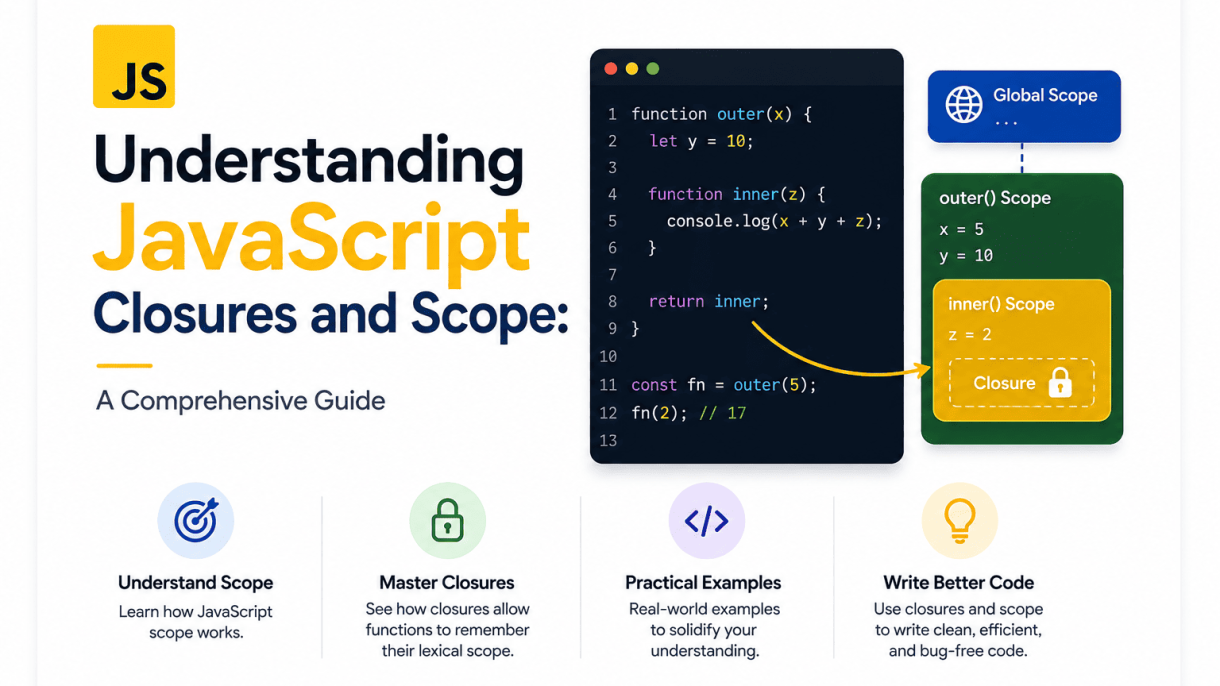

Introduction to JavaScript Scope
Before you can truly grasp closures, you must first understand the environment in which they operate: scope. In JavaScript, scope defines the current context of execution, determining which variables and functions are accessible at any given point in your code. Think of scope as a set of rules that the JavaScript engine follows to resolve identifiers—when you write a variable name, the engine must decide which value it refers to. Without these rules, every variable would be globally accessible, leading to unpredictable collisions and bugs that are nearly impossible to trace. Mastering scope is not just an academic exercise; it is the foundation for writing code that is predictable, maintainable, and free from hidden interdependencies.
What is Scope and Why It Matters
Scope is the accessibility boundary of a variable or function. When you declare a variable inside a block, function, or module, you are implicitly creating a bounded region where that variable exists. Outside that region, the variable is either hidden or completely nonexistent. This matters for several practical reasons:
- Name collision prevention: You can reuse common variable names (like
countorindex) in different scopes without conflict. - Memory management: Variables that go out of scope become eligible for garbage collection, freeing up memory.
- Code isolation: Changes to a variable inside one scope do not accidentally affect another scope, reducing side effects.
- Security: Sensitive data can be hidden from parts of the program that do not need access.
Without scope, a single global namespace would make large applications unmanageable. Every library, every function, and every loop would risk overwriting each other’s data. Scope gives you a controlled environment, allowing you to reason about your code in smaller, isolated pieces.
Global vs. Local Scope
JavaScript has two primary levels of scope: global and local. The global scope is the outermost layer. Any variable declared outside a function, block, or module—at the top level of your script—is globally scoped. Globally scoped variables are accessible from anywhere in your program, which sounds convenient but is generally discouraged. Overuse of global variables leads to tight coupling and makes debugging difficult because any part of the code can silently modify them.
Local scope, on the other hand, is created when you enter a function or a block (such as an if statement or a for loop). Variables declared with let or const inside a block are block-scoped, meaning they exist only within that block. Variables declared with var are function-scoped, meaning they are visible throughout the entire function regardless of block boundaries. Consider this simple example:
let globalVar = 'I am global';

function myFunction() {
    let localVar = 'I am local';
    if (true) {
        let blockVar = 'I am block-scoped';
        var functionVar = 'I am function-scoped';
    }
    console.log(functionVar); // Works
    console.log(localVar);   // Works
    // console.log(blockVar); // ReferenceError
}
console.log(globalVar); // Works
// console.log(localVar); // ReferenceError
The key takeaway is that local scope protects the integrity of your function’s internal logic, while global scope exposes data to the entire application. Good practice dictates that you should minimize global variables and rely on local scopes to encapsulate behavior.
Lexical Scope: The Key to Closures
The most important concept for understanding closures is lexical scope (also called static scope). Lexical scope means that the accessibility of variables is determined by the physical placement of the code in the source file, not by the call stack or how functions are invoked. In other words, when you write a function, it has access to variables that are in its lexical environment—the scope where the function was defined, plus all outer scopes that contain that definition.
This is different from dynamic scope, where a function would look up variables at call time. JavaScript uses lexical scope, which is why you can predict which variables a function will see simply by reading the code structure. Here is an illustration:
const outerVariable = 'outer';

function outerFunction() {
    const innerVariable = 'inner';

    function innerFunction() {
        console.log(outerVariable); // 'outer' - from lexical parent
        console.log(innerVariable); // 'inner' - from direct parent
    }
    innerFunction();
}
outerFunction();
When innerFunction is defined, it captures a reference to its lexical environment, which includes innerVariable and outerVariable. Even if you were to call innerFunction later from a completely different context, it would still remember these variables. This capturing behavior is the very mechanism that powers closures. Lexical scope is not just a theoretical detail—it is the reason why closures can “remember” their surrounding state long after the outer function has finished executing.
Understanding lexical scope gives you a mental model: every function is born with a backpack of variables from its definition site. That backpack is immutable in terms of which variables it references, though the values of those variables can change. This is the foundation you need before moving on to closures themselves.
Understanding JavaScript Closures and Scope: The Mechanics of Execution Contexts
To truly grasp Understanding JavaScript Closures and Scope, you must first see how the engine builds the environment in which your code runs. Every time your script executes, JavaScript creates an execution context—a wrapper that holds the variables, functions, and rules for resolving identifiers. These contexts are stacked and linked, forming the backbone of scope. Without this foundation, closures remain a mystery; with it, they become an inevitable consequence of the language’s design.
Global Execution Context and the Call Stack
When your page loads, JavaScript creates the global execution context. This is the default environment where all top-level code lives. It does two things immediately: it sets up the global object (e.g., window in browsers) and creates the special this binding. The global context is always at the bottom of the call stack—a LIFO (last-in, first-out) structure that tracks which context is currently running.
Consider this sequence:
- Script starts → global context is pushed onto the stack.
- A function is called → its new context is pushed on top.
- That function calls another → another context is pushed.
- When a function returns, its context is popped off, revealing the previous one.
The call stack never empties while the page is alive because the global context persists. This persistent bottom layer is why global variables are accessible everywhere—they sit in a context that never leaves the stack.
Function Execution Contexts and Variable Environments
Each time you invoke a function, JavaScript creates a function execution context. Unlike the global context, this one is temporary. It contains a variable environment—a private storage for that function’s parameters, local declarations, and inner function definitions. This environment is created fresh on every call, even if the function calls itself recursively. That means two invocations of the same function never share local variables; they each get their own copy.
Critically, the variable environment also records the outer reference—a link to the parent context’s environment. This link is established lexically (based on where the function is written in the source code), not dynamically (based on where it is called). For example:
function outer() {
  let count = 0;
  function inner() {
    count++;
    return count;
  }
  return inner;
}
const counter = outer();
counter(); // 1
counter(); // 2
Here, inner’s variable environment points to outer’s environment. Even after outer returns and its context is popped off the stack, inner retains that reference—this is the seed of a closure.
The Scope Chain and Variable Resolution
When you reference a variable, JavaScript does not search the entire program. Instead, it walks the scope chain: a linked list of variable environments, starting with the current context and moving outward to the global context. The chain is built from the outer references stored in each function’s environment.
| Step | Lookup location | Result if found |
|---|---|---|
| 1 | Current function’s variable environment | Uses that binding |
| 2 | Parent function’s environment (if any) | Uses that binding |
| 3 | Global environment | Uses that binding or throws ReferenceError |
This resolution happens at runtime, not at parse time. The engine walks the chain each time it encounters an identifier. That is why a closure can read a variable that was not yet defined when the closure was created—as long as the variable exists in the chain by the time the closure executes. The chain is dynamic in value, but static in structure.
This mechanism also explains why block-scoped variables (let, const) behave differently from var. The former are confined to their block’s environment, which is added to the chain only while that block runs. The latter is hoisted to the function environment. Understanding the scope chain thus reveals not just where variables live, but when they are reachable—and that timing is the essence of closures.
Understanding JavaScript Closures and Scope
When you hear the phrase “Understanding JavaScript Closures and Scope,” the term closure often feels abstract. Yet closures are not a special library feature or a rare syntax—they are a natural consequence of how JavaScript handles function scope and variable lifetime. In essence, a closure is created every time a function is defined inside another function and that inner function references variables from its outer scope. The remarkable part is that the inner function retains access to those variables even after the outer function has finished executing and returned. This behavior is possible because JavaScript keeps the outer function’s variable environment alive in memory as long as the inner function exists.
The Classic Definition of a Closure
A closure is the combination of a function bundled together with references to its surrounding state (the lexical environment). In simpler terms: a closure gives you access to an outer function’s scope from an inner function, even after the outer function has returned. The word “lexical” refers to the fact that the scope is determined at author time—where the function is written in the code—not at call time. When you declare a function inside another function, the inner function “closes over” the variables in the outer function’s scope. That closed-over set of variables is the closure.
To be precise, three elements must exist for a closure to form:
- An outer function that defines at least one variable.
- An inner function that references that variable.
- The inner function must be returned, passed, or otherwise made available outside the outer function’s execution.
Without the third condition, the inner function still has access to the outer scope while the outer function runs, but once the outer function exits, that scope would normally be garbage-collected. The closure prevents that collection by keeping a reference to the environment.
Creating a Closure: A Step-by-Step Example
Consider the following canonical example:
function createCounter() {
  let count = 0;          // Step 1: variable in outer scope
  return function() {     // Step 2: inner function returned
    count += 1;           // Step 3: inner function references 'count'
    return count;
  };
}

const counter = createCounter();
console.log(counter()); // 1
console.log(counter()); // 2
console.log(counter()); // 3
Here is what happens step by step:
- Outer function invocation:
createCounter()runs, creating a local variablecountinitialized to0. - Inner function creation: The anonymous function is defined inside
createCounter, capturing the current value ofcountin its lexical environment. - Return and assignment: The inner function is returned and assigned to
counter. At this moment,createCounterhas finished executing, and its local variablecountwould normally be destroyed. - Closure persists: Because the inner function still references
count, JavaScript keeps that variable’s storage alive. Each call tocounter()increments the samecountvariable, not a fresh copy.
This behavior is why closures are often used for data privacy, factory functions, and partial application.
Closures Capture Variables, Not Values
A frequent misconception is that a closure snapshots the value of a variable at the moment the inner function is created. In reality, a closure captures the variable itself—the binding, not the value. This distinction becomes critical in loops. Consider this classic pitfall:
function buildFunctions() {
  const funcs = [];
  for (var i = 0; i < 3; i++) {
    funcs.push(function() { return i; });
  }
  return funcs;
}

const funcs = buildFunctions();
console.log(funcs[0]()); // 3, not 0
console.log(funcs[1]()); // 3, not 1
console.log(funcs[2]()); // 3, not 2
Because var is function-scoped, there is only one i binding shared by all three inner functions. After the loop finishes, i equals 3, and every closure sees that same final value. If you use let instead, each iteration creates a new binding, and each closure captures its own distinct i. The principle remains: closures hold references to the variable’s storage location, not a copy of its current value.
| Aspect | Capturing a Value | Capturing a Variable (Closure) |
|---|---|---|
| What is stored | Immutable snapshot at creation time | Live reference to the binding |
| Effect of later changes | Closure sees the old value | Closure sees the updated value |
Loop with var |
Would print 0, 1, 2 | Prints 3, 3, 3 (shared binding) |
Loop with let |
Prints 0, 1, 2 (new binding per iteration) | Prints 0, 1, 2 (still variable capture, but distinct bindings) |
| Memory behavior | No extra retention after outer function returns | Outer scope retained as long as closure exists |
Understanding this distinction is essential for debugging and for writing predictable code. When you grasp that closures capture bindings, you can use them intentionally to maintain state across function calls, create private variables, or memoize expensive computations. The key takeaway is that a closure is not a copy of data—it is a persistent link to the original scope.
Practical Use Cases for Closures
Closures are not merely a theoretical curiosity; they are the backbone of many JavaScript patterns that developers use daily. When a function retains access to its lexical scope even after that scope has executed, it unlocks powerful capabilities for controlling state and behavior. The following use cases demonstrate how closures solve recurring problems in real-world application development, from data encapsulation to code organization.
Data Privacy and Emulating Private Methods
JavaScript lacks native support for private properties in objects, but closures provide a reliable workaround. By defining variables inside a function and returning functions that access them, you create a scope that is inaccessible from the outside. This emulates the behavior of private fields found in class-based languages like Java or C++.
Consider a counter that should only be modified through explicit methods:
function createCounter() {
  let count = 0;  // private variable

  return {
    increment: function() { count++; },
    decrement: function() { count--; },
    getValue: function() { return count; }
  };
}

const counter = createCounter();
counter.increment();
counter.increment();
console.log(counter.getValue()); // 2
console.log(counter.count);      // undefined (private)
Here, the returned object’s methods form closures over count. The variable is not directly reachable from the outside, preventing accidental modification. This pattern is invaluable for:
- Maintaining internal invariants without exposing implementation details.
- Creating stateful utilities that resist tampering from other parts of the codebase.
- Reducing the risk of naming collisions in large applications.
Function Factories and Partial Application
Closures enable function factories—functions that generate other functions with pre-configured behavior. This is particularly useful for partial application, where you fix some arguments of a function and defer the rest.
function multiply(factor) {
  return function(number) {
    return number * factor;
  };
}

const double = multiply(2);
const triple = multiply(3);

console.log(double(5)); // 10
console.log(triple(5)); // 15
In this example, double and triple each capture their own factor value. The closure preserves the argument passed to multiply, allowing you to create specialized functions without repeating logic. This approach shines in scenarios like:
- Configuring event handlers with specific parameters.
- Building API clients with pre-set endpoints or headers.
- Creating validation functions with different thresholds or rules.
Partial application reduces code duplication and improves readability by making the intent of each function explicit.
The Module Pattern in JavaScript
Before ES6 modules, closures were the standard way to create encapsulated modules. The module pattern combines an immediately invoked function expression (IIFE) with closures to expose a public API while keeping internal state and helper functions hidden.
const ShoppingCart = (function() {
  let items = [];

  function calculateTotal() {
    return items.reduce((sum, item) => sum + item.price, 0);
  }

  return {
    addItem: function(item) { items.push(item); },
    removeItem: function(index) { items.splice(index, 1); },
    getTotal: function() { return calculateTotal(); }
  };
})();

ShoppingCart.addItem({ name: 'Book', price: 15 });
ShoppingCart.addItem({ name: 'Pen', price: 2 });
console.log(ShoppingCart.getTotal()); // 17
The IIFE runs once, creating a private scope for items and calculateTotal. Only the returned object’s methods can access them. This pattern offers several benefits:
| Benefit | Explanation |
|---|---|
| Encapsulation | Internal variables and functions are hidden from the global scope. |
| Namespace management | Reduces global pollution by exposing a single object. |
| Memory efficiency | The module is instantiated only once, sharing state across calls. |
Even with modern ES modules, the closure-based module pattern remains relevant for creating singletons or for use in non-module environments like browser scripts loaded via <script> tags. It demonstrates how understanding closures directly translates to robust, maintainable code architecture.
Understanding JavaScript Closures and Scope: A Comprehensive Guide
When you combine closures with loops and asynchronous operations, JavaScript’s scoping rules can produce surprising—and often frustrating—results. The root cause lies in how closures capture variables by reference, not by value. This means every function created inside a loop shares the same variable binding unless you deliberately create a new scope per iteration. Below, we dissect the classic pitfalls and the modern, clean solutions.
The Classic Loop Problem with var
Using var in a loop declares a single function-scoped variable that is shared across all iterations. Each closure created inside the loop captures that same variable, not a copy. By the time the loop finishes, the variable holds its final value, so every closure sees that final value.
for (var i = 0; i < 3; i++) {
    setTimeout(function() { console.log(i); }, 100);
}
// Outputs: 3, 3, 3 (not 0, 1, 2)
Why does this happen? The closure’s environment refers to the same i binding. After the loop ends, i equals 3, and all three timers read that same binding. The same issue applies to event handlers attached inside loops:
var buttons = document.querySelectorAll('button');
for (var i = 0; i < buttons.length; i++) {
    buttons[i].addEventListener('click', function() {
        console.log('Button ' + i);
    });
}
Every click logs the final index, not the button’s actual position. This is the most notorious closure-in-loop bug.
Using let and Block Scoping to Fix Loop Issues
The modern fix is to replace var with let. The let keyword creates a new binding for each iteration of the loop. In other words, each closure captures its own unique i value. This works because the loop body is executed in a fresh lexical environment per iteration.
for (let i = 0; i < 3; i++) {
    setTimeout(function() { console.log(i); }, 100);
}
// Outputs: 0, 1, 2
This behavior applies to for, for...of, and for...in loops. For event handlers, the same principle works seamlessly:
for (let i = 0; i < buttons.length; i++) {
    buttons[i].addEventListener('click', function() {
        console.log('Button ' + i);
    });
}
If you must support older browsers or prefer an explicit approach, an IIFE (Immediately Invoked Function Expression) provides a manual per-iteration scope:
for (var i = 0; i < 3; i++) {
    (function(index) {
        setTimeout(function() { console.log(index); }, 100);
    })(i);
}
The IIFE receives the current i as a parameter, creating a new variable index that persists for each closure.
Event Handlers and Asynchronous Callbacks
Closures in event handlers and asynchronous callbacks face the same fundamental issue: the callback executes later, after the loop has finished. Even with let, you must understand that the closure captures the variable’s binding at the time the callback is created, not when it runs. For example, with let, each iteration gets a fresh binding, so the callback correctly remembers its own value.
However, asynchronous code introduces another subtlety: if you mutate a captured variable inside the callback, the change is visible to all closures sharing that binding. Consider this pattern:
let data = [];
for (let i = 0; i < 3; i++) {
    fetch('/api/item/' + i).then(response => {
        data.push(response); // 'data' is shared across all callbacks
    });
}
Here, data is a single outer variable, and all callbacks share it. That is usually intended, but be careful not to accidentally reassign it inside the callback—use const or a separate variable per iteration if you need isolation.
For event handlers, a practical tip is to use data-* attributes or bind() to pass values explicitly, avoiding reliance on closure scope altogether:
buttons.forEach(function(button, index) {
    button.addEventListener('click', function() {
        console.log('Button ' + index);
    });
});
Using forEach creates a new function scope for each iteration, so the closure captures the index parameter correctly. This is often cleaner than manual IIFEs and works with both var and let.
To summarize the key differences:
| Approach | Captures | Result in loop |
|---|---|---|
var + closure |
Single shared binding | All closures see final value |
let + closure |
New binding per iteration | Each closure sees its own value |
IIFE with var |
Parameter copy per iteration | Each closure sees its own value |
forEach callback |
Parameter per invocation | Each closure sees its own value |
Mastering these patterns eliminates a whole class of timing bugs. Always prefer let or forEach for loop-based closures, and reserve IIFEs for legacy code or when you need explicit control over the captured scope.
Scope and Closures in Modern JavaScript (ES6+)
The introduction of ES6 (ECMAScript 2015) fundamentally reshaped how developers think about scope and closures. While the core concept of a closure—a function retaining access to its lexical environment—remains unchanged, the tools for creating and controlling that environment have become more precise and expressive. Traditional `var` declarations were function-scoped, leading to common pitfalls like loop variable leakage and unintended global pollution. Modern JavaScript replaces this with block scoping, lexical `this` binding, and more ergonomic syntax, all of which interact with closures in powerful ways.
Block Scope with let and const
The most significant shift is the introduction of `let` and `const`, which are block-scoped rather than function-scoped. A block is any set of curly braces `{}`, such as those in `if` statements, `for` loops, or standalone blocks. This directly affects closures because each block now creates a new lexical environment. Consider the classic loop closure problem:
// With var (function scope) – all closures see the final value
for (var i = 0; i < 3; i++) {
  setTimeout(() => console.log(i), 100); // logs 3, 3, 3
}

// With let (block scope) – each iteration has its own binding
for (let j = 0; j < 3; j++) {
  setTimeout(() => console.log(j), 100); // logs 0, 1, 2
}
With `let`, the loop body is re-evaluated per iteration, creating a fresh lexical environment for each closure. This eliminates the need for the old IIFE (Immediately Invoked Function Expression) workaround. Furthermore, `const` provides immutability of the binding, but the value inside a closure can still be mutated if it’s an object. The key takeaway is that block scoping gives you finer control over closure capture—you can now isolate state precisely where it’s needed.
Arrow Functions and Lexical this
Arrow functions do not have their own `this`, `arguments`, `super`, or `new.target`. Instead, they inherit `this` from the enclosing scope at the time of definition. This is not a new form of closure per se, but it changes how closures handle context. In traditional functions, `this` was dynamically bound, often causing bugs when passing methods as callbacks. With arrow functions, `this` is lexically bound, meaning it behaves like any other variable captured by the closure.
const obj = {
  data: [1, 2, 3],
  process: function() {
    // Traditional function: this is dynamic, fails inside forEach
    this.data.forEach(function(item) {
      console.log(this.data); // undefined
    });
    // Arrow function: this is lexical, works as expected
    this.data.forEach((item) => {
      console.log(this.data); // [1, 2, 3]
    });
  }
};
obj.process();
This lexical `this` is effectively a closure over the surrounding `this` value. It makes closures more predictable in object-oriented and event-driven code, as the captured context remains stable regardless of how the function is invoked.
Closures in Template Literals and Destructuring
Template literals and destructuring do not create new scopes themselves, but they interact elegantly with closures in practical scenarios. Template literals allow you to embed expressions that can call functions returning values from closures, making string construction more readable. Destructuring, especially in function parameters, can extract closure-held values cleanly. Here is a practical example combining both:
function createUser(name, age) {
  let secret = 'hidden'; // private variable via closure
  return {
    getInfo: () => `${name} (${age} years old)`,
    updateSecret: (newSecret) => { secret = newSecret; },
    getSecret: () => secret
  };
}

const { getInfo, updateSecret, getSecret } = createUser('Alice', 30);
console.log(getInfo()); // Alice (30 years old)
updateSecret('new hidden');
console.log(getSecret()); // new hidden
Here, destructuring in the assignment extracts the methods, and the template literal inside `getInfo` accesses `name` and `age` from the closure. The `secret` variable remains private, accessible only through the closure-returned functions. This pattern shows how modern syntax simplifies working with closures without altering their fundamental power.
- Block scope prevents accidental closure capture in loops and conditionals.
- Arrow functions bind `this` lexically, making closures more predictable.
- Template literals offer readable interpolation of closure values.
- Destructuring enables clean extraction of closure-returned methods.
In summary, ES6+ did not replace closures but refined their usage. Block scoping gives you precise control over what a closure captures, arrow functions eliminate the `this` ambiguity, and modern syntax like template literals and destructuring make working with closures more expressive and less error-prone. Understanding these interactions is essential for writing robust, maintainable JavaScript in today’s ecosystem.
Understanding JavaScript Closures and Scope: Performance Implications of Closures
Closures are a powerful feature of JavaScript, but their convenience comes with measurable costs. When a function retains access to its lexical scope, that scope—including all variables, functions, and objects it references—remains alive in memory as long as the closure exists. This is not inherently problematic, but it demands deliberate management. The trade-off is between expressiveness and resource consumption. Every closure adds a layer of indirection that can affect both memory footprint and execution speed, especially in large applications or long-lived environments like browser tabs. Understanding these implications is essential for writing code that remains responsive and scalable.
Memory Usage and Garbage Collection
Each time a closure is created, the JavaScript engine allocates memory for the closure’s captured environment. This environment is not a copy of the outer scope; rather, it is a reference to the live scope object. The engine must track these references to determine when memory can be reclaimed. Garbage collection (GC) in modern engines uses reachability—an object is collected only if no closure or global reference points to it. Consider this example:
function createCounter() {
  let count = 0;
  return function() {
    count++;
    return count;
  };
}
const counter = createCounter();
Here, the inner function holds a reference to count. As long as counter exists, the environment containing count cannot be freed. If you create thousands of such closures, each retains its own environment, leading to increased memory pressure. The GC can handle this, but frequent allocation and retention can cause longer pause times. To minimize impact, avoid creating closures inside loops that are not strictly necessary. Instead, consider using class fields or module-level variables when you need shared state without per-instance closures.
Avoiding Unintentional Memory Leaks
Memory leaks occur when closures hold references to large objects that are no longer needed. A common pattern is attaching event listeners that capture outer variables. For example:
let bigData = new Array(1000000).fill('x');
function onClick() {
  console.log(bigData.length);
}
document.getElementById('btn').addEventListener('click', onClick);
If onClick is never removed, the closure keeps bigData alive even after the DOM element is removed. This is a classic leak in single-page applications. To prevent this, always remove event listeners when they are no longer needed, using removeEventListener or AbortController. Additionally, be cautious with closures inside timers or async callbacks. If you assign a closure to a global variable and never nullify it, the captured scope persists indefinitely. Best practices include:
- Nullify references to large objects after use, e.g.,
bigData = null. - Use
WeakMaporWeakSetfor caching that should not prevent GC. - Prefer short-lived closures that are created and released within a function call.
Performance Tips for Closure-Heavy Code
While closures are elegant, overusing them can degrade performance. Here are actionable strategies to keep your code fast:
| Strategy | Why It Helps |
|---|---|
| Minimize closure creation in hot paths | Creating a closure per iteration in a loop adds allocation overhead. Move closure creation outside the loop when possible. |
Use let and const instead of var |
Block-scoped variables reduce the amount of captured environment, making closures lighter. |
| Break large closures into smaller, focused ones | Smaller closures capture fewer variables, reducing memory footprint and lookup time. |
| Leverage function factories sparingly | Factories that return closures are useful but can proliferate. Cache the factory result if you call it repeatedly. |
Another technique is to avoid unnecessary variable capture. For instance, if a closure only needs a specific property, pass that property as an argument instead of capturing the whole object. This reduces the scope size and speeds up property access. Finally, profile your code using browser DevTools to identify closures that cause GC pressure. Optimize only after measuring—premature optimization can complicate code without real benefit. In practice, closures are rarely the bottleneck, but understanding their cost helps you make informed trade-offs between clarity and efficiency.
Common Mistakes and Misconceptions
Even experienced JavaScript developers stumble when reasoning about closures and scope. The mental models we build early on often contain subtle flaws that surface as baffling bugs. Below are three of the most frequent errors, explained with corrections and practical examples.
Confusing Scope with Execution Context
Scope and execution context are related but distinct concepts. Scope is a static, lexical property: it determines which variables and functions are accessible at a given point in the code, based on where that code is written. Execution context is dynamic: it is the environment in which code is currently running, including the this value, the variable environment, and the call stack.
The mistake occurs when developers say “the closure’s scope changes” or “this is part of the closure’s scope.” Closures capture the lexical environment (scope), not the execution context. The this value is bound to the execution context and can change depending on how a function is called, while the closure’s variable bindings remain fixed.
Correction: Always separate the two. A closure gives you access to the outer function’s variables, not to its this. To preserve this inside a closure, use an arrow function or .bind().
| Feature | Scope | Execution Context |
|---|---|---|
| Nature | Static (lexical) | Dynamic (runtime) |
| Determined by | Where code is written | How/where code is called |
| Contains | Variable and function declarations | this, arguments, call stack, variable environment |
| Lifetime | Persists as long as the closure exists | Ends when the function returns |
| Example | Access to outer function’s let variable |
this inside a method called on an object |
Misunderstanding Hoisting and Temporal Dead Zone
Hoisting is often taught as “variables are moved to the top,” which leads to the misconception that let and const behave like var. In reality, declarations are processed before execution, but let and const are hoisted into a temporal dead zone (TDZ). Accessing them before their declaration throws a ReferenceError, not undefined.
For example:
console.log(x); // ReferenceError: Cannot access 'x' before initialization
let x = 5;
Many developers assume the error comes from “not hoisted,” but it is hoisted—it just cannot be accessed during the TDZ. This affects closures because a closure may capture a variable that is still in the TDZ if the closure is invoked before the variable is initialized.
Correction: Treat let and const as if they do not exist until the line of declaration executes. Always declare variables at the top of their block to avoid TDZ errors and to make code predictable.
Assuming Closures Capture Values at Creation
This is perhaps the most common pitfall. A closure does not copy the value of a variable at the time the closure is created. Instead, it captures a reference to the variable itself. If that variable changes later, the closure sees the updated value.
Consider the classic loop problem:
for (var i = 0; i < 3; i++) {
  setTimeout(() => console.log(i), 100);
}
// Outputs: 3, 3, 3
Because var is function-scoped, there is only one i variable. Each closure references that same variable, which ends at 3. Developers expecting 0, 1, 2 wrongly assume the closure captured the value at creation.
Correction: To capture the current value, create a new variable per iteration. Use let (which creates a new binding each iteration) or an IIFE:
for (let i = 0; i < 3; i++) {
  setTimeout(() => console.log(i), 100);
}
// Outputs: 0, 1, 2
Alternatively, use a factory function that takes the value as a parameter. Understanding that closures hold references—not snapshots—is essential for writing correct asynchronous code.
By correcting these three misconceptions, you will avoid a large class of subtle bugs and gain a more accurate mental model of how JavaScript truly works under the hood.
Advanced Patterns: Currying, Memoization, and More
Understanding JavaScript Closures and Scope opens the door to functional programming patterns that transform how you structure code. Closures—functions retaining access to their lexical environment—are the backbone of several advanced techniques that improve reusability, performance, and state management. By mastering these patterns, you move beyond basic event handlers and module patterns into a style of coding that is both elegant and practical.
Currying and Partial Application with Closures
Currying converts a function that takes multiple arguments into a sequence of functions, each accepting a single argument. Partial application, a related concept, fixes some arguments and returns a function for the rest. Both rely on closures to “remember” the already-supplied arguments.
Consider a logging function that needs a timestamp and a message. Instead of repeating the timestamp argument, you can curry it:
const createLogger = (timestamp) => (level) => (message) =>
  console.log(`[${timestamp}] [${level}] ${message}`);

const infoLogger = createLogger(new Date().toISOString())('INFO');
infoLogger('User signed in'); // [2025-01-01T12:00:00Z] [INFO] User signed in
Here, infoLogger closes over both the timestamp and the level, producing a specialized function. This pattern shines in scenarios where you repeatedly call functions with the same configuration, such as API clients with fixed headers or validation rules with preset options.
Memoization for Performance Optimization
Memoization caches function results based on arguments, avoiding expensive recomputation. Closures make this seamless by storing the cache privately. This is especially valuable for recursive or computationally heavy functions, like calculating Fibonacci numbers or processing large datasets.
const memoize = (fn) => {
  const cache = new Map();
  return (arg) => {
    if (cache.has(arg)) return cache.get(arg);
    const result = fn(arg);
    cache.set(arg, result);
    return result;
  };
};

const factorial = memoize((n) => (n <= 1 ? 1 : n * factorial(n - 1)));
console.log(factorial(5)); // 120
console.log(factorial(6)); // 720 (reuses cached 120)
Key benefits of memoization with closures:
- Isolation: The cache is inaccessible outside the returned function, preventing accidental mutation.
- Efficiency: Repeated calls with identical inputs run in O(1) after the first computation.
- Simplicity: You wrap existing functions without altering their logic.
Building State Machines with Closures
State machines manage transitions between discrete states, and closures provide a clean way to encapsulate the current state and transition rules. Unlike class-based implementations, closure-based state machines are lightweight and avoid exposing internal state directly.
const createTrafficLight = () => {
  let state = 'red';
  const transitions = {
    red: 'green',
    green: 'yellow',
    yellow: 'red'
  };
  return {
    change() { state = transitions[state]; return state; },
    current() { return state; }
  };
};

const light = createTrafficLight();
console.log(light.current()); // 'red'
light.change();
console.log(light.current()); // 'green'
This pattern ensures the state variable is only modifiable through defined methods. You can extend it with guards (e.g., prevent invalid transitions) or add side effects on each change. Closures make the state fully private, which is superior to using a global variable or an object property that could be reassigned accidentally.
These three patterns—currying, memoization, and state machines—demonstrate how Understanding JavaScript Closures and Scope enables you to write modular, efficient, and secure code. Each leverages the same core mechanism: a function that remembers its environment, giving you precise control over data and behavior.
Testing and Debugging Closures
Closures are powerful but can be notoriously difficult to reason about, especially when they capture variables across multiple execution contexts. Effective testing and debugging require a combination of browser tooling, deliberate unit test design, and an understanding of where closure logic typically breaks. The following strategies will help you isolate state, verify behavior, and avoid common pitfalls when working with closures in JavaScript.
Inspecting the Scope Chain in DevTools
Modern browser DevTools provide direct visibility into the closure scope. To inspect a closure at runtime, set a breakpoint inside the inner function and open the Sources panel (Chrome/Edge) or Debugger panel (Firefox). In the right-hand Scope pane, you will see a nested list labeled Closure, Local, and Global. The Closure entry lists every variable captured from outer function scopes, along with their current values at that exact moment.
Key techniques for efficient inspection:
- Step through the call stack: When a closure is invoked, the debugger shows the entire chain of frames. Clicking each frame updates the Scope pane to reflect the variables available in that particular execution context.
- Use the console while paused: Type the name of a captured variable directly into the console (e.g.,
secretCounter) to read or even mutate it before continuing execution. This helps verify whether the closure is reading the expected binding. - Evaluate expressions: Right-click a variable in the Scope pane and select “Add to Watch” to monitor how its value changes across multiple breakpoints.
- Check for “value below” indicators: In some browsers, an uninitialized
letorconstinside a closure’s temporal dead zone appears as<value unavailable>. This immediately flags a scope hoisting issue.
For asynchronous code (e.g., closures inside setTimeout or event listeners), use the Async checkbox in the call stack panel. This reveals the closure’s original creation context, which is often where the bug originates.
Writing Unit Tests for Closure-Based Logic
Unit tests for closures should verify two things: state isolation and capture correctness. A common pattern is to test a factory function that returns a closure, then assert that each instance maintains independent state.
Example test structure using a simple counter factory:
function createCounter() {
  let count = 0;
  return {
    increment: () => ++count,
    getCount: () => count
  };
}

// Test (pseudo-code)
const a = createCounter();
const b = createCounter();
a.increment();
assert(a.getCount() === 1);
assert(b.getCount() === 0); // isolation
Recommended practices for writing such tests:
- Test the public interface only: Do not attempt to access the closure’s private variables directly. Instead, invoke the returned methods and assert observable outcomes.
- Create fresh instances per test: Use
beforeEachto instantiate a new closure for every test case. This prevents state leakage between tests. - Test edge cases of captured parameters: If a closure captures a function argument, pass
undefined,null, and repeated values to ensure the closure does not accidentally share mutations. - Use snapshot testing for complex state: If the closure returns an object, compare its serialized form after several operations to catch unintended changes.
- Mock external dependencies: If the closure uses a global variable or a module-level singleton, replace it with a mock to isolate the closure’s logic.
When testing asynchronous closures (e.g., callbacks), use async/await or a fake timer library to control execution order. Verify that the closure captures the correct values from the loop or promise chain, not the final mutated value.
Debugging Common Closure Issues
Most closure bugs fall into three categories: stale captures, accidental sharing, and memory leaks. Here is how to recognize and resolve each:
| Symptom | Likely Cause | Debugging Strategy |
|---|---|---|
| All loop iterations return the same final value | Capturing a var or a loop variable by reference instead of by value |
Use let for block scoping, or wrap the closure in an IIFE that takes the current value as a parameter. |
| Multiple closure instances share the same state unexpectedly | Closure defined inside a method that references a property on this which is later reassigned |
Assign this to a local variable (e.g., const self = this) before defining the closure, or use arrow functions to preserve lexical this. |
| Memory usage grows over time | Closure retains references to large objects or DOM nodes that are no longer needed | In DevTools, use the Memory panel to take a heap snapshot and filter for “closure” or “detached”. Set the captured variable to null when done. |
Variable appears as undefined inside closure |
Shadowing: an inner variable with the same name hides the outer captured one | Rename the inner variable. Use the Scope pane to see which binding is actually resolved. |
One frequent pitfall is the loop closure problem. When a closure is created inside a for loop using var, all closures share the same variable. Debugging this is straightforward: place a breakpoint inside the closure and inspect the Scope pane—you will see the loop variable already advanced to its final value. Switching to let creates a new binding per iteration, which the Scope pane will show as separate Closure entries for each call.
Another common issue is over-capturing. If a closure captures a large object but only uses one property, the entire object remains in memory. To debug, log Object.keys(closureScopeVariable) in the console while paused. If you see unused properties, refactor the closure to accept only the needed primitive value instead of the full object.
Finally, remember that closures in event listeners or timers may execute after the original scope is gone. If you see unexpected values, check whether the listener was added multiple times (causing duplicate closures) by using the Event Listeners panel in DevTools. Remove unused listeners with removeEventListener and the same function reference to prevent stale closure execution.
Frequently Asked Questions
What is a JavaScript closure?
A closure is a function that retains access to its lexical scope even when the function is executed outside that scope. In JavaScript, every function creates a closure at creation time, capturing variables from its outer scopes. This allows the function to access those variables later, even after the outer function has returned. For example, if you define a function inside another function, the inner function can still reference the outer function's variables, enabling powerful patterns like data privacy and factory functions.
What is the difference between scope and closure in JavaScript?
Scope determines where variables are accessible in your code. JavaScript has global, function, and block scopes. A closure is a function that remembers its lexical scope even when called outside it. While scope is about visibility at a given point in time, closure is about preserving scope for later use. Every function has a scope, but a closure specifically refers to the combination of a function and the environment in which it was declared, allowing the function to access variables from that environment later.
What is lexical scoping in JavaScript?
Lexical scoping means that the accessibility of variables is determined by the position of variables and blocks in the source code. In JavaScript, the scope of a variable is defined by its location within the code. For example, a variable declared inside a function is not accessible outside it, but it is accessible to nested functions. This is called 'lexical' because the scope is resolved at compile time based on the nesting of functions and blocks, not at runtime. Closures rely on lexical scoping to remember variables from their defining context.
How do closures work in JavaScript?
When a function is defined, it captures the scope chain at its creation point. This scope chain includes references to variables from all outer scopes. When the function is invoked, it uses this captured scope chain to resolve variable names. Even if the outer function has completed execution and its variables would normally be garbage-collected, the closure keeps them alive as long as the inner function exists. For instance, in a counter function, the inner increment function can access and modify the count variable because of the closure, preserving its state across calls.
What are the common use cases for closures?
Closures are used in many JavaScript patterns: 1) Data privacy and encapsulation – creating private variables that cannot be accessed externally. 2) Function factories – generating functions with preset parameters. 3) Event handlers and callbacks – preserving context in asynchronous code. 4) Module pattern – creating modules with public and private methods. 5) Memoization – caching results of expensive function calls. 6) Partial application and currying – fixing arguments to functions. Closures are fundamental to functional programming in JavaScript.
What is the difference between var, let, and const in terms of scope?
var is function-scoped, meaning it is accessible throughout the entire function even if declared inside a block. let and const are block-scoped, meaning they are only accessible within the block (e.g., inside an if or for loop) where they are declared. Additionally, var is hoisted and initialized as undefined, while let and const are hoisted but not initialized (temporal dead zone). const also prevents reassignment, but object properties can still be modified. These differences affect how closures capture variables in loops and conditionals.
How do closures affect memory and performance?
Closures can increase memory usage because they keep references to outer variables, preventing them from being garbage collected until the closure is no longer referenced. This can lead to memory leaks if closures are used excessively or unintentionally, especially in large applications or long-lived event listeners. However, when used correctly, closures are efficient. To avoid leaks, remove event listeners when they are no longer needed, set references to null, and avoid creating closures in loops unnecessarily. Performance impact is minimal for most use cases, but be mindful of creating many closures in hot paths.
What are common mistakes with closures in JavaScript?
A classic mistake is creating closures in loops, where each iteration captures the same variable reference, leading to all closures seeing the final value. For example, using var in a for loop with setTimeout results in all callbacks logging the same number. The fix is to use let for block scoping or an IIFE to capture each iteration's value. Another mistake is accidentally creating global variables by omitting var/let/const. Also, overusing closures for private variables can make debugging harder and increase memory usage. Understanding the scope chain is key to avoiding these pitfalls.
Sources and further reading
- MDN Web Docs: Closures
- MDN Web Docs: Scope
- MDN Web Docs: Lexical scoping
- ECMAScript Language Specification (ECMA-262) – Scope and Closures
- JavaScript.info: Closures
- JavaScript.info: Variable scope, closure
- W3Schools: JavaScript Closures
- MDN Web Docs: let
- MDN Web Docs: const
- Google Developers: JavaScript Closures – How to Avoid Memory Leaks
Need help with this topic?
Send us your details and we will contact you.