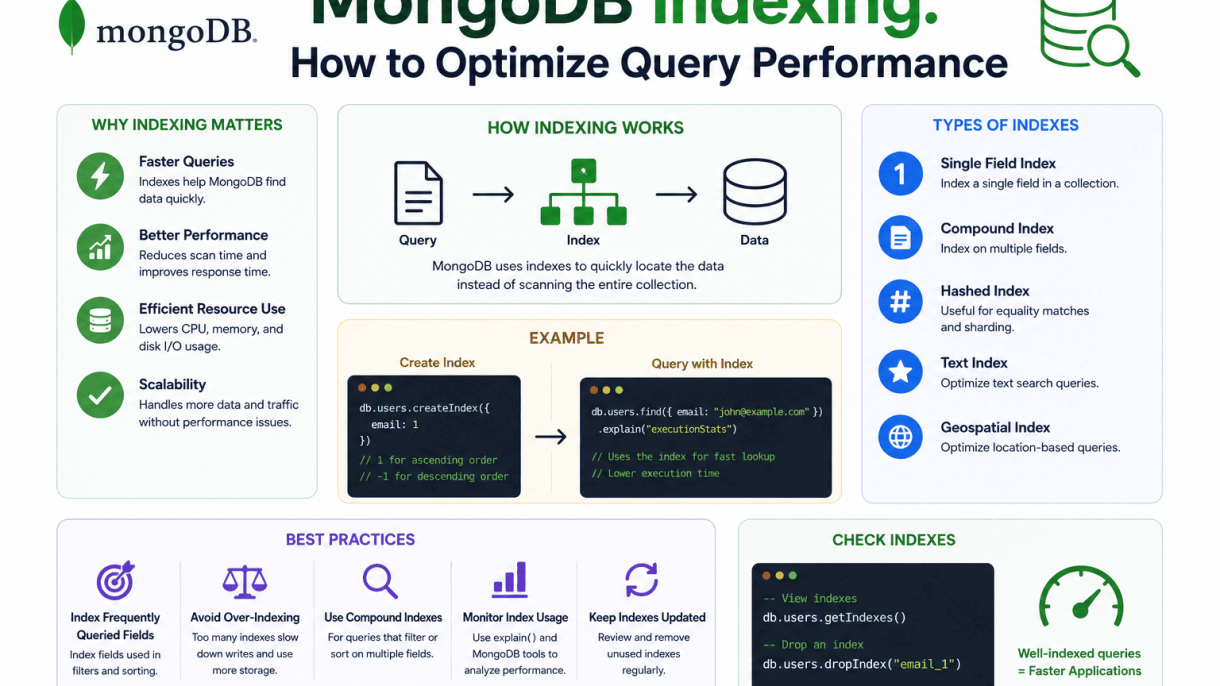

Introduction to MongoDB Indexing and Query Performance
In MongoDB, indexing is the primary mechanism for achieving fast query execution at scale. Without indexes, MongoDB must perform a collection scan, examining every document in a collection to find matching results. As collections grow into millions or billions of documents, collection scans become prohibitively slow, degrading application responsiveness and increasing server load. Indexes provide a structured, efficient path to the data, enabling MongoDB to locate documents with minimal disk I/O and CPU time. This section introduces the foundational concepts of indexing in MongoDB, explaining what indexes are, how they accelerate queries, and the most common index types you will use in production systems.
What is an Index in MongoDB?
An index in MongoDB is a specialized data structure that stores a small subset of the collection’s data in an ordered, easily traversable format. Specifically, MongoDB indexes are built on B-tree (balanced tree) structures, which maintain sorted order and support logarithmic-time search, insertion, and deletion operations. Each index entry contains the value of the indexed field(s) and a pointer (the document’s location in the collection). When a query uses an index, MongoDB navigates the B-tree to quickly locate the relevant entries, then retrieves the full documents using those pointers. This is fundamentally different from scanning every document: a B-tree index on a field like userId can find a specific value among millions in microseconds, whereas a full scan would require reading every document sequentially.
Indexes are stored separately from the collection data and are maintained automatically by MongoDB on write operations. By default, MongoDB creates a unique index on the _id field for every collection. You can create additional indexes using the createIndex() method or through the MongoDB driver. However, indexes consume disk space and memory (especially when cached in RAM), and they add overhead to write operations because the index must be updated with each insert, update, or delete. Therefore, careful planning is required to balance query performance gains against write performance and storage costs.
How Indexes Accelerate Query Performance
Indexes accelerate query performance in several key ways:
- Reduced document scanning: Instead of reading every document in the collection, MongoDB uses the index to directly locate only the documents that match the query predicate. For equality matches, this can reduce the search space from millions to a handful of index entries.
- Efficient sorting: If a query requests sorted results (e.g.,
.sort({date: -1})), and an index exists on that field in the same order, MongoDB can return results directly from the index without performing an in-memory sort. This is often a dramatic performance improvement. - Covered queries: When all fields required by a query are present in the index itself, MongoDB can return results entirely from the index without fetching the actual documents. This is called a covered query and eliminates disk reads entirely.
- Index intersection: MongoDB can combine multiple indexes to satisfy complex query filters, though compound indexes are generally more efficient.
The following table summarizes the performance characteristics of indexed versus unindexed queries:
| Query Type | Without Index (Collection Scan) | With Index |
|---|---|---|
| Equality match on 10M documents | ~10M document reads | ~1–10 index reads + 1 document read |
| Range query on 10M documents | ~10M document reads | ~log₂(10M) ≈ 24 index reads + matching document reads |
| Sort by indexed field | Full collection scan + in-memory sort (O(n log n)) | Index traversal in order (O(log n + k)) |
Common Index Types: Single Field, Compound, and Multikey
MongoDB offers several index types to address different query patterns. The three most fundamental are single field, compound, and multikey indexes.
Single field indexes are the simplest: they index a single field in ascending (1) or descending (-1) order. They are ideal for equality queries, range queries, and sort operations on that field. For example, db.users.createIndex({email: 1}) creates an ascending index on the email field, enabling fast lookups by email address.
Compound indexes index multiple fields within a single index structure. The order of fields in the index definition is crucial: MongoDB uses a prefix-based strategy, meaning the index can support queries on the first field, the first two fields, and so on. For instance, db.orders.createIndex({status: 1, createdAt: -1}) efficiently serves queries filtering by status alone, or by both status and createdAt sorted in descending order. Compound indexes are powerful for multi-field query filters and for covering queries completely.
Multikey indexes are used when the indexed field contains an array. MongoDB automatically creates a multikey index when you index an array field, storing separate index entries for each element in the array. This allows efficient queries that match any element of the array. For example, db.articles.createIndex({tags: 1}) on a tags array field enables fast lookups for articles that contain a specific tag. Note that multikey indexes have some limitations: they cannot be used as the prefix of a compound index if the array field is the first field, and they do not support certain query operators like $elemMatch as efficiently as other structures.
MongoDB Indexing: How to Optimize Query Performance
Before you can optimize query performance with indexing, you must first identify which queries are slow and why. MongoDB provides several built-in tools for detecting inefficient operations. By systematically using these tools, you can pinpoint queries that lack proper index support, scan too many documents, or perform poorly due to collection size. The goal is to collect actionable data that guides your indexing strategy—whether you need to add a new compound index, reorder existing index fields, or remove unused indexes.
Using explain() to Analyze Query Execution
The explain() method is your first line of defense for understanding how MongoDB executes a query. Attach it to any find(), aggregate(), or count() operation to return a detailed execution plan. The output includes three key modes: queryPlanner (default), executionStats, and allPlansExecution. For performance tuning, use executionStats to see actual execution times and document counts.
Focus on these critical fields in the output:
- stage: Look for
COLLSCAN(collection scan) instead ofIXSCAN(index scan)—a red flag indicating no index is used. - totalDocsExamined: Compare this to
nReturned. A large ratio means the query scans many documents to find few results. - executionTimeMillis: The total time for the query. Consistently high values suggest an indexing need.
- indexBounds: Shows which index keys were used and their range. Missing bounds indicate the index is not selective.
Example command using explain("executionStats") on a collection named orders:
db.orders.find({ status: "pending", created_at: { $gt: ISODate("2024-01-01") } }).explain("executionStats")
If the output shows "stage": "COLLSCAN" and "totalDocsExamined": 500000 with only 50 documents returned, you need an index on { status: 1, created_at: 1 } to cover the query.
Enabling the Database Profiler for Performance Tuning
The database profiler records detailed information about operations that exceed a configurable latency threshold. Enable it at the database level to capture slow queries over time. The profiler stores its output in the system.profile collection, which you can query like any other collection.
To enable profiling for all operations slower than 100 milliseconds:
db.setProfilingLevel(1, { slowms: 100 })
Profiling levels:
| Level | Description |
|---|---|
| 0 | Profiling off (default) |
| 1 | Logs only slow operations (based on slowms) |
| 2 | Logs all operations (use sparingly in production) |
After enabling profiling, query the system.profile collection to find problematic queries:
db.system.profile.find({ millis: { $gt: 200 } }).sort({ ts: -1 }).limit(10).pretty()
This returns the ten most recent queries that took over 200 milliseconds. Each document includes ns (namespace), op (operation type), query, and millis—allowing you to correlate slow operations with missing indexes.
Interpreting Slow Query Logs and Metrics
MongoDB logs slow queries to the standard log output when profiling is enabled or when the slowOpThresholdMs parameter is set. By default, this threshold is 100 milliseconds. In production environments, examine these logs to identify recurring patterns.
Key metrics to analyze in slow query logs:
- Command and filter: The exact query and its conditions. Look for predicates on unindexed fields or range queries without index support.
- DocsExamined vs. nreturned: A high ratio (e.g., 10,000:1) indicates a full collection scan or a poorly selective index.
- KeysExamined: If this number is close to
DocsExaminedbut far exceedsnreturned, the index is not selective enough—consider a compound index with better field ordering. - planSummary: Shows the winning plan.
COLLSCANorIXSCANwithFETCHstages can hint at index coverage issues.
For example, a log entry like planSummary: IXSCAN { status: 1 } with keysExamined: 100000 and nreturned: 500 suggests the single-field index on status is too broad. Adding a second field (e.g., created_at) will narrow the scan range. Regularly review these logs, especially during peak load, to prioritize new indexes that reduce document examination and improve response times.
Creating and Managing Single Field Indexes
A single field index is the most fundamental index type in MongoDB, built on a single field of a collection. It accelerates queries that filter, sort, or perform equality matches on that field. Properly creating and managing these indexes is essential for optimizing query performance while balancing storage and write overhead.
Creating a Single Field Index with createIndex()
To create a single field index, use the createIndex() method on a collection, specifying the field and the sort order (1 for ascending, -1 for descending). The order matters for sort operations but does not affect equality lookups. For example:
db.orders.createIndex({ orderDate: 1 })
This creates an ascending index on the orderDate field. You can also create a unique index to enforce uniqueness:
db.users.createIndex({ email: 1 }, { unique: true })
Key points when using createIndex():
- Indexes are built in the background by default in recent MongoDB versions, minimizing blocking of other operations.
- You can name indexes explicitly using the
nameoption for easier management. - To verify an index exists, use
db.collection.getIndexes(). - Drop an index with
db.collection.dropIndex("indexName")when it is no longer needed.
Choosing the Right Field for Indexing
Selecting the optimal field for a single field index depends on query patterns and data distribution. Consider the following best practices:
- High cardinality fields: Fields with many distinct values (e.g., user ID, email, timestamp) benefit most from indexing because they narrow results efficiently.
- Selectivity: Index fields that are frequently used in query filters (e.g.,
WHEREconditions) or sort operations. Avoid indexing fields with low cardinality (e.g., boolean flags, gender) as they may not improve performance and can harm write speed. - Coverage: If queries often return only the indexed field, the index can serve as a “covered query,” reading directly from the index without fetching documents.
- Compound queries: For queries filtering on multiple fields, a compound index is usually better than multiple single field indexes.
To evaluate cardinality, inspect the number of unique values using db.collection.distinct("fieldName"). For example, an index on status with only three values (e.g., “active”, “inactive”, “pending”) has low cardinality and may not significantly speed up queries.
Impact on Write Performance and Storage
Every index adds overhead to write operations (inserts, updates, deletes) because MongoDB must update each index when data changes. The trade-off between read performance and write cost is critical. The table below summarizes the key differences:
| Factor | Without Index | With Single Field Index |
|---|---|---|
| Read query speed | Slower (full collection scan) | Faster (index scan, often logarithmic) |
| Write operation cost | Lower (no index maintenance) | Higher (must update index per write) |
| Storage consumption | Minimal (only data) | Increased (index B-tree structure) |
| Memory usage | No index RAM overhead | Uses RAM for working set (index pages) |
For write-heavy workloads, limit indexes to essential fields. Each index also consumes disk space; a single field index on a 10-million-document collection with a 32-byte field can occupy approximately 320 MB plus overhead. Monitor index size using db.collection.totalIndexSize(). To mitigate write impact, consider building indexes during low-traffic periods and using background building (default in MongoDB 4.2+).
In summary, single field indexes are powerful for optimizing read queries but require careful field selection and awareness of their storage and write performance trade-offs. Regular monitoring of index usage via the $indexStats aggregation stage helps identify redundant or underused indexes that should be removed.
Leveraging Compound Indexes for Complex Queries
When queries involve multiple fields—filtering, sorting, and range conditions simultaneously—single-field indexes often fall short. Compound indexes, which incorporate two or more fields in a defined order, allow MongoDB to satisfy complex query patterns without scanning large subsets of documents. The key to designing effective compound indexes lies in structuring field order to match the query’s logical flow, minimizing index scans and document lookups. A poorly ordered compound index can be nearly as inefficient as no index at all, while a well-crafted one can reduce query time from seconds to milliseconds.
ESR Rule: Equality, Sort, Range Ordering
The ESR rule provides a practical guideline for ordering fields in a compound index: place fields that require equality matches first, then fields used for sort operations, and finally fields involved in range queries (e.g., $gt, $lt, $gte, $lte). This ordering maximizes index efficiency by allowing MongoDB to narrow the result set with exact matches before applying sort and range scans.
- Equality fields (e.g.,
status: "active") reduce the candidate set to only documents matching exact values. - Sort fields (e.g.,
createdAt: 1) allow MongoDB to return results in sorted order directly from the index, avoiding an in-memory sort. - Range fields (e.g.,
price: { $gte: 10, $lte: 50 }) are placed last to leverage the index’s B-tree structure for efficient range traversal after equality and sort narrowing.
For example, consider a query filtering by status (equality), sorting by createdAt (sort), and filtering by price (range). An optimal compound index would be: { status: 1, createdAt: 1, price: 1 }. This ordering ensures that the index scan starts with only active documents, proceeds in sorted order by creation date, and then efficiently traverses the price range.
Prefixing and Index Intersection Considerations
Compound indexes follow a prefixing principle: the index can support queries that use any leftmost prefix of its fields. For instance, an index on { a: 1, b: 1, c: 1 } can serve queries on a, a+b, or a+b+c, but not on b or c alone. This means you must carefully consider the most common query patterns to avoid creating too many indexes. Over-indexing wastes disk space and slows writes.
When queries cannot be fully satisfied by a single compound index, MongoDB may use index intersection—combining results from two or more indexes to fulfill the query. While useful, index intersection is generally less efficient than a single compound index because it requires merging multiple index scans and fetching document references. Use it sparingly; prefer compound indexes that align with your query workload. For example, if you frequently query { status: "active", region: "US" } and separately query { region: "US", createdAt: { $gte: ISODate(...) } }, consider individual indexes on status and region (which can intersect) versus a compound index that covers both patterns. Evaluate performance with explain() to decide.
| Index Design Approach | Pros | Cons |
|---|---|---|
| Single compound index per pattern | Fast, predictable performance | More indexes, slower writes |
| Index intersection | Fewer indexes, flexible | Slower query performance, higher CPU |
Covering Queries with Compound Indexes
A covering query occurs when all fields required by the query (both in the filter and in the projection) exist within the compound index. MongoDB can then serve the query entirely from the index, without fetching any documents from disk. This dramatically reduces I/O and improves speed. To design covering queries, ensure that the compound index includes not only the fields used in the query filter but also any fields returned in the projection.
For example, a query that filters on status and createdAt and projects only title and price can be covered by an index on { status: 1, createdAt: 1, title: 1, price: 1 }. Note that the index order still follows ESR principles for the filter fields, while additional projected fields are appended at the end. Use the covered field in explain() output to verify.
db.orders.createIndex({ status: 1, createdAt: 1, title: 1, price: 1 });
db.orders.find(
  { status: "shipped", createdAt: { $gte: ISODate("2024-01-01") } },
  { title: 1, price: 1, _id: 0 }
).explain("executionStats");
// Look for "totalDocsExamined": 0 in the output to confirm a covering query.
Covering queries are particularly beneficial for read-heavy workloads, but they increase index size and write overhead. Balance index width against query frequency to optimize overall performance.
Optimizing with Multikey Indexes on Arrays
When your MongoDB documents contain array fields, standard single-field or compound indexes are insufficient for efficient querying. Multikey indexes are MongoDB’s solution for indexing array values, automatically created whenever you index a field that holds an array. These indexes allow queries to match individual elements within arrays, dramatically improving performance for operations like filtering, sorting, and range scans on array data. However, improper use can lead to degraded performance or unexpected behavior, especially with compound indexes or deeply nested arrays. This section covers best practices for creating multikey indexes, navigating their limitations, and handling arrays of embedded documents.
Creating Multikey Indexes for Array Fields
Creating a multikey index is straightforward: you simply create an index on an array field using the same createIndex() method as for any other field. MongoDB automatically detects that the field contains arrays and builds a multikey index, which stores each array element as a separate index entry. This enables efficient queries that match any element in the array.
- Basic example:
db.collection.createIndex({ tags: 1 })indexes each value in thetagsarray field. - Query benefit: A query like
db.collection.find({ tags: "mongodb" })uses the multikey index to quickly locate documents containing that tag. - Performance tip: Ensure that the indexed array does not contain excessively large or deeply nested data, as each element increases index size and write overhead.
- Compound multikey indexes: You can combine an array field with a scalar field, e.g.,
db.collection.createIndex({ tags: 1, date: -1 }), but be aware of the limitations described in the next section.
Multikey indexes also support geospatial queries on arrays of coordinates and text indexes on arrays of strings, making them versatile for diverse data models.
Limitations with Compound Multikey Indexes
Compound multikey indexes—those that include more than one array field—have critical restrictions that can affect query performance. MongoDB allows only one array field per compound index. If you attempt to create a compound index on two array fields, such as db.collection.createIndex({ tags: 1, categories: 1 }), MongoDB will throw an error because the resulting index would have a cartesian product of all element combinations, leading to an explosion in index size and query complexity.
| Scenario | Allowed? | Reason |
|---|---|---|
| One array field + scalar fields | Yes | Only one array path is indexed; scalars are indexed per element. |
| Two or more array fields | No | Would create a combinatorial explosion of index entries. |
| Array field in nested documents | Yes, with caution | Each subdocument can have its own array, but only one array path per compound index. |
To work around this limitation, consider these strategies:
- Use separate indexes: Create individual multikey indexes on each array field and rely on MongoDB’s index intersection feature for queries involving multiple arrays.
- Denormalize data: Flatten arrays into a single array field if the data model allows, or use a separate collection for array elements.
- Filter early: Structure queries to use the array index first, then apply other conditions in memory or via additional indexes.
Indexing Arrays of Embedded Documents
When your arrays contain embedded documents (subdocuments), you can create multikey indexes on specific fields within those subdocuments. For example, given a collection of orders with an array items containing subdocuments like { product: "A", quantity: 2 }, create an index on items.product to speed up queries like find({ "items.product": "A" }). MongoDB indexes the value of the product field from each subdocument, enabling efficient lookups.
Key considerations for indexing arrays of embedded documents:
- Dot notation: Use dot notation in the index key, e.g.,
db.orders.createIndex({ "items.product": 1 }). - Compound indexes on subdocument fields: You can combine a subdocument field with a scalar field, but again, only one array path is allowed. For instance,
db.orders.createIndex({ "items.product": 1, orderDate: -1 })is valid. - Performance pitfalls: Avoid indexing the entire subdocument (e.g.,
db.orders.createIndex({ items: 1 })) unless you query for exact matches on the full subdocument structure, as this can lead to large indexes and poor selectivity. - Partial indexes: Use partial indexes with a filter condition to limit indexed documents, reducing index size and write overhead when only a subset of documents contain relevant array data.
By understanding these nuances, you can leverage multikey indexes to dramatically improve query performance on array fields while avoiding common pitfalls that degrade database efficiency.
MongoDB Indexing: How to Optimize Query Performance
Text indexes in MongoDB are specialized data structures designed to support efficient full-text search queries on string content. Unlike regular indexes that match exact values or ranges, text indexes tokenize and stem the indexed strings, enabling searches for words, phrases, and even language-specific variations. This capability is essential for applications that need to search through large volumes of text, such as product descriptions, blog posts, or user reviews. Properly implemented text indexes dramatically reduce query latency compared to scanning entire collections with regex patterns.
Creating a Text Index on One or More Fields
To create a text index, use the createIndex() method with the "text" type on the field(s) you want to index. You can index a single field or combine multiple fields into a single text index. When multiple fields are included, MongoDB searches across all of them simultaneously.
- Single field text index:
db.articles.createIndex({ content: "text" }) - Compound text index on multiple fields:
db.articles.createIndex({ title: "text", body: "text" })
You can also assign weights to fields to prioritize matches in certain fields. For example, a match in the title field might be considered more relevant than a match in the body field.
db.articles.createIndex(
  { title: "text", body: "text" },
  { weights: { title: 10, body: 1 } }
)
MongoDB supports multiple languages for text indexing. By default, it uses English stemming and stop words. You can specify a different language using the default_language option, for example { default_language: "french" }. If your collection contains documents with different languages, you can store the language in a field and reference it during index creation.
Performing Text Search Queries with $text
Once a text index exists, you query it using the $text operator in the query filter. The $text operator accepts a $search string that can include words, phrases, and logical operators.
- Simple word search:
db.articles.find({ $text: { $search: "mongodb indexing" } }) - Phrase search:
db.articles.find({ $text: { $search: ""optimize performance"" } }) - Excluding words: Use a minus sign:
db.articles.find({ $text: { $search: "mongodb -replica" } }) - Logical OR:
db.articles.find({ $text: { $search: "database storage engine" } })— matches documents containing any of these words. - Logical AND: Use quotes for each term: not directly supported, but you can combine with
$andor use multiple$textqueries.
The $text operator also supports a $language option to override the default language for a specific query. This is useful when your index uses a default language but some queries require a different linguistic processing.
Combining Text Indexes with Other Filters
Text indexes can be combined with other query filters to refine results further. However, there are important constraints: a query can use at most one $text expression, and the $text operator must appear in the query filter alongside other conditions.
For example, to search for articles containing “performance” that were published after January 2023:
db.articles.find({
  $text: { $search: "performance" },
  publishedDate: { $gte: ISODate("2023-01-01") }
})
When combining $text with other indexed fields, MongoDB can use the text index for the text portion and a separate index for the other filter, provided a compound index does not exist. If you frequently combine a text search with a filter on another field (e.g., category), consider creating a compound index that includes both the text field and the filter field. This allows MongoDB to satisfy both conditions using a single index scan.
- Compound index with text:
db.articles.createIndex({ category: 1, content: "text" }) - Query example:
db.articles.find({ category: "database", $text: { $search: "indexing" } })
Note that in a compound index, the text index must be placed after any equality fields for optimal performance. The $text operator also affects sort order: you can use { $meta: "textScore" } in the projection or sort to order results by relevance.
db.articles.find(
  { $text: { $search: "indexing" } },
  { score: { $meta: "textScore" } }
).sort({ score: { $meta: "textScore" } })
By carefully designing text indexes and combining them with other filters, you can build high-performance search features that scale with your data.
Geospatial Indexes for Location-Based Queries
Geospatial indexes in MongoDB power location-based queries such as finding nearby points, checking if a location falls within a boundary, or identifying intersecting geometries. Two primary index types exist: 2dsphere for spherical (Earth-like) coordinate data using GeoJSON format, and 2d for flat, legacy coordinate pairs. Choosing the right index is critical for performance and accuracy in applications like ride-hailing, real estate, or logistics.
Creating a 2dsphere Index for GeoJSON Data
To optimize queries on GeoJSON objects (points, lines, polygons), use a 2dsphere index. This index supports spherical geometry calculations, accounting for the Earth’s curvature. Create it on the field containing the GeoJSON object:
- Syntax:
db.collection.createIndex( { locationField: "2dsphere" } ) - GeoJSON format requirement: Each document must have a
type(e.g., “Point”) andcoordinatesarray ([longitude, latitude]). - Example document:
{ name: "Central Park", location: { type: "Point", coordinates: [-73.97, 40.77] } } - Supported operators:
$near,$geoWithin,$geoIntersects,$nearSphere.
For legacy coordinate pairs (e.g., [x, y] on a flat plane), use a 2d index instead. This index does not account for Earth’s curvature and is suitable for small areas or non-geographic coordinate systems.
Querying with $near and $geoWithin
Two essential operators leverage geospatial indexes:
| Operator | Purpose | Example |
|---|---|---|
$near |
Returns documents sorted by distance from a point, closest first. Requires a geospatial index. | db.places.find({ location: { $near: { $geometry: { type: "Point", coordinates: [-73.97, 40.77] }, $maxDistance: 1000 } } }) |
$geoWithin |
Returns documents whose geometry is entirely within a specified shape (e.g., polygon, circle). | db.places.find({ location: { $geoWithin: { $geometry: { type: "Polygon", coordinates: [ [ [0,0], [3,6], [6,1], [0,0] ] ] } } } }) |
Key differences: $near automatically sorts results and can limit distance via $maxDistance. $geoWithin does not sort and is typically used for boundary checks. Both require an index on the queried field.
Performance Considerations for Geospatial Workloads
Optimizing geospatial queries involves index design, data modeling, and query patterns:
- Index selection: Use
2dspherefor global or regional data;2dis faster for small, flat coordinate spaces but inaccurate for large distances. - Compound indexes: Combine a geospatial key with other filters (e.g., category, timestamp) to avoid in-memory filtering:
db.collection.createIndex( { location: "2dsphere", category: 1 } ). - Query selectivity: Prefer
$geoWithinover$nearwhen you only need containment, as$nearincurs sorting overhead. - Coordinate precision: Use GeoJSON
Pointwith[longitude, latitude]order. Avoid excessive decimal places; 6 digits (~0.1 meter) is often sufficient. - Memory and storage: Geospatial indexes are typically larger than B-tree indexes. Monitor index size via
db.collection.totalIndexSize()and ensure sufficient RAM. - Write performance: Indexing many geospatial fields or frequent updates can slow writes. Batch updates or use sparse indexes if only a subset of documents have location data.
Benchmark queries with explain("executionStats") to verify index usage and check for COLLSCAN (collection scan) which indicates a missing or non-selective index. For high-throughput geospatial workloads, shard on the geospatial field to distribute data across clusters, but note that $near queries across shards require careful routing.
Advanced Indexing: TTL, Sparse, Partial, and Hashed
Beyond standard single-field and compound indexes, MongoDB provides specialized index types designed for specific data patterns and operational requirements. Time-to-live (TTL) indexes automate document expiration, sparse indexes handle fields with null values efficiently, partial indexes filter indexed documents based on conditions, and hashed indexes support hash-based sharding for even data distribution. Mastering these advanced index types allows you to fine-tune query performance, reduce storage overhead, and simplify data lifecycle management.
Setting TTL Indexes for Automatic Document Expiry
A TTL index is a special single-field index that MongoDB uses to automatically remove documents after a specified period of time. This is ideal for session data, temporary caches, or logs that should be purged after a defined lifespan. The index is created on a date field (or an array of dates), and the expiration is set using the expireAfterSeconds option. For example, to expire documents 3600 seconds (1 hour) after the createdAt timestamp:
- Index creation:
db.collection.createIndex({ "createdAt": 1 }, { expireAfterSeconds: 3600 }) - Behavior: MongoDB runs a background task every 60 seconds to check for expired documents and remove them.
- Limitations: TTL indexes cannot be compound indexes; they must be single-field indexes on a date or array of dates. The background deletion task is not precise—documents may persist up to 60 seconds past their expiration time.
- Best practice: Use TTL indexes only for data that can tolerate slight delays in removal, and avoid them on collections with high write throughput to prevent performance degradation from the deletion task.
Using Sparse Indexes to Exclude Null Values
Sparse indexes only contain entries for documents that have the indexed field. This reduces index size and improves performance when querying for fields that exist in only a subset of documents. A sparse index is created by setting the sparse option to true. Consider a collection where 90% of documents lack an email field. A sparse index on email will exclude those null documents, making queries like db.collection.find({ email: { $exists: true } }) faster and more storage-efficient.
- Use case: Fields that are optional and often missing, such as optional contact information or secondary identifiers.
- Caution: Sparse indexes can cause unexpected query behavior if the query predicate does not match the sparse index’s assumptions. For example, a query
db.collection.find({ email: null })will not use the sparse index because null documents are excluded. - Combination: Sparse indexes can be combined with unique constraints to enforce uniqueness only on documents that have the field.
Partial Indexes for Conditional Filtering and Hashed Indexes for Sharding
Partial indexes allow you to index only documents that meet a specified filter expression. This is more flexible than sparse indexes because you can define any condition, not just field existence. For example, to index only documents where status: "active":
- Creation:
db.collection.createIndex({ "score": 1 }, { partialFilterExpression: { status: "active" } }) - Benefit: Reduces index size and improves write performance by ignoring inactive documents.
- Requirement: The query must include the filter expression (or a subset) for the index to be used.
Hashed indexes, on the other hand, are designed specifically for hash-based sharding. They compute a hash of the indexed field value and store the hash, ensuring even distribution of data across shards. Hashed indexes are single-field indexes and cannot be compound. They are not suitable for range queries but excel in equality lookups and shard key distribution.
| Index Type | Primary Use Case | Supports Compound? | Query Compatibility |
|---|---|---|---|
| TTL | Automatic document expiration | No | Equality and range on date field |
| Sparse | Exclude null/missing field values | Yes | Equality, existence, range (with caution) |
| Partial | Index subset of documents by condition | Yes | Must include filter condition |
| Hashed | Hash-based sharding | No | Equality only; no range queries |
Choosing the right advanced index type depends on your data characteristics and query patterns. TTL indexes simplify data cleanup, sparse and partial indexes reduce storage and write overhead, and hashed indexes enable scalable sharding. By leveraging these tools appropriately, you can significantly optimize query performance and resource utilization in MongoDB.
Monitoring and Maintaining Index Health
Creating effective indexes is only the first step in optimizing MongoDB query performance. Without regular monitoring and maintenance, indexes can become fragmented, unused, or redundant, degrading write performance and consuming unnecessary storage. Sustaining query speed requires a proactive approach to tracking index utilization, managing fragmentation, and cleaning up obsolete indexes. This section outlines best practices for maintaining index health to ensure your database remains performant over time.
Using $indexStats to Monitor Index Utilization
MongoDB provides the $indexStats aggregation stage to reveal how often each index is accessed. This command returns metrics such as the number of accesses, operations, and the time since the last use. By analyzing these statistics, you can identify which indexes are actively supporting queries and which are rarely or never used. For example, to view index usage for a collection named orders, run:
db.orders.aggregate([ { $indexStats: {} } ])
The output includes fields like name, accesses.ops, and accesses.since. Use this data to:
- Detect indexes with zero or very low access counts over an extended period.
- Compare index usage across peak and off-peak times to understand actual demand.
- Identify indexes that are only used by infrequent or legacy queries.
For a more comprehensive view, combine $indexStats with $currentOp or monitoring tools like MongoDB Atlas. Regularly reviewing this data—weekly for high-traffic databases—helps you make informed decisions about which indexes to keep or drop.
Reindexing and Compacting to Reduce Fragmentation
Over time, frequent insertions, updates, and deletions cause index fragmentation. Fragmented indexes occupy more disk space and slow down query performance because the B-tree structure becomes less efficient. Rebuilding an index eliminates fragmentation, reclaims storage, and restores optimal access patterns. Use the reIndex() command to rebuild all indexes on a collection:
db.orders.reIndex()
Alternatively, you can rebuild a single index with dropIndex() followed by createIndex(), which is safer for production systems because it avoids locking the entire collection. Consider these best practices:
- Schedule reindexing during maintenance windows or low-traffic periods.
- Monitor fragmentation levels using
db.collection.totalIndexSize()and compare against document counts. - Use
compact(on MongoDB Enterprise or Atlas) as a less disruptive alternative that rewrites the data and indexes in place.
For collections with heavy write workloads, reindex monthly. For read-heavy collections, reindex quarterly unless performance degrades sooner.
Dropping Unused or Redundant Indexes
Unused indexes waste disk space and slow down write operations because MongoDB must update each index on every insert, update, or delete. Redundant indexes (e.g., multiple indexes with overlapping prefixes) compound this overhead without adding query benefits. After reviewing $indexStats, identify indexes that are candidates for removal:
| Index Type | Example | Action |
|---|---|---|
| Unused | { status: 1 } with zero accesses in 30 days |
Drop with dropIndex() |
| Redundant | { status: 1, date: -1 } and { status: 1 } |
Keep the compound index; drop the single-field |
| Legacy | Index created for a deprecated query pattern | Drop after confirming no active use |
To drop an index safely, first verify its usage pattern over at least one full business cycle (e.g., one week). Then run:
db.orders.dropIndex("status_1")
After dropping indexes, monitor query performance to ensure no negative impact. If a dropped index is needed later, you can recreate it—but this should be rare if you followed the monitoring steps. Regularly pruning unused and redundant indexes keeps your database lean and write-efficient, directly contributing to sustained query performance.
Common Pitfalls and Anti-Patterns in MongoDB Indexing
Even with a solid understanding of indexing fundamentals, developers frequently fall into traps that degrade query performance rather than improve it. Recognizing these anti-patterns is essential for maintaining a fast, efficient database. Below are three of the most prevalent mistakes and how to avoid them.
Over-Indexing and Its Impact on Write Speed
Adding an index to every field that appears in a query filter seems like a safe approach, but it often backfires. Each index consumes disk space and memory, and more critically, every write operation—insert, update, delete—must update every index on the collection. This overhead can dramatically slow write throughput.
Consider the trade-offs:
- Read performance: Each additional index can speed up specific queries, but only those that use it.
- Write performance: Every index adds latency to write operations. For a collection with five indexes, a single insert requires updating five B-trees.
- Storage: Indexes can grow large. A collection with many indexes may use more disk space for indexes than for data.
To avoid over-indexing, start by profiling your workload. Use MongoDB’s explain() output to identify queries that actually benefit from an index. Remove indexes that are never used or that duplicate the functionality of compound indexes. A good rule of thumb is to limit indexes to those that support your most frequent and critical query patterns.
Misordered Fields in Compound Indexes
A compound index on fields (a, b, c) is not equivalent to an index on (c, b, a). The order of fields in a compound index determines which query patterns it can support efficiently. A common mistake is placing a low-selectivity field (e.g., a boolean flag) first, which forces MongoDB to scan many index entries even when a high-selectivity field (e.g., a unique user ID) is present in the query.
Key guidelines for field order:
- Equality fields first: Place fields that are used in equality filters (e.g.,
{ status: "active" }) before fields used for range, sort, or grouping. - Sort order matters: If your query sorts by one field and filters by another, include the sort field after the equality fields. For example, an index on
(status, created_at)supportsdb.collection.find({ status: "active" }).sort({ created_at: -1 })without an in-memory sort. - Selectivity: Place more selective fields earlier. A field with many unique values (like email) should come before a field with few unique values (like gender).
If you find that a compound index is being used but still performing slowly, check the index’s key pattern against your query’s filter and sort clauses. A misordered index can force MongoDB to scan many documents or perform a blocking sort, negating the benefit of the index.
Ignoring Explain Output and Query Patterns
Many developers create indexes based on intuition or guesswork rather than actual query patterns. This leads to indexes that are never used, or worse, indexes that slow down writes without improving reads. The explain() method is your primary diagnostic tool, yet it is often overlooked.
What to look for in explain output:
| Field | What It Tells You |
|---|---|
stage |
If COLLSCAN, no index is used; if IXSCAN, an index is used. FETCH follows an index scan to retrieve documents. |
nReturned |
Number of documents returned by the query. |
totalDocsExamined |
Number of documents scanned. High values relative to nReturned indicate poor selectivity. |
executionTimeMillis |
Total query execution time. Compare before and after index creation. |
indexBounds |
Shows the range of index keys scanned. Tight bounds are good; wide bounds indicate inefficiency. |
To avoid this pitfall, regularly review your slow query log and run explain("executionStats") on problematic queries. Adjust indexes based on real query patterns, not hypothetical ones. Also, consider using the $indexStats aggregation stage to see which indexes are actually being used. An index with zero access operations is a candidate for removal.
By avoiding over-indexing, carefully ordering compound index fields, and basing decisions on explain output, you can ensure your indexes serve their intended purpose: accelerating queries without compromising write performance.
Frequently Asked Questions
What is MongoDB indexing and why is it important for query performance?
MongoDB indexing is a data structure that improves the speed of data retrieval operations on a collection. Without indexes, MongoDB must scan every document in a collection to select those that match the query statement, which is inefficient for large datasets. Indexes store a small portion of the data set in a form that allows efficient traversal, significantly reducing the number of documents that must be examined. Proper indexing is crucial for achieving fast query performance, especially in production environments with high read loads.
What are the different types of indexes available in MongoDB?
MongoDB offers several index types: single field indexes (ascending/descending), compound indexes (multiple fields), multikey indexes (for arrays), text indexes (for full-text search), geospatial indexes (2dsphere, 2d), hashed indexes (for sharding), TTL indexes (auto-expire documents), and unique indexes (enforce uniqueness). Each type serves different query patterns. For example, compound indexes support queries on multiple fields, while text indexes enable efficient text search. Choosing the right index type is essential for performance.
How do I create an index in MongoDB?
Indexes in MongoDB can be created using the `createIndex()` method on a collection. For example, `db.collection.createIndex({ field: 1 })` creates an ascending index on `field`. You can specify options like `{ unique: true }` for unique indexes or `{ expireAfterSeconds: 3600 }` for TTL indexes. Indexes can also be created in the background to avoid blocking write operations. In MongoDB Atlas, you can create indexes via the UI. It's important to plan indexes based on your query patterns.
What is a compound index and when should I use one?
A compound index is an index on multiple fields within a collection. For example, `db.collection.createIndex({ field1: 1, field2: -1 })`. Compound indexes support queries that filter on multiple fields, as well as sort operations. They are most effective when the index key order matches the query filter and sort order. Use compound indexes for queries that involve equality conditions on leading fields and range or sort on subsequent fields. Avoid creating many compound indexes; instead, design them to cover multiple query patterns.
How can I analyze and optimize MongoDB query performance with indexes?
Use the `explain()` method to analyze query execution plans. It shows whether an index was used, the number of documents scanned, and execution time. Look for `COLLSCAN` (collection scan) which indicates no index was used. Use `hint()` to force a specific index for testing. The MongoDB profiler can log slow queries. Tools like MongoDB Compass provide visual explain plans. Regularly review slow query logs and create indexes that match your most frequent query patterns. Also consider using covered queries (all fields in the index) for maximum performance.
What are the trade-offs of using too many indexes in MongoDB?
While indexes speed up reads, they slow down writes (inserts, updates, deletes) because each index must be updated. Indexes also consume disk space and memory (working set). Having many indexes can degrade overall performance, especially on write-heavy workloads. It's recommended to limit indexes to those that directly support your query patterns. Use the `$indexStats` aggregation to monitor index usage and remove unused indexes. In sharded clusters, indexes can also affect performance across shards.
How does MongoDB choose which index to use for a query?
MongoDB's query planner evaluates candidate indexes based on the query filter, sort, and projection. It considers index selectivity, the number of index keys scanned, and whether the index can return results in sorted order. The planner may run multiple query plans in parallel for a short period and select the one that completes first. You can override the planner's choice using `hint()`. Understanding the planner's behavior helps in designing effective indexes and avoiding unexpected performance issues.
What is a covered query in MongoDB and how does it improve performance?
A covered query is a query where all the fields required in the query filter, projection, and sort are part of the same index. MongoDB can satisfy the query entirely from the index without reading the actual documents, which is much faster. To achieve a covered query, create a compound index that includes all fields in the query projection, and ensure the query does not include fields not in the index. Covered queries are ideal for read-heavy applications, as they reduce I/O and improve response times.
Sources and further reading
- MongoDB Indexes Documentation
- MongoDB createIndex Method
- MongoDB Compound Indexes
- MongoDB Explain Results
- MongoDB Covered Queries
- MongoDB Indexing Strategies
- MongoDB Performance Best Practices
- MongoDB University: Indexing Course
- MongoDB Atlas Performance Advisor
- MongoDB Index Types Overview
Need help with this topic?
Send us your details and we will contact you.