
Introduction to MongoDB Aggregation Pipeline
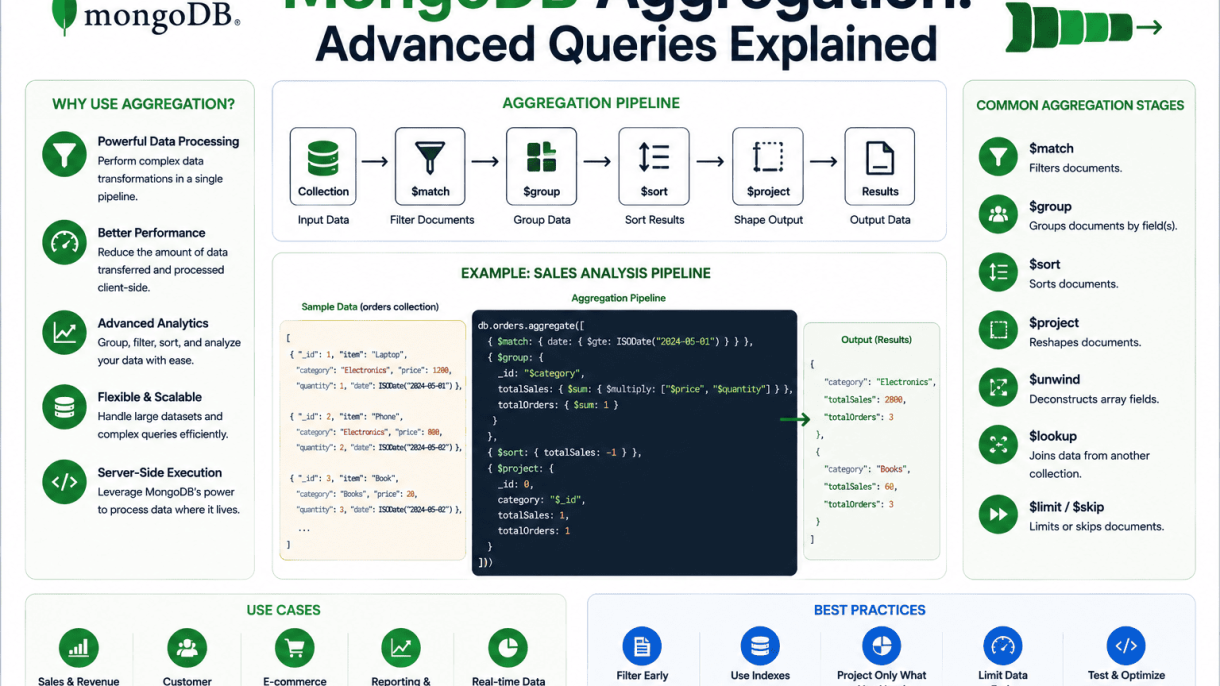
The MongoDB aggregation pipeline is a powerful, flexible framework for processing data records and returning computed results. Unlike basic find() operations that retrieve documents based on simple filters, the aggregation pipeline enables multi-stage transformations—filtering, grouping, sorting, reshaping, and computing—all within a single, efficient pipeline. It is designed for complex analytics, such as calculating averages across categories, joining data from multiple collections, or generating time-series summaries. By passing documents through a sequence of stages, each stage transforms the data before passing it to the next, the pipeline provides a declarative yet expressive way to perform advanced data processing that would otherwise require multiple queries or application-level logic.
What Is the Aggregation Pipeline and How It Works
The aggregation pipeline is a series of stages, each defined by a specific operator. Documents flow through these stages sequentially, and each stage can modify, filter, or aggregate the documents. Common stages include $match (filtering), $group (grouping and computing), $sort (ordering), $project (reshaping fields), $unwind (deconstructing arrays), and $lookup (joining collections). The pipeline processes data in memory or using indexes where possible, with each stage operating on the output of the previous one. For example, a pipeline might first $match documents from the last month, then $group by product category to calculate total sales, then $sort by sales descending. This modularity allows developers to build complex queries step by step, making the logic transparent and maintainable.
Key Differences Between Aggregation and Find Queries
While find() queries are ideal for simple retrieval, aggregation queries offer distinct advantages for advanced data processing. The table below summarizes the main differences:
| Aspect | Find Queries | Aggregation Pipeline |
|---|---|---|
| Purpose | Retrieve documents matching criteria | Transform, compute, and aggregate data |
| Stages | Single filter (query) + optional projection | Multiple stages (filter, group, sort, etc.) |
| Computation | Limited to field selection and simple sorting | Supports sum, average, count, and custom expressions |
| Joins | Not supported natively | Supported via $lookup |
| Performance | Index-optimized for simple queries | Index-optimized at early stages; memory-intensive later |
Aggregation queries are also more expressive, allowing you to reshape documents, compute derived fields, and handle arrays in ways that find() cannot. However, they may consume more memory and CPU, so they are best reserved for cases where basic queries fall short.
When to Use Aggregation for Advanced Data Processing
You should reach for the aggregation pipeline when your data processing needs go beyond simple retrieval. Typical use cases include:
- Analytics and reporting: Calculating totals, averages, or percentiles across groups, such as monthly revenue per region.
- Data transformation: Reshaping nested documents or arrays into flat structures for export or further processing.
- Joining collections: Combining data from multiple collections (e.g., orders and customers) without application-level joins.
- Time-series analysis: Bucketing data by time intervals (e.g., hourly, daily) to detect trends or anomalies.
- Complex filtering and sorting: Applying multiple conditions, including computed fields, that are cumbersome with
find().
In summary, the aggregation pipeline is indispensable for any application that requires real-time data analysis, dynamic report generation, or ETL-like operations directly within MongoDB. Its stage-based architecture makes complex queries readable and maintainable, while its performance optimizations (like early filtering) ensure efficiency. By mastering the pipeline, you unlock MongoDB’s full potential for advanced data processing.
Core Pipeline Stages and Their Functions
The MongoDB aggregation pipeline processes documents through a sequence of stages, each transforming the data in a specific way. Understanding the core stages—$match, $group, $sort, $project, and $addFields—is essential for building efficient and expressive queries. These stages form the backbone of most aggregation workflows, allowing you to filter, sort, group, and reshape data with precision.
Filtering Data with $match and $sort
The $match stage filters documents based on specified conditions, similar to the find() method. It should be placed early in the pipeline to reduce the number of documents passed to subsequent stages, improving performance. The $sort stage reorders documents by one or more fields in ascending (1) or descending (-1) order. When used together, $match first narrows the dataset, then $sort organizes the results.
Practical example: Retrieve orders from the last 30 days, sorted by total descending.
db.orders.aggregate([
  { $match: { orderDate: { $gte: new Date(Date.now() - 30 * 24 * 60 * 60 * 1000) } } },
  { $sort: { total: -1 } }
])
Key considerations for $match and $sort:
- Use indexes on fields referenced in
$matchand$sortto speed up queries. $matchaccepts all standard query operators ($gt,$in,$regex, etc.).$sortcan handle multiple fields; the order of fields determines the sorting priority.- Place
$matchbefore$sortwhenever possible to reduce the number of documents to sort.
Grouping and Aggregating with $group
The $group stage groups documents by a specified expression, often a field value, and computes aggregate values for each group. It is analogous to SQL’s GROUP BY clause. You must specify an _id field that defines the grouping key, and then use accumulator operators like $sum, $avg, $min, $max, and $push to perform calculations on grouped data.
Example: Calculate total sales and average order value per product category.
db.orders.aggregate([
  { $group: {
    _id: "$category",
    totalSales: { $sum: "$total" },
    avgOrderValue: { $avg: "$total" },
    orderCount: { $sum: 1 }
  } }
])
Common accumulator operators and their uses:
| Operator | Purpose | Example Output |
|---|---|---|
$sum |
Adds numeric values | Sum of all totals in a group |
$avg |
Calculates average | Mean order value |
$min |
Finds minimum value | Cheapest product price |
$max |
Finds maximum value | Most expensive item |
$push |
Creates an array of values | List of product names per category |
Note: $group outputs one document per unique group key, which can drastically reduce document count.
Shaping Output with $project and $addFields
The $project stage reshapes each document by including, excluding, or computing new fields. Use 1 to include a field, 0 to exclude it, or expressions to create derived fields. The $addFields stage adds new fields to documents without affecting existing fields, making it ideal for incremental transformations.
Example with $project: Include only customer name and order total, and compute a discounted price.
db.orders.aggregate([
  { $project: {
    customerName: 1,
    total: 1,
    discountedPrice: { $multiply: ["$total", 0.9] },
    _id: 0
  } }
])
Example with $addFields: Add a full name field by concatenating first and last names.
db.customers.aggregate([
  { $addFields: {
    fullName: { $concat: ["$firstName", " ", "$lastName"] }
  } }
])
Best practices for shaping output:
- Use
$projectto reduce document size early in the pipeline, especially when passing to stages that process many fields. $addFieldsis preferable when you want to preserve all original fields and add computed ones.- Both stages support expressions using operators like
$cond,$ifNull, and arithmetic operators. - Remember that
$projectcan only exclude fields if you explicitly include others; the default is to include all fields unless specified.
Advanced Grouping and Accumulators
In MongoDB aggregation pipelines, the $group stage transforms documents into aggregated results by grouping them by a specified key expression. While basic grouping returns simple counts, advanced usage leverages accumulator operators to compute metrics, collect values, and perform multi-level aggregation. These operators—such as $sum, $avg, $first, $last, $push, and $addToSet—enable precise control over how grouped data is summarized. This section explores each operator’s behavior, demonstrates multi-level grouping, and provides practical examples for real-world queries.
Using $sum, $avg, and $count for Metrics
The $sum and $avg operators compute numeric aggregates across grouped documents. $sum returns the total of numeric field values or increments by 1 for each document if given a constant (e.g., { $sum: 1 }). $avg calculates the arithmetic mean of values, ignoring non-numeric entries. The $count operator (introduced in MongoDB 5.0) provides a shorthand for counting documents per group, equivalent to { $sum: 1 } but with clearer semantics.
Example: For an orders collection, group by status and compute total amount, average amount, and order count:
db.orders.aggregate([
  { $group: {
    _id: "$status",
    totalAmount: { $sum: "$amount" },
    avgAmount: { $avg: "$amount" },
    orderCount: { $count: {} }
  }}
])
This returns documents like { _id: "shipped", totalAmount: 15000, avgAmount: 250, orderCount: 60 }. Use $sum for running totals, $avg for performance benchmarks, and $count for straightforward grouping tallies.
Collecting Values with $push and $addToSet
$push returns an array of all values encountered for a field within each group, preserving duplicates and order of insertion. $addToSet returns an array of unique values, eliminating duplicates but not guaranteeing order. Both are useful for generating lists of related items, such as product names per category or tags per user.
Example: Group by category and collect all product names (with duplicates) and unique tags:
db.products.aggregate([
  { $group: {
    _id: "$category",
    allNames: { $push: "$name" },
    uniqueTags: { $addToSet: "$tags" }
  }}
])
$push is ideal for audit logs or ordered sequences, while $addToSet is efficient for deduplicated lists, such as distinct customer IDs per region. Note that large arrays can impact performance; use $slice or $limit in later stages if needed.
Implementing Multi-Level Grouping with Nested $group
Multi-level grouping uses successive $group stages to aggregate data at increasing levels of granularity. The first stage groups by a detailed key (e.g., city), and the second stage groups those results by a broader key (e.g., region). This pattern is essential for hierarchical rollups, such as sales by city then by country.
Example: First, group sales by city to compute city totals; then group by region to sum those totals:
db.sales.aggregate([
  { $group: {
    _id: { city: "$city", region: "$region" },
    cityTotal: { $sum: "$amount" }
  }},
  { $group: {
    _id: "$_id.region",
    regionTotal: { $sum: "$cityTotal" },
    cities: { $push: { city: "$_id.city", total: "$cityTotal" } }
  }}
])
This yields region-level summaries with embedded city details. For custom accumulation logic, combine $group with $project or $addFields to reshape data between stages. The following table compares key accumulator operators for quick reference:
| Operator | Return Type | Duplicate Handling | Order Preserved | Use Case |
|---|---|---|---|---|
$sum |
Number | N/A (numeric aggregate) | N/A | Totals, counts |
$avg |
Number | N/A (numeric aggregate) | N/A | Mean values |
$push |
Array | Includes duplicates | Yes | Ordered lists, logs |
$addToSet |
Array | Removes duplicates | No | Unique value collections |
$first |
Any | N/A (single value) | Based on sort order | First document per group |
$last |
Any | N/A (single value) | Based on sort order | Last document per group |
Mastering these operators allows you to build sophisticated aggregation pipelines that answer complex business questions with precision and efficiency.
Array Expressions and Unwinding
When working with MongoDB documents that contain arrays, advanced aggregation queries often require manipulating these nested structures to extract meaningful insights. The aggregation pipeline provides several powerful operators—$unwind, $filter, $slice, and $arrayElemAt—that allow you to flatten, filter, slice, or directly access array elements. These techniques are essential for transforming array data into a format suitable for grouping, sorting, or further analysis downstream. Understanding how each operator behaves and its impact on document cardinality and memory usage is critical for building efficient pipelines.
Flattening Arrays with $unwind and Its Impacts
The $unwind operator deconstructs an array field from each input document, outputting one document per array element. This effectively flattens nested data, enabling operations like grouping or joining across array items. However, $unwind can dramatically increase the number of documents in the pipeline, which may affect performance and memory consumption. Consider a collection of orders, each containing an array of products:
db.orders.aggregate([
  { $unwind: "$items" },
  { $group: { _id: "$items.category", totalSales: { $sum: "$items.price" } } }
])
This pipeline unwinds the items array, then groups by category. Key impacts of $unwind include:
- Cardinality explosion: A single document with 100 array elements generates 100 documents, increasing processing time and memory.
- Preserving null or empty arrays: By default, documents with missing, null, or empty arrays are discarded. Use
preserveNullAndEmptyArrays: trueto retain them. - Index usage:
$unwindprevents index use after it runs, so place it late in the pipeline when possible. - Memory limits: For large arrays, consider using
$unwindwith$limitearly to reduce document count.
Filtering and Slicing Arrays with $filter and $slice
Instead of unwinding entire arrays, you can use $filter to select specific elements based on a condition, or $slice to extract a contiguous subset. These operators keep the array structure intact, reducing document proliferation. $filter is ideal for removing unwanted items before further processing:
db.inventory.aggregate([
  {
    $project: {
      highValueItems: {
        $filter: {
          input: "$items",
          as: "item",
          cond: { $gte: ["$$item.price", 100] }
        }
      }
    }
  }
])
This returns only items with a price of 100 or more. $slice is useful for paginating array content or sampling a fixed number of elements:
$slice: ["$array", 5]returns the first 5 elements.$slice: ["$array", -3]returns the last 3 elements.$slice: ["$array", 2, 4]returns 4 elements starting from index 2.
Both operators are non-blocking and can be combined with $unwind for more targeted flattening, reducing unnecessary document duplication.
Accessing Array Elements with $arrayElemAt
The $arrayElemAt operator retrieves a single element from an array by its index position, with zero-based indexing. It is lightweight and does not increase document count, making it perfect for extracting specific values like the first or last element. For example, to get the most recent order item:
db.orders.aggregate([
  { $addFields: { firstItem: { $arrayElemAt: ["$items", 0] } } }
])
Negative indices access elements from the end of the array: -1 returns the last element. This operator is particularly useful when combined with $sort to retrieve top or bottom array entries without unwinding. Common use cases include:
- Extracting the highest-scoring review from a product.
- Getting the latest transaction from a user’s history.
- Pulling a specific metadata field stored at a known index.
By mastering these array expressions, you can build aggregation pipelines that handle complex nested data efficiently, balancing readability and performance.
Date, String, and Conditional Operations
In MongoDB aggregation pipelines, transforming and conditionally computing fields is essential for preparing data for analysis or reporting. This section explores three critical categories of operations: date formatting and conversion, string manipulation, and conditional logic. Mastering these techniques allows you to reshape documents dynamically, handle missing or irregular data, and create computed fields that drive meaningful insights. Each operation integrates seamlessly into pipeline stages like $project, $addFields, or $group, enabling precise control over output.
Formatting and Manipulating Dates with $dateToString
The $dateToString operator converts a date object into a string formatted according to a specified pattern. This is invaluable when you need dates in human-readable formats or for grouping by date parts like year, month, or day. The operator accepts a date field and a format string using format specifiers (e.g., %Y for year, %m for month, %d for day). You can also include a timezone option to adjust for local time.
Common format specifiers include:
%Y– four-digit year (e.g., 2025)%m– two-digit month (01–12)%d– two-digit day of month (01–31)%H– two-digit hour (00–23)%M– two-digit minute (00–59)%S– two-digit second (00–59)
Example usage within a $project stage:
{ $project: { formattedDate: { $dateToString: { format: "%Y-%m-%d", date: "$createdAt" } } } }
For converting strings back to dates, use $toDate. This operator accepts a string field and returns a date object, enabling date arithmetic or further formatting downstream. For instance, { $toDate: "$dateString" } converts a valid ISO date string into a BSON date.
String Operations: $concat, $toLower, and $substr
String transformations are common when cleaning or combining text fields. $concat concatenates two or more strings, including field values or literals. It handles missing fields gracefully by returning null if any referenced field is absent. Example:
{ $concat: ["$firstName", " ", "$lastName"] }
$toLower converts a string to lowercase, useful for case-insensitive comparisons or uniform output. Its counterpart, $toUpper, works similarly. For extracting substrings, $substr (or $substrCP for Unicode support) takes a string, a start index (0-based), and a length. Example:
{ $substr: ["$email", 0, 5] } // first 5 characters
These operators are often combined. For instance, to create a lowercase, truncated version of a name field:
{ $toLower: { $substr: ["$fullName", 0, 10] } }
A practical table of string operators:
| Operator | Purpose | Example |
|---|---|---|
$concat |
Join strings | { $concat: ["$a", "-", "$b"] } |
$toLower |
Convert to lowercase | { $toLower: "$field" } |
$substr |
Extract substring | { $substr: ["$field", 0, 3] } |
Conditional Logic with $cond and $switch
Conditional operators allow pipelines to evaluate expressions and return different values based on boolean conditions. $cond is the ternary operator: it takes three arguments—a condition, a value if true, and a value if false. Conditions can involve comparison operators like $gte, $eq, or logical operators $and, $or. Example:
{ $cond: { if: { $gte: ["$age", 18] }, then: "Adult", else: "Minor" } }
For multiple conditions, $switch provides a case-based structure. It accepts an array of case objects with a case expression and a then value, plus an optional default. This is cleaner than nested $cond statements. Example:
{
  $switch: {
    branches: [
      { case: { $lt: ["$score", 60] }, then: "Fail" },
      { case: { $lt: ["$score", 80] }, then: "Pass" },
      { case: { $gte: ["$score", 80] }, then: "Excellent" }
    ],
    default: "Unknown"
  }
}
These operators are powerful in $project, $addFields, or $group stages for creating computed fields based on business rules. For example, you might conditionally assign a discount rate or categorize products by price range. Both $cond and $switch can reference any field or computed expression, making them essential for dynamic pipelines.
MongoDB Aggregation: Advanced Queries Explained
The aggregation framework in MongoDB provides powerful tools for combining data across collections. Two of the most versatile stages for this purpose are $lookup and $graphLookup. $lookup performs a left outer join between collections, while $graphLookup enables recursive graph traversals, such as finding hierarchical relationships like organizational charts or social networks. Understanding their syntax, performance implications, and appropriate use cases is essential for building efficient, scalable queries.
Basic $lookup for Cross-Collection Joins
The simplest form of $lookup joins two collections on a local field and a foreign field. It adds an array field to each document containing the matching documents from the foreign collection. The basic syntax is:
db.orders.aggregate([
  {
    $lookup: {
      from: "customers",
      localField: "customerId",
      foreignField: "_id",
      as: "customerInfo"
    }
  }
])
In this example, each order document gains a customerInfo array containing the matching customer document. If no match exists, the array is empty, mimicking a left outer join. Key considerations include:
- Index usage: Index the foreign field (
_idin the example) to speed up lookups. Without an index, MongoDB scans the entire foreign collection. - Data size: The resulting array can become large if many documents match. Use
$unwindor limit fields with a pipeline to reduce memory. - Collection limit: Basic
$lookuponly supports equality matches on a single field. For complex conditions, use the pipeline syntax.
Complex Join Conditions with Pipeline Syntax
When you need more than a simple equality join—such as joining on multiple fields, applying filters, or performing calculations—use the pipeline variant of $lookup. This syntax allows you to define a sub-pipeline that runs on the foreign collection, with access to the local document via the let variable. For example, to join orders with customers and only include customers who have an active status:
db.orders.aggregate([
  {
    $lookup: {
      from: "customers",
      let: { custId: "$customerId", minOrders: 5 },
      pipeline: [
        { $match: { $expr: { $and: [
          { $eq: ["$_id", "$$custId"] },
          { $gte: ["$orderCount", "$$minOrders"] }
        ] } } },
        { $project: { name: 1, email: 1 } }
      ],
      as: "activeCustomers"
    }
  }
])
This approach offers flexibility but introduces performance trade-offs:
| Aspect | Basic $lookup | Pipeline $lookup |
|---|---|---|
| Join condition | Single equality | Any expression |
| Index support | Direct foreign field index | Index on fields used in $match |
| Memory usage | Returns entire matching documents | Can project and filter early |
| Performance | Simple, fast for small datasets | More overhead per document |
Always index the fields referenced in the pipeline’s $match stage to avoid collection scans.
Recursive Queries Using $graphLookup
$graphLookup performs a recursive traversal on a collection, following edges defined by a connectFromField and connectToField. It is ideal for hierarchical data like employee-manager relationships or category trees. The stage accumulates results into an array, with optional controls for depth and deduplication. A practical example finds all subordinates of a manager:
db.employees.aggregate([
  { $match: { name: "Alice" } },
  {
    $graphLookup: {
      from: "employees",
      startWith: "$_id",
      connectFromField: "_id",
      connectToField: "managerId",
      as: "subordinates",
      maxDepth: 5,
      depthField: "depth"
    }
  }
])
This returns Alice’s document with a subordinates array containing all employees who report to her, directly or indirectly, up to five levels deep. Performance considerations include:
- Index on connectToField: Index
managerIdto accelerate each hop. - Depth limit: Always set
maxDepthto prevent infinite loops in cyclic data. - Memory: Results are held in memory; large traversals may exceed the 100 MB limit. Use
allowDiskUse: trueif needed. - Unique documents: By default, duplicates are removed. Use
restrictSearchWithMatchto filter traversed nodes.
When used correctly, $graphLookup elegantly solves problems that would otherwise require multiple queries or external code.
MongoDB Aggregation: Advanced Queries Explained – Windowing and Rank Functions with $setWindowFields
Window functions, long a staple of SQL databases, bring powerful analytical capabilities to MongoDB through the $setWindowFields stage. Introduced in MongoDB 5.0, this operator allows you to perform calculations across a set of documents related to the current document—without collapsing them into a single output. By defining a partition and sort order, you can compute ranks, row numbers, cumulative sums, and moving averages directly within an aggregation pipeline. This section explains how to harness these functions for advanced queries, focusing on $rank, $denseRank, $rowNumber, and cumulative aggregations over sorted partitions.
Understanding Window Partitions and Sort Order
Before applying window functions, you must define the window’s structure using two key components: partition and sort order. A partition divides the collection into groups (similar to $group), while the sort order determines the sequence of documents within each partition. The syntax for $setWindowFields includes:
- partitionBy: Specifies the field(s) to group documents. If omitted, the entire result set is treated as a single partition.
- sortBy: Defines the order of documents within each partition (ascending or descending).
- output: Assigns window function results to new fields.
For example, consider a sales collection with documents containing region, salesperson, and amount. To rank sales within each region by amount descending, you would partition by region and sort by amount descending. The sort order is critical because functions like $rank rely on it to assign positions.
| Property | Purpose | Example |
|---|---|---|
partitionBy |
Groups documents into independent windows | region: "$region" |
sortBy |
Orders documents within each partition | amount: -1 |
output |
Defines new fields with window function results | rank: { $rank: {} } |
Computing Ranks and Row Numbers
MongoDB provides three primary ranking functions: $rank, $denseRank, and $rowNumber. Each behaves differently when ties occur in the sort order.
- $rank: Assigns a unique rank to each document, with gaps for ties. For example, if two documents tie for first place, both receive rank 1, and the next document receives rank 3.
- $denseRank: Similar to
$rankbut without gaps. Ties still share the same rank, but the next distinct value receives the immediately following integer (e.g., 1, 1, 2). - $rowNumber: Assigns a unique, sequential integer to each document within a partition, ignoring ties. Every document gets a different number based on its position in the sort order.
To compute these, use the following syntax within the output object:
{
  $setWindowFields: {
    partitionBy: "$region",
    sortBy: { amount: -1 },
    output: {
      rank: { $rank: {} },
      denseRank: { $denseRank: {} },
      rowNum: { $rowNumber: {} }
    }
  }
}
These functions are invaluable for leaderboards, top-N queries, and identifying document positions within groups. For instance, you can filter documents where rank <= 3 to get the top three sales per region.
Cumulative and Moving Aggregations
Beyond ranking, $setWindowFields supports cumulative and moving aggregations using functions like $sum, $avg, $min, and $max with window bounds. You specify the window’s range using documents or range options to control which documents are included in the calculation relative to the current document.
- Cumulative sum: Use
$sumwith a window that starts at"unbounded"and ends at"current". This adds all values from the beginning of the partition up to the current document. - Moving average: Define a window of fixed size, such as the last three documents, using
documents: [-2, 0](two preceding and the current).
Example for cumulative sum per region, ordered by date:
{
  $setWindowFields: {
    partitionBy: "$region",
    sortBy: { date: 1 },
    output: {
      cumulativeAmount: {
        $sum: "$amount",
        window: { documents: ["unbounded", "current"] }
      }
    }
  }
}
For a 3-day moving average of sales:
{
  $setWindowFields: {
    partitionBy: "$region",
    sortBy: { date: 1 },
    output: {
      movingAvg: {
        $avg: "$amount",
        window: { documents: [-2, 0] }
      }
    }
  }
}
These aggregations enable trend analysis, running totals, and smoothing of noisy data directly within the aggregation pipeline, eliminating the need for client-side post-processing.
Performance Optimization for Aggregation Pipelines
Optimizing MongoDB aggregation pipelines is critical for maintaining responsive applications as data volume grows. Without careful tuning, even well-structured pipelines can degrade into costly full-collection scans. The primary levers for performance include strategic index use, early-stage filtering, minimizing stage complexity, and leveraging MongoDB’s diagnostic tools. Below, we explore specific techniques that yield measurable improvements.
Leveraging Indexes with $match and $sort
Indexes are the foundation of fast aggregation performance. The $match and $sort stages are the only stages that can directly leverage indexes. To maximize benefit:
- Place
$matchas the first stage in the pipeline to filter documents early and reduce the number of documents flowing to subsequent stages. - Ensure the
$matchpredicate uses an indexed field or a compound index that matches the query pattern. - When a
$sortimmediately follows a$matchon the same index key, MongoDB can often avoid an in-memory sort by reading the index in order. - For
$groupor$bucketstages that require sorted input, a preceding$sorton an indexed field can be highly efficient.
For example, a pipeline filtering by status: "active" and sorting by createdAt should have a compound index on {status: 1, createdAt: 1}. This allows both stages to use the index without additional sorting overhead.
Reducing Pipeline Stages and Document Size
Every stage in a pipeline adds processing time. Minimizing the number of stages and the size of documents passed between them directly reduces resource consumption:
- Early filtering: Use
$matchand$limitas early as possible. A$limitafter$matchcan stop scanning once enough documents are found. - Projection: Use
$projector$addFieldsto discard unnecessary fields early. This reduces memory and network overhead, especially in sharded clusters. - Avoid unnecessary stages: Combine
$groupand$sortwhen possible, or replace$unwind+$groupwith$reduceor$addToSetif the goal is aggregation. - Document size: Keep documents small by using
$projectto exclude large fields (e.g., images, logs) until needed. Use$sliceor$filteron arrays to limit their size.
The following table compares common stage combinations and their relative performance impact:
| Pipeline Pattern | Document Processing | Memory Usage | Recommended Use Case |
|---|---|---|---|
$match → $group → $sort |
Moderate | Low to moderate | Filtered grouping with sorted output |
$unwind → $group → $sort |
High | High | Array expansion with aggregation |
$match → $project → $limit |
Low | Low | Early projection and pagination |
$sort → $group (no index) |
Very high | Very high | Avoid; always use indexed sort |
Analyzing Performance with explain() and $hint
MongoDB provides two essential tools for diagnosing and optimizing pipeline performance: explain() and $hint.
Using explain("executionStats"): This method returns detailed metrics about how the pipeline executed, including:
- Number of documents scanned vs. returned
- Index usage per stage
- Execution time and memory consumption
- Whether an in-memory sort was performed
Run explain("executionStats") on your pipeline. If you see totalDocsExamined far exceeding nReturned, you need better index coverage or earlier filtering. A high inMemorySort value indicates a missing or suboptimal sort index.
Using $hint: In rare cases, the query planner may choose a suboptimal index. The $hint stage forces the use of a specific index. For example:
db.collection.aggregate([
  { $match: { status: "active" } },
  { $sort: { createdAt: 1 } },
  { $group: { _id: "$category", count: { $sum: 1 } } }
]).hint({ status: 1, createdAt: 1 })
Use $hint only after verifying with explain() that the chosen index is indeed more efficient. Overusing or misusing $hint can degrade performance when data distribution changes. Always test with representative data volumes.
Real-World Use Cases and Examples
MongoDB’s aggregation pipeline transforms raw collections into actionable insights across diverse business domains. By chaining stages such as $match, $group, and $project, developers can efficiently handle operations that would otherwise require multiple queries or external processing. Below are three practical scenarios demonstrating how advanced aggregations solve real problems in sales reporting, user analytics, and data preparation.
Building a Sales Dashboard with Monthly Aggregations
A retail company needs a dashboard showing monthly sales totals, average order values, and top product categories. The aggregation pipeline processes a orders collection where each document contains an orderDate, totalAmount, and items array. The solution uses $unwind to flatten the items array, $group by year-month and category, then computes sums and averages.
Example aggregation command:
db.orders.aggregate([
  { $match: { status: "completed" } },
  { $unwind: "$items" },
  { $group: {
      _id: {
        year: { $year: "$orderDate" },
        month: { $month: "$orderDate" },
        category: "$items.category"
      },
      totalSales: { $sum: "$items.price" },
      orderCount: { $sum: 1 }
  }},
  { $sort: { "_id.year": 1, "_id.month": 1 } },
  { $project: {
      _id: 0,
      period: {
        $concat: [
          { $toString: "$_id.year" },
          "-",
          { $toString: "$_id.month" }
        ]
      },
      category: "$_id.category",
      totalSales: 1,
      averageOrderValue: { $divide: ["$totalSales", "$orderCount"] }
  }}
])
This pipeline outputs clean monthly aggregates that feed directly into a dashboard visualization, avoiding heavy application-side computation.
User Activity Analysis with Sessionization
For a SaaS platform, analyzing user sessions from raw event logs requires grouping consecutive actions into meaningful sessions. The events collection stores each user action with a userId and timestamp. The pipeline uses $sort to order events chronologically, then $group with $push to collect events per user. Session boundaries are defined by a 30-minute inactivity gap.
Key stages include:
$sort: Order events byuserIdandtimestampascending.$group: Collect all events per user into an array.$function(or$reduce): Iterate through the array to split into sessions where the gap between consecutive timestamps exceeds 30 minutes.$unwind: Expand each session into its own document for further analysis.
The result provides session durations, page sequences, and drop-off points, enabling product teams to optimize user flows and identify engagement trends.
Data Cleaning and Enrichment for ETL Pipelines
ETL processes often ingest messy data from external sources. MongoDB aggregation can clean and enrich records before loading into a data warehouse. Consider a raw_customers collection with inconsistent fields, missing values, and unstandardized addresses. The pipeline performs multiple transformations in a single pass.
Common operations include:
$addFields: Create standardized fields (e.g., normalize phone numbers to E.164 format).$lookup: Enrich records by joining with a reference collection (e.g., adding region from a zip code table).$project: Select only clean, mapped fields, dropping raw or sensitive data.$merge: Output the cleaned documents into a newcustomers_cleancollection, optionally upserting by a unique key.
Example snippet for address standardization:
{ $addFields: {
    normalized_state: { $toUpper: { $trim: { input: "$state" } } },
    zip5: { $substr: ["$zip", 0, 5] }
}},
{ $lookup: {
    from: "zip_codes",
    localField: "zip5",
    foreignField: "code",
    as: "location"
}},
{ $unwind: { path: "$location", preserveNullAndEmptyArrays: true } },
{ $project: {
    raw_fields: 0,
    _id: 0,
    customerId: 1,
    fullName: { $concat: ["$firstName", " ", "$lastName"] },
    city: "$location.city",
    state: "$normalized_state",
    region: "$location.region"
}}
This approach reduces ETL complexity by offloading data quality rules directly to MongoDB, ensuring only clean, enriched records reach downstream systems.
Common Pitfalls and Best Practices
Mastering MongoDB aggregation pipelines requires not only understanding syntax but also anticipating common pitfalls that degrade performance and maintainability. Even experienced developers can encounter memory limits, inefficient joins, or pipelines that become unreadable labyrinths. By recognizing these traps and adopting best practices, you can build pipelines that are both performant and easy to evolve.
Managing Memory and Stage Limits
MongoDB enforces a default memory limit of 100 MB per pipeline stage. When stages like $group, $sort, or $bucket exceed this threshold, the operation may fail with an error. To avoid this, consider these strategies:
- Use
allowDiskUse(true): Enable this option to allow stages that exceed memory to write temporary files to disk. Be aware that this can slow performance. - Filter early with
$match: Reduce the document set before memory-intensive stages. For example, place$matchbefore$groupto limit input. - Limit document size: Use
$projectto exclude unnecessary fields before grouping or sorting. - Monitor with
$explain: Use the explain plan to identify stages consuming excessive memory.
| Stage | Memory Risk | Mitigation |
|---|---|---|
$group |
High with many groups | Reduce grouping keys, use allowDiskUse |
$sort |
High with large datasets | Sort after $match, use indexes |
$bucket |
Medium | Limit boundaries, pre-filter |
$facet |
High (multiple sub-pipelines) | Use separate pipelines when possible |
Avoiding Expensive Operations in Early Stages
Placing costly operations like $unwind, $lookup, or $graphLookup early in the pipeline can explode the document count and slow down subsequent stages. Key practices include:
- Defer
$unwind: Only unwind arrays after you have filtered documents. For example, if you need to count array elements, use$sizein$addFieldsinstead of unwinding. - Optimize
$lookup: Always add a$matchstage before$lookupto reduce the source collection size. Use indexes on the foreign field and consider using$lookupwith a pipeline for more targeted joins. - Avoid
$unwind–$grouppatterns: These often indicate a need for$reduceor$mapinstead. For instance, instead of unwinding and regrouping to sum array elements, use$sumwith$reduce. - Use
$samplecarefully: Random sampling early can be useful for prototyping but should be removed in production pipelines.
Writing Modular and Testable Aggregation Pipelines
Long pipelines become difficult to debug and maintain. Adopt these practices to keep your code clean:
- Break pipelines into named stages: Use comments or separate variables for each stage. In code, assign each stage to a constant like
const matchStage = { $match: { status: "active" } };. - Test stages incrementally: Run each stage independently against a small sample of documents to verify output. Use
db.collection.aggregate([stage1])and check results. - Use aggregation variables: Define variables with
$letor$lookuppipelines to avoid repeating complex expressions. - Document intent: Add comments for non-obvious transformations, especially when using
$reduce,$function, or custom expressions. - Version control pipelines: Store aggregation scripts in files with descriptive names, such as
generate_report_v2.js, to track changes.
By following these guidelines, you can create aggregation pipelines that are not only efficient but also transparent, making future modifications faster and safer.
Frequently Asked Questions
What is the MongoDB aggregation pipeline?
The MongoDB aggregation pipeline is a framework for data processing that allows documents from a collection to pass through a series of stages (e.g., $match, $group, $sort). Each stage transforms the documents, enabling operations like filtering, grouping, sorting, reshaping, and computing aggregations. It is analogous to a Unix pipe, where output of one stage becomes input for the next. The pipeline is highly optimized for performance and can use indexes for early stages like $match and $sort.
How do I use $lookup for joins?
The $lookup stage performs a left outer join with another collection. It adds a new array field to each input document containing matching documents from the 'from' collection. For example: { $lookup: { from: 'orders', localField: '_id', foreignField: 'customer_id', as: 'orders' } }. You can also use a pipeline with $lookup for more complex joins, including conditions, sorting, and limiting. Indexes on the foreignField improve performance.
What are the most common aggregation operators?
Common aggregation operators include $sum, $avg, $min, $max, $count, $first, $last, $push, and $addToSet for accumulation. For array operations, $unwind deconstructs arrays. For grouping, $bucket and $bucketAuto create histogram-like groups. $facet allows multiple pipelines in one stage. $addFields and $project reshape documents. $sortByCount counts distinct values. These operators enable powerful data analysis directly in the database.
How can I optimize the aggregation pipeline?
Optimize by placing $match and $sort stages early to leverage indexes and reduce document volume. Use $project to limit fields early. Avoid $unwind on large arrays if not needed. Use $lookup with indexes on the foreign collection. For large datasets, consider $allowDiskUse for memory-intensive stages. Monitor performance with explain() and analyze stage execution times. Break complex pipelines into smaller, reusable stages.
What is the difference between $group and $bucket?
$group groups documents by a specified key and computes accumulators for each group (e.g., sum, average). It is flexible for arbitrary grouping expressions. $bucket groups documents into specified ranges (buckets) based on a numeric or date field, and optionally computes accumulators per bucket. $bucketAuto automatically determines bucket boundaries. $bucket is ideal for histogram generation and range-based analysis, while $group is for general key-based aggregation.
Can I use aggregation with sharded collections?
Yes, MongoDB supports aggregation on sharded collections. The aggregation pipeline runs in parallel across shards where possible, with merge operations on the primary shard or mongos. Some stages like $out and $merge may have restrictions. For optimal performance, ensure $match and $sort stages use the shard key. The $lookup stage can be expensive on sharded collections; consider denormalization or using $lookup with a pipeline that includes the shard key.
How do I handle large results from aggregation?
For large results, use the aggregation cursor to iterate results in batches instead of loading all into memory. You can also use $out to write results to a new collection, or $merge to merge into an existing collection (with options for handling duplicates). For very large datasets, use $allowDiskUse to enable temporary disk storage. Consider using $limit and $skip for pagination, but be aware of performance implications for large skips.
What are some advanced aggregation techniques?
Advanced techniques include using $facet for multi-faceted search, $graphLookup for recursive queries (e.g., tree structures), $lookup with a pipeline for complex joins, $bucketAuto for automatic histogram generation, $addFields with conditional expressions ($cond, $switch), and $redact for document-level security. You can also use $merge with custom pipelines to update documents incrementally. These techniques enable sophisticated data transformations without leaving the database.
Sources and further reading
- MongoDB Aggregation Pipeline Documentation
- MongoDB $lookup Documentation
- MongoDB $group Aggregation Stage
- MongoDB $bucket Aggregation Stage
- MongoDB $facet Aggregation Stage
- MongoDB $unwind Aggregation Stage
- MongoDB $addFields Aggregation Stage
- MongoDB $project Aggregation Stage
- MongoDB $sort Aggregation Stage
- MongoDB $match Aggregation Stage
Need help with this topic?
Send us your details and we will contact you.