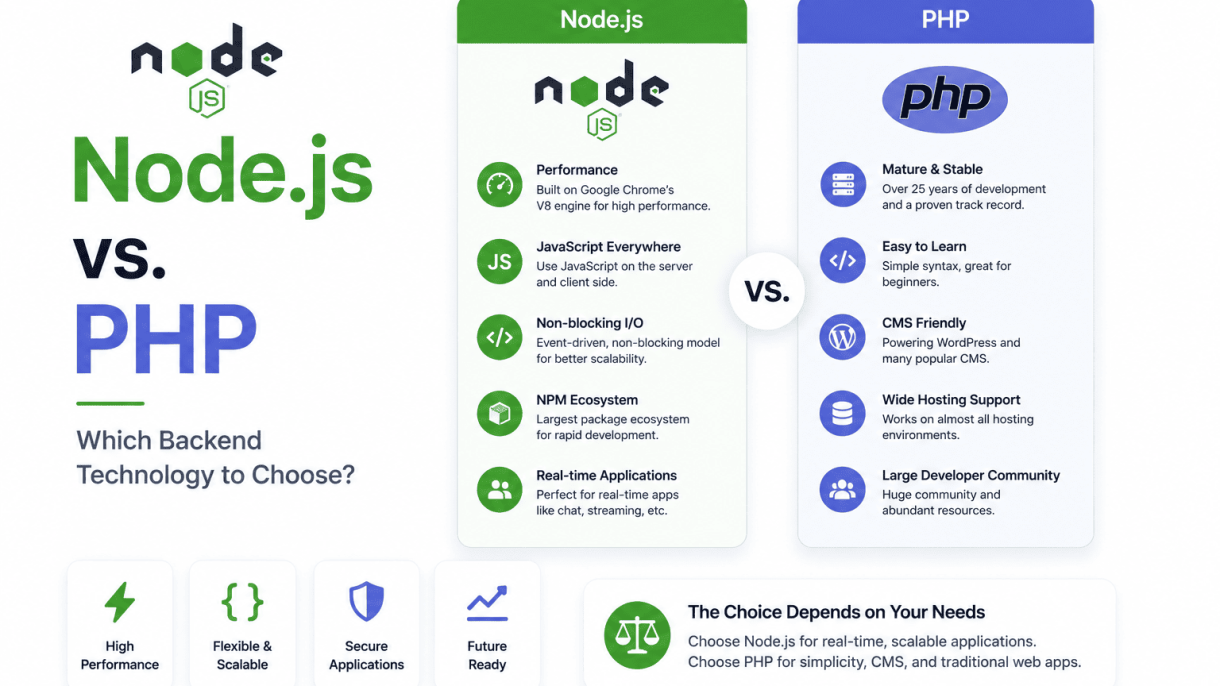

Introduction: The Backend Dilemma in Modern Web Development
The choice between Node.js and PHP represents one of the most consequential decisions in modern backend development. Both technologies power millions of websites and applications, yet they approach the server-side challenge from fundamentally different angles. PHP, born in 1994, emerged as a straightforward scripting language designed to make dynamic web pages accessible to hobbyists and professionals alike. Node.js, arriving in 2009, introduced JavaScript to the server, promising non-blocking, event-driven architecture that could handle thousands of concurrent connections with ease. For developers, CTOs, and project managers, understanding this dichotomy is not merely academic—it directly affects development speed, application performance, team hiring, and long-term maintenance costs.
A Brief History of PHP and Node.js
PHP began as a set of Common Gateway Interface (CGI) binaries created by Rasmus Lerdorf, evolving into a full scripting language by 1997. Its simplicity allowed developers to embed code directly into HTML, making it the dominant force behind early content management systems like WordPress, Drupal, and Joomla. PHP’s philosophy has always prioritized ease of use and rapid deployment, with a vast ecosystem of pre-built solutions. Node.js, developed by Ryan Dahl, was a response to the limitations of traditional web servers that created a new thread for each connection. By leveraging Google’s V8 JavaScript engine, Node.js introduced an event loop that handled I/O operations asynchronously, drastically reducing overhead. This architectural shift made Node.js particularly attractive for real-time applications, APIs, and microservices.
Why Backend Technology Choice Impacts Performance and Scalability
The backend technology you select dictates how your application handles traffic, processes data, and manages resources. PHP traditionally operates with a blocking, synchronous model: each request spawns a new process or thread, which can lead to memory exhaustion under high concurrency. Modern PHP versions (7.x and 8.x) have improved performance significantly through just-in-time compilation and optimized opcode caching, but the fundamental architecture remains request-synchronous. Node.js, in contrast, uses a single-threaded event loop that delegates I/O tasks to the operating system, allowing it to handle tens of thousands of concurrent connections without proportional increases in memory. This makes Node.js inherently more scalable for I/O-heavy workloads like chat applications, live streaming, or collaborative tools. However, CPU-intensive operations can block the event loop, degrading performance unless handled with worker threads or external services.
Who This Article Is For: Developers, CTOs, and Project Managers
- Developers seeking clarity on which technology aligns with their current skill set and project requirements.
- CTOs and technical leads evaluating long-term maintainability, hiring pipelines, and ecosystem maturity for their teams.
- Project managers who need to understand trade-offs in development speed, deployment complexity, and scalability before making architectural decisions.
Each audience will find actionable insights throughout this comparison, from code examples to deployment considerations. The goal is not to declare a universal winner, but to equip decision-makers with the knowledge to choose based on specific project needs, team expertise, and business goals.
Performance and Execution Speed: Node.js vs. PHP
When evaluating backend technologies, runtime performance and execution speed are critical factors that directly impact user experience and server costs. Node.js and PHP approach these metrics from fundamentally different architectural paradigms, making direct comparisons nuanced. Node.js relies on an event-driven, non-blocking I/O model, while PHP traditionally executes synchronously, though modern versions have introduced significant optimizations to close the gap. Understanding these differences helps developers choose the right tool for specific workloads, from API-heavy applications to content-driven websites.
Node.js Event Loop and Non-Blocking I/O Explained
Node.js operates on a single-threaded event loop that handles all incoming requests asynchronously. When a request triggers an I/O operation—such as reading a file, querying a database, or calling an external API—Node.js does not wait for completion. Instead, it registers a callback and continues processing other requests. Once the I/O operation finishes, the callback is placed into the event queue, and the event loop executes it when the call stack is empty. This non-blocking model allows Node.js to handle thousands of concurrent connections with minimal overhead, as there is no per-request thread creation or context switching. For example, a simple HTTP server using Node.js can serve multiple requests simultaneously without blocking:
const http = require('http');
const server = http.createServer((req, res) => {
  // Simulate a non-blocking file read
  const fs = require('fs');
  fs.readFile('data.txt', 'utf8', (err, data) => {
    if (err) {
      res.writeHead(500);
      res.end('Error');
      return;
    }
    res.writeHead(200, { 'Content-Type': 'text/plain' });
    res.end(data);
  });
});
server.listen(3000);
This code demonstrates how Node.js can process other requests while waiting for the file system. The event loop remains responsive, making Node.js particularly effective for I/O-bound tasks, such as real-time applications, streaming services, and REST APIs with frequent database calls.
PHP’s Synchronous Execution Model with Modern Optimizations (JIT, OPcache)
PHP traditionally follows a synchronous execution model. Each request spawns a new process or thread (depending on the server configuration, such as mod_php for Apache or PHP-FPM for Nginx). The script executes line by line, blocking on I/O operations like database queries or file reads until they complete. This model is simpler to reason about and debug, but historically limited concurrency and throughput under high load. Modern PHP has introduced significant optimizations to mitigate these limitations:
- OPcache: Compiles PHP scripts into opcode and caches them in shared memory, eliminating the need to recompile on every request. This reduces CPU overhead for script parsing and compilation by up to 70%.
- JIT (Just-In-Time) Compilation: Introduced in PHP 8.0, JIT compiles frequently executed code paths into native machine code at runtime. This dramatically speeds up CPU-intensive tasks, such as mathematical computations or image processing, by reducing interpretation overhead.
- PHP-FPM with Process Pooling: Manages a pool of worker processes that can handle multiple requests concurrently, improving throughput compared to traditional CGI-based setups.
Despite these improvements, PHP’s synchronous core still means that a single slow I/O operation blocks the entire process for that request. For high-concurrency I/O scenarios, PHP often relies on additional tools like ReactPHP or Swoole to introduce asynchronous capabilities, though these are not part of the default runtime.
Benchmarking Scenarios: API Requests, File I/O, and Concurrent Users
Real-world benchmarks reveal how each technology performs under common backend tasks. The following table summarizes typical scenarios and observed performance characteristics:
| Scenario | Node.js | PHP (with OPcache + JIT) | Key Insight |
|---|---|---|---|
| API Requests (lightweight JSON) | High throughput, low latency under concurrency | Moderate throughput; latency increases with concurrent users | Node.js excels due to non-blocking I/O; PHP slower under heavy load |
| File I/O (reading/writing large files) | Non-blocking; handles multiple files without blocking | Blocking per request; sequential processing within each process | Node.js significantly faster for concurrent file operations |
| Concurrent Users (1000 simultaneous) | Handles easily with low memory; event loop scales well | Requires more processes; higher memory usage; risk of process exhaustion | Node.js more efficient for high concurrency; PHP needs tuning |
For CPU-bound tasks, PHP with JIT can match or even exceed Node.js performance, especially in scenarios like template rendering or complex data processing. However, for most modern web applications that involve significant I/O—such as database queries, API calls, or file uploads—Node.js typically offers faster execution speed and better resource utilization under load. The choice ultimately depends on whether your application is I/O-heavy or CPU-heavy, and whether you prioritize raw throughput or predictable synchronous execution.
Scalability: Handling Growth with Node.js and PHP
Scalability determines how well a backend technology can accommodate increasing traffic, data volume, and user demands without degrading performance. Node.js and PHP approach growth from fundamentally different architectural perspectives, each with distinct strengths for specific scaling scenarios. Node.js excels at handling concurrent, real-time connections through its event-driven, non-blocking I/O model, while PHP traditionally relies on a process-per-request model that can be scaled horizontally with proper tooling. Understanding these differences is critical for choosing the right technology for high-traffic applications.
Node.js Clustering and Load Balancing for Real-Time Apps
Node.js runs on a single thread by default, but its built-in cluster module enables horizontal scaling by forking multiple worker processes that share the same server port. Each worker handles incoming requests independently, effectively utilizing multi-core CPUs. This is particularly beneficial for real-time applications—such as chat systems, live dashboards, and online gaming—where maintaining persistent connections and low latency is essential. Load balancing across workers can be achieved with a round-robin approach (default on non-Windows systems) or via external tools like NGINX. Additionally, Node.js’s event loop and asynchronous I/O allow a single worker to manage thousands of concurrent connections, making clustering a lightweight yet powerful scaling technique for I/O-bound workloads.
PHP’s Shared-Nothing Architecture with Laravel and Symfony
PHP’s traditional shared-nothing architecture means each request is handled by an isolated process, with no shared memory or state between them. This design simplifies horizontal scaling: you can add more servers behind a load balancer without worrying about inter-process communication or state synchronization. Modern PHP frameworks like Laravel and Symfony enhance this by providing built-in support for queue systems (e.g., Redis, Beanstalkd) and caching layers (e.g., Memcached, Redis) to offload heavy tasks. For example, Laravel Horizon offers a scalable queue management dashboard with auto-scaling workers. However, PHP’s process-per-request model can become resource-intensive under high concurrency, especially for long-lived connections, as each request consumes a full process thread. To mitigate this, PHP-FPM (FastCGI Process Manager) allows dynamic process management, adjusting the number of child processes based on traffic. Despite these optimizations, PHP is generally better suited for CPU-bound or traditional request-response workloads rather than real-time, high-concurrency scenarios.
Cloud and Containerization: Docker, Kubernetes, and Serverless Deployments
Both Node.js and PHP benefit significantly from modern cloud and containerization technologies, which abstract infrastructure complexity and enable elastic scaling. Docker containers encapsulate applications with their dependencies, ensuring consistency across development and production environments. Kubernetes orchestrates these containers, automatically scaling replicas based on CPU or memory metrics, and performing rolling updates with zero downtime. For Node.js, Kubernetes works seamlessly with cluster modules, allowing each pod to run a clustered Node.js application. PHP applications, especially those using Laravel or Symfony, can be containerized with Docker, with separate containers for the web server (e.g., Nginx), PHP-FPM, and the database. Serverless platforms like AWS Lambda or Vercel further simplify scaling by executing code in response to events, with automatic provisioning and billing per execution. Node.js is a natural fit for serverless due to its fast startup times and lightweight runtime, while PHP can also run on serverless via platforms like Bref, though cold starts may be slightly slower. The table below summarizes key scalability aspects:
| Aspect | Node.js | PHP (Laravel/Symfony) |
|---|---|---|
| Concurrency model | Event-driven, non-blocking I/O | Process-per-request (shared-nothing) |
| Horizontal scaling | Built-in clustering, load balancers | Add servers behind reverse proxy (e.g., Nginx) |
| Real-time capabilities | Excellent (WebSockets, SSE) | Limited (requires external services like Pusher) |
| Resource efficiency | Low memory per connection | Higher memory per process |
| Containerization | Docker + Kubernetes (native support) | Docker + Kubernetes (requires PHP-FPM) |
| Serverless readiness | Fast cold starts, widely supported | Cold starts slower, less mature ecosystem |
Choosing between Node.js and PHP for scalability depends on your application’s primary workload: Node.js is ideal for real-time, I/O-intensive, high-concurrency apps, while PHP with modern frameworks offers robust, cost-effective scaling for traditional request-response services, especially when combined with containerization and cloud orchestration.
Development Speed and Ecosystem: Tools and Frameworks
The choice between Node.js and PHP often hinges on developer productivity, which is heavily influenced by the breadth and maturity of each ecosystem’s frameworks, package managers, and tooling. Both have evolved to streamline backend development, but they approach it from different philosophical angles. Below, we break down the key components that shape workflow speed and maintainability.
Node.js Frameworks: Express, NestJS, and Fastify
Node.js offers a spectrum of frameworks, from minimalist to opinionated, allowing teams to select the right level of abstraction. Express remains the most popular, providing a lightweight, unopinionated foundation for building APIs and web applications. Its minimal overhead makes it ideal for microservices and rapid prototyping. For more structure, NestJS uses TypeScript and architectural patterns like modules, decorators, and dependency injection, making it suitable for enterprise-level projects where maintainability is critical. Fastify focuses on performance with low overhead and a robust plugin system, often used in high-throughput scenarios. A practical example of starting a simple Express server:
const express = require('express');
const app = express();
app.get('/', (req, res) => res.send('Hello World'));
app.listen(3000, () => console.log('Server running on port 3000'));
PHP Frameworks: Laravel, Symfony, and CodeIgniter
PHP’s framework landscape is dominated by full-stack, feature-rich solutions. Laravel is the clear leader, offering an expressive syntax, built-in ORM (Eloquent), authentication, and queue management. It prioritizes developer happiness with tools like Artisan CLI and Blade templating. Symfony is a modular, high-performance framework with reusable components, often chosen for complex, long-term projects that require flexibility. CodeIgniter is lightweight and simple, requiring less configuration, making it suitable for shared hosting or smaller applications. Below is a comparison of key framework traits:
| Framework | Type | Key Strength | Best For |
|---|---|---|---|
| Laravel | Full-stack | Rapid development, expressive syntax | CRUD apps, SaaS, content management |
| Symfony | Modular | Extensibility, long-term support | Enterprise, large-scale applications |
| CodeIgniter | Lightweight | Simplicity, low footprint | Shared hosting, small projects |
Package Management: npm vs. Composer and Their Impact on Workflow
Package management is a cornerstone of modern backend development, directly affecting how quickly you can integrate dependencies and manage versions. npm (Node Package Manager) is the default for Node.js, hosting the largest registry of JavaScript packages. Its semantic versioning and package-lock.json ensure reproducible builds, though the sheer volume of packages can introduce dependency bloat. A common workflow command:
npm install express --save
Composer is PHP’s equivalent, focusing on a declarative approach with composer.json and composer.lock. It excels at autoloading and dependency resolution, often resulting in more stable dependency trees compared to npm’s deeper nested structures. For example:
composer require laravel/framework
Key differences in impact on workflow:
- npm: Faster for small projects, but requires careful auditing to avoid vulnerabilities from transitive dependencies.
- Composer: More predictable resolution order, with built-in autoloading that aligns with PHP class naming conventions.
- Workflow integration: npm integrates tightly with JavaScript toolchains (Webpack, Babel), while Composer works seamlessly with PHP-specific tools like PHPUnit and PHP-CS-Fixer.
Ultimately, Node.js frameworks offer flexibility and performance for modern, event-driven applications, while PHP frameworks provide mature, all-in-one solutions for traditional web development. Your choice should align with your team’s expertise and the project’s architectural needs.
Language Syntax and Learning Curve
When comparing Node.js and PHP for beginners, the syntax and learning curve differ significantly due to their underlying languages. PHP was designed specifically for web development, with a straightforward, procedural syntax that allows newcomers to write dynamic pages quickly. Node.js, built on JavaScript, inherits the language’s event-driven, non-blocking architecture, which can present a steeper initial learning curve for those unfamiliar with asynchronous programming. However, JavaScript’s ubiquity in frontend development means many beginners already have exposure to its syntax, potentially easing the transition to Node.js for full-stack work. Community support is strong for both: PHP benefits from decades of web-focused documentation and extensive forums, while Node.js enjoys a vibrant, modern ecosystem with active resources on platforms like GitHub and Stack Overflow.
JavaScript’s Asynchronous Nature vs. PHP’s Procedural Simplicity
JavaScript’s asynchronous nature is a core feature of Node.js, enabling non-blocking I/O operations that handle multiple requests efficiently without waiting for tasks to complete. This is achieved through callbacks, promises, and async/await syntax. For beginners, understanding concepts like the event loop and callback hell can be challenging. In contrast, PHP traditionally follows a procedural, synchronous model where code executes line by line. This linear flow is intuitive for newcomers, as each step completes before the next begins. PHP’s simplicity allows beginners to build functional web pages quickly without grappling with concurrency. However, modern PHP (version 8+) supports asynchronous programming via extensions like Swoole, but its primary strength remains in straightforward, request-response cycles. A comparison of key differences:
- Execution model: Node.js uses an event-driven, non-blocking loop; PHP uses a blocking, synchronous thread per request.
- Error handling: Node.js relies heavily on callbacks and promise chains; PHP uses try-catch blocks and error functions.
- Learning curve: PHP is easier for absolute beginners due to its predictability; Node.js requires understanding of asynchronous patterns.
- Use cases: Node.js excels in real-time apps (e.g., chat, streaming); PHP is ideal for content-driven sites (e.g., CMS, blogs).
TypeScript Integration for Node.js: Pros and Cons
TypeScript, a typed superset of JavaScript, integrates seamlessly with Node.js, offering static type checking and modern features. Pros include improved code maintainability through explicit types, early detection of runtime errors during development, and enhanced IDE support with autocompletion and refactoring tools. This is particularly beneficial for large-scale Node.js projects where code complexity grows. Additionally, TypeScript compiles to standard JavaScript, ensuring compatibility with all Node.js versions. Cons involve an additional learning curve for developers unfamiliar with type systems, increased setup time with configuration files (e.g., tsconfig.json), and slower compilation during development. For beginners, TypeScript can add overhead, but for teams, it reduces bugs and improves collaboration. A summary of pros and cons:
| Pros | Cons |
|---|---|
| Static typing reduces runtime errors | Steeper learning curve for new developers |
| Better tooling and IDE support | Requires compilation step before execution |
| Improves code readability and scalability | Can slow down rapid prototyping |
| Strong community and library types | May introduce unnecessary complexity for small projects |
PHP 8’s Modern Features: Named Arguments, Attributes, and JIT
PHP 8 introduced several modern features that significantly reduce the learning curve and enhance developer experience. Named arguments allow developers to pass arguments to functions in any order by specifying parameter names, improving code readability and reducing errors when functions have many optional parameters. Attributes provide structured metadata for classes, methods, and properties, replacing docblock annotations with native syntax that is easier to parse and maintain. The Just-In-Time (JIT) compiler improves performance for CPU-intensive tasks by compiling PHP code into machine code at runtime, though typical web applications see modest gains. These features modernize PHP without abandoning its procedural roots, making it more approachable for beginners while appealing to seasoned developers. For example:
- Named arguments:
function createUser(name: "John", role: "admin"); - Attributes:
#[Route('/api/users')] public function list() { ... } - JIT: Boosts performance in loops and mathematical operations, but not in I/O-heavy web scenarios.
These additions help PHP remain competitive with Node.js in terms of expressiveness and tooling, while preserving its beginner-friendly syntax.
Use Cases: Where Each Technology Excels
Choosing between Node.js and PHP depends heavily on the specific requirements of your project. Each technology has distinct strengths that make it the superior choice for certain types of applications. Understanding these use cases helps you align your backend architecture with your product goals, development timeline, and team expertise.
Real-Time Applications: Chat, Gaming, and Collaborative Tools with Node.js
Node.js is the clear winner for any application requiring real-time, bidirectional communication. Its event-driven, non-blocking architecture, built on the V8 JavaScript engine, handles thousands of concurrent connections with minimal overhead. This makes it ideal for:
- Chat applications: WebSockets enable instant message delivery without polling.
- Online gaming: Low-latency server updates for multiplayer experiences.
- Collaborative tools: Real-time document editing (like Google Docs) and whiteboarding.
- Live streaming and dashboards: Push updates to clients as data changes.
The Node.js ecosystem provides robust libraries for real-time features. For example, using the ws library, a basic WebSocket server can be set up in just a few lines:
const WebSocket = require('ws');
const wss = new WebSocket.Server({ port: 8080 });

wss.on('connection', function connection(ws) {
  ws.on('message', function incoming(message) {
    console.log('received: %s', message);
    // Broadcast to all clients
    wss.clients.forEach(function each(client) {
      if (client.readyState === WebSocket.OPEN) {
        client.send(message);
      }
    });
  });
});
PHP, by contrast, was designed for request-response cycles and lacks native real-time capabilities. While solutions like Laravel Echo with Pusher or Ratchet exist, they introduce complexity and often require separate server processes, making Node.js the more natural and performant choice for real-time systems.
Content Management Systems and E-Commerce: PHP’s Domain with WordPress and Magento
PHP remains the dominant force for content-driven websites and e-commerce platforms. Its mature ecosystem of content management systems (CMS) and frameworks provides out-of-the-box solutions for rapid development. Key strengths include:
- WordPress: Powers over 40% of all websites. Ideal for blogs, news sites, corporate pages, and simple membership sites. Its vast plugin library and theme system allow non-developers to manage content.
- Magento (Adobe Commerce): A robust e-commerce platform for large-scale online stores. Handles complex product catalogs, multi-currency support, and advanced inventory management.
- Drupal and Joomla: Suited for community portals and enterprise content hubs with complex user permissions.
- Laravel and Symfony: For custom CMS or e-commerce builds requiring tailored business logic.
PHP’s shared-nothing architecture means each request is isolated, simplifying state management in content applications. Its deep integration with MySQL and traditional LAMP/LEMP stacks makes deployment straightforward. For projects where rapid content publishing or out-of-the-box e-commerce is the priority, PHP’s ecosystem offers the fastest path to launch.
Microservices and APIs: Choosing Between Node.js and PHP for REST and GraphQL
Both Node.js and PHP can build effective APIs, but the choice depends on performance characteristics and team expertise. Consider the following comparisons:
| Criterion | Node.js | PHP |
|---|---|---|
| Concurrency handling | Non-blocking I/O; handles many concurrent requests efficiently with a single thread. | Blocking I/O per request; requires multiple processes (e.g., PHP-FPM) for concurrency. |
| API speed | Fast for I/O-bound operations (database queries, external API calls). | Good for CPU-bound operations; slower under heavy concurrent load without caching. |
| GraphQL support | Excellent with Apollo Server and express-graphql; seamless integration with JavaScript frontends. | Good with libraries like Lighthouse (Laravel) or webonyx/graphql-php; requires more setup. |
| Microservices ecosystem | Lightweight frameworks (Express, Fastify, Koa) ideal for small, independent services. | Heavier frameworks (Laravel, Symfony) better suited for monolithic APIs; microservices possible with slim frameworks (Slim, Lumen). |
| Development speed | Rapid prototyping for simple APIs; consistent language across frontend and backend. | Fast for CRUD-heavy APIs with mature ORMs (Eloquent, Doctrine). |
Node.js excels in microservice architectures where services need to handle high throughput and maintain low latency, particularly for I/O-heavy tasks. PHP remains a strong choice for API development when your team is PHP-proficient, the API is primarily CRUD-based, or you need deep integration with a PHP CMS or e-commerce platform. For GraphQL APIs, Node.js offers a smoother developer experience due to shared JavaScript types and tooling, but PHP’s solutions are production-ready for most use cases.
Community, Support, and Job Market Trends
When choosing between Node.js and PHP for a backend project, the strength of the surrounding community, quality of documentation, and current job market demand play critical roles. Both technologies boast massive ecosystems, but they serve different developer demographics and industry niches. Understanding these dynamics helps you align your technology choice with long-term project viability and career growth.
Node.js Community: NPM Ecosystem and Open Source Contributions
The Node.js community is one of the most active and rapidly evolving in software development. Its cornerstone is the npm (Node Package Manager) registry, which hosts over two million packages—the largest package ecosystem of any programming language. This breadth allows developers to quickly integrate libraries for almost any functionality, from authentication to real-time data streaming. The community thrives on open source contributions, with major frameworks like Express.js, Next.js, and Nest.js maintained by thousands of contributors. Documentation is generally thorough, with official Node.js docs being well-structured and complemented by extensive third-party tutorials and Stack Overflow threads. The Node.js Foundation, under the OpenJS Foundation, oversees governance, ensuring regular updates and security patches. However, the sheer volume of packages can lead to dependency bloat and security risks if not managed carefully, requiring developers to vet packages actively.
PHP Community: WordPress Dominance and Enterprise Support
PHP’s community is deeply rooted in web hosting and content management systems, with WordPress powering over 43% of all websites. This dominance provides PHP with a vast, stable user base and a wealth of beginner-friendly documentation, particularly for WordPress-specific development. The PHP community also benefits from strong enterprise support through frameworks like Laravel and Symfony, which offer robust documentation, active forums, and certified training programs. The PHP Documentation Group maintains excellent official docs with user-contributed notes, making it easy to find real-world usage examples. While the community is less focused on bleeding-edge trends compared to Node.js, it excels in providing long-term support for legacy systems and shared hosting environments. The PHP-FIG (Framework Interoperability Group) fosters collaboration across frameworks, promoting coding standards like PSR-4 for autoloading. This ecosystem ensures that PHP remains a reliable choice for businesses requiring consistent, backward-compatible solutions.
Salary Trends and Job Opportunities for Node.js vs. PHP Developers
Job market dynamics reflect the distinct roles each technology plays. Below is a comparison of key metrics based on current industry data:
- Node.js developer roles: Typically higher average salaries due to demand in modern, scalable applications (e.g., microservices, real-time APIs). Median salaries range from $110,000 to $140,000 in the U.S., with strong growth in startups and tech-forward enterprises.
- PHP developer roles: More abundant in total job listings, especially for WordPress maintenance, e-commerce (Magento, WooCommerce), and legacy system support. Median salaries range from $80,000 to $100,000 in the U.S., with stable demand in agencies and small-to-medium businesses.
- Geographic variance: Node.js opportunities concentrate in tech hubs (Silicon Valley, New York, London), while PHP roles are more evenly distributed, including remote-friendly positions for content management projects.
- Skill overlap: Developers proficient in both languages often command higher salaries, especially in full-stack roles where they can handle frontend (Node.js) and backend (PHP) systems.
- Growth trajectory: Node.js shows faster job growth (approximately 15-20% year-over-year), driven by cloud-native and IoT applications. PHP job growth is slower (5-8%) but remains steady due to the vast installed base of WordPress sites.
Ultimately, the choice between Node.js and PHP should factor in your career goals: Node.js offers higher earning potential and cutting-edge projects, while PHP provides broader job availability and easier entry points for web development. Both communities continue to evolve, ensuring long-term support and relevance in the tech landscape.
Security Considerations: Best Practices and Common Pitfalls
Security in backend development is non-negotiable, and both Node.js and PHP offer strong foundations when configured correctly, but each has distinct vulnerabilities that developers must address. Node.js, with its event-driven, non-blocking architecture, often faces risks from unvalidated input and outdated dependencies, while PHP’s long history in web development means its security pitfalls—such as SQL injection and session mismanagement—are well-documented but still common. The following practices and comparisons will help you harden your application regardless of your chosen platform.
Node.js Security: Input Validation, Dependency Audits, and Helmet
Node.js applications are only as secure as their ecosystem and code. The most frequent vulnerabilities arise from improper input handling and third-party dependencies. To mitigate these, follow these actionable steps:
- Input Validation: Always validate and sanitize user input using libraries like
express-validatororjoi. Never trust data from the client—check for type, length, and format before processing. For example, if an API expects a numeric ID, reject non-numeric values immediately. - Dependency Audits: Run
npm auditregularly to identify known vulnerabilities in your packages. Use tools like Snyk or Dependabot for automated monitoring. Outdated libraries are a primary attack vector in Node.js, so keep dependencies updated and remove unused ones. - Helmet Middleware: Implement the
helmetpackage to set secure HTTP headers. It helps prevent common attacks like cross-site scripting (XSS), clickjacking, and MIME-type sniffing. A basic setup isapp.use(helmet()), which configures headers such asX-Content-Type-OptionsandX-Frame-Options.
Common pitfalls include exposing stack traces in error responses and failing to limit request rates, which can lead to denial-of-service (DoS) attacks.
PHP Security: SQL Injection Prevention, Session Management, and PHP-FPM
PHP’s widespread use in content management systems and legacy codebases makes it a frequent target. Focus on these three critical areas:
- SQL Injection Prevention: Always use prepared statements with PDO or MySQLi. Never concatenate user input directly into SQL queries. For example, use
$stmt = $pdo->prepare('SELECT * FROM users WHERE id = :id'); $stmt->execute(['id' => $input]);. This parameterization ensures input is treated as data, not executable code. - Session Management: Use secure session settings in
php.ini. Setsession.cookie_secure = 1(HTTPS only),session.cookie_httponly = 1(inaccessible to JavaScript), andsession.use_strict_mode = 1. Regenerate session IDs after login to prevent session fixation. - PHP-FPM Hardening: Run PHP-FPM with a dedicated, low-privilege user. Limit
pm.max_childrento prevent resource exhaustion. Disable dangerous functions likeexec()andsystem()viadisable_functionsinphp.ini.
Common pitfalls include leaving error reporting enabled in production, which can leak sensitive information, and using outdated PHP versions that no longer receive security patches.
HTTPS, CSP, and General Backend Hardening for Both Platforms
Regardless of whether you choose Node.js or PHP, several universal hardening measures apply. HTTPS is mandatory—obtain a TLS certificate from a trusted authority and enforce redirects from HTTP to HTTPS. Implement a Content Security Policy (CSP) header to control which resources can load, mitigating XSS risks. For example: Content-Security-Policy: default-src 'self'. Additionally, apply these practices:
- Keep your server operating system and all software updated.
- Use environment variables for secrets (e.g., database passwords, API keys) instead of hardcoding them.
- Implement rate limiting and brute-force protection (e.g.,
express-rate-limitfor Node.js, orfail2banfor PHP). - Log security events (e.g., failed login attempts) and monitor logs regularly.
| Security Aspect | Node.js | PHP |
|---|---|---|
| Primary vulnerability | Dependency supply chain attacks | SQL injection in legacy code |
| Key hardening tool | Helmet middleware for HTTP headers | PDO prepared statements for database |
| Session security | Use secure flags in express-session (e.g., cookie.secure: true) |
Configure session.cookie_secure and session.cookie_httponly in php.ini |
| Dependency management | Run npm audit and use Snyk for monitoring |
Use Composer with composer audit for PHP packages |
| Common mistake | Exposing error details in production | Leaving display_errors enabled in production |
By addressing these security considerations—input validation, dependency audits, SQL injection prevention, session management, and general hardening—you can significantly reduce the risk of breaches in both Node.js and PHP environments. Proactive, layered security is the best defense against evolving threats.
Hosting, Deployment, and Operational Costs
When choosing between Node.js and PHP, the hosting environment, deployment process, and long-term operational costs can significantly influence your decision. PHP has a long history of inexpensive shared hosting, while Node.js often requires more capable infrastructure. Understanding these differences helps you plan for both immediate launch expenses and ongoing maintenance budgets.
Shared Hosting and VPS for PHP vs. Node.js Hosting Requirements
PHP dominates the shared hosting market. Most providers offer cPanel-based plans with Apache or Nginx, automatic PHP version management, and one-click installers for WordPress, Drupal, and Laravel. For a small PHP project, shared hosting costs between $3 and $10 per month and includes MySQL databases, email accounts, and basic support.
Node.js is rarely available on traditional shared hosting. Because Node.js runs as a persistent process, it requires a VPS (Virtual Private Server) or a cloud instance where you can install Node.js, manage processes with PM2 or systemd, and configure reverse proxies. Entry-level VPS plans start at $5 to $10 per month from providers like Linode, Vultr, or DigitalOcean. You will need to handle server administration or use a managed Node.js hosting service, which typically costs more.
Key hosting differences:
- PHP: Wide shared hosting availability; low entry cost; automatic scaling limited.
- Node.js: Requires VPS or cloud server; more control over environment; higher initial setup effort.
- Memory usage: PHP processes are typically short-lived; Node.js maintains a long-running event loop, often using 50–150 MB baseline.
- Concurrency: PHP relies on multiple processes (e.g., PHP-FPM pools); Node.js handles many connections with a single thread.
Platform as a Service: Heroku, DigitalOcean, and AWS Elastic Beanstalk
Platform as a Service (PaaS) solutions simplify deployment for both technologies but differ in cost and configuration. Heroku supports both PHP and Node.js via buildpacks, with free tiers (now limited) and paid dynos starting at $7 per month. For Node.js, you define a Procfile; for PHP, Heroku detects composer.json and sets up Apache or Nginx automatically.
DigitalOcean App Platform offers a similar experience with fixed pricing starting at $5 per month per app. It supports both runtimes but requires a container-based deployment model. AWS Elastic Beanstalk provides greater flexibility: you upload a ZIP file or connect a Git repository, and it manages load balancing, auto-scaling, and health monitoring. Pricing follows underlying EC2 and RDS usage, typically starting around $15–$30 per month for a small production app.
Practical deployment example for Node.js on Heroku:
# Create a simple Node.js server (server.js)
const express = require('express');
const app = express();
app.get('/', (req, res) => res.send('Hello World'));
app.listen(process.env.PORT || 3000);

# Procfile
web: node server.js

# Deploy
git init
heroku create my-node-app
git add .
git commit -m "Initial deploy"
git push heroku main
For PHP on Heroku, the equivalent is a composer.json file and an index.php in the root directory; Heroku automatically starts Apache.
Cost Analysis: Server Resources, Database Connections, and Maintenance
Operational costs depend on traffic patterns and resource consumption. PHP applications often use more memory per request due to process-per-request architecture, but idle costs are low because processes terminate. Node.js applications keep the runtime alive, so a small app may run continuously on a $5 VPS, but memory leaks or high traffic can force upgrades to $20–$40 plans.
Database connections differ significantly. PHP typically opens a new connection per request (or uses a persistent pool in frameworks like Laravel). Node.js maintains persistent connections via libraries like pg or mysql2, which can exhaust connection limits on low-tier database plans. For example, a free Heroku Postgres plan allows 20 connections; a Node.js app with 15 concurrent requests may exceed that, requiring a $9–$50 per month database upgrade.
Maintenance tasks include:
- PHP: Updating PHP versions, managing opcode caches (OPcache), monitoring PHP-FPM pools.
- Node.js: Managing npm dependencies, handling process restarts, monitoring event loop lag.
- Both: SSL certificate renewal, log rotation, backup strategies.
For a small project (under 10,000 daily visits), PHP on shared hosting costs around $5–$15 per month total. Node.js on a VPS or PaaS typically runs $10–$30 per month. For medium-scale applications (50,000+ visits), PHP may require a $20–$40 VPS with multiple PHP workers, while Node.js can often handle the same load on a $20 instance due to efficient concurrency. Total cost of ownership over one year for a small app: PHP ~$120, Node.js ~$240.
Conclusion: Making the Right Choice for Your Project
Choosing between Node.js and PHP ultimately depends on the specific demands of your project, the expertise of your team, and your long-term roadmap. Both technologies are mature, well-supported, and capable of powering high-traffic applications, but they excel in different environments. The decision is not about which is universally better, but which aligns with your application’s core requirements.
When to Choose Node.js: Real-Time, High-Concurrency, and JavaScript-First Teams
Node.js is the optimal choice when your application demands real-time bidirectional communication, handles thousands of concurrent connections, or benefits from a unified JavaScript stack. Its event-driven, non-blocking architecture makes it especially powerful for:
- Real-time applications: Chat systems, live collaboration tools, gaming servers, and streaming services.
- APIs and microservices: Lightweight, fast RESTful or GraphQL endpoints that need to scale horizontally.
- Single-page applications (SPAs): Full-stack JavaScript development using frameworks like React, Vue, or Angular.
- Data-intensive applications: Handling many I/O operations, such as file uploads or database queries, without blocking the event loop.
- Teams with JavaScript expertise: A unified language for frontend and backend reduces context switching and accelerates development.
When to Choose PHP: Content-Heavy Sites, Legacy Systems, and Rapid Prototyping
PHP remains an excellent choice for content-driven websites, projects with tight deadlines, and environments where a mature ecosystem is critical. Its synchronous, shared-nothing architecture and extensive library support make it ideal for:
- Content management systems (CMS): WordPress, Drupal, Joomla, and Laravel-based applications thrive on PHP’s straightforward templating.
- E-commerce platforms: Magento, WooCommerce, and OpenCart are built on PHP, offering robust, battle-tested solutions.
- Rapid prototyping and MVPs: PHP’s low learning curve and abundant hosting options allow for quick iteration.
- Legacy system maintenance: Many enterprise applications still run on PHP, requiring ongoing support and integration.
- Simple, synchronous workflows: Form processing, file generation, and server-side rendering benefit from PHP’s predictable execution model.
| Consideration | Choose Node.js | Choose PHP |
|---|---|---|
| Primary use case | Real-time, high-concurrency | Content-heavy, rapid prototyping |
| Team skills | JavaScript full-stack | Laravel, WordPress, or CMS expertise |
| Hosting simplicity | Requires process management | Shared hosting, cPanel, LAMP stack |
| Ecosystem maturity | npm, event-driven libraries | Composer, CMS plugins, legacy support |
| Long-term scalability | Horizontal scaling, microservices | Vertical scaling, caching layers |
Hybrid Approaches: Combining Node.js and PHP in a Single Stack
Many modern architectures successfully combine Node.js and PHP to leverage the strengths of both. A common hybrid pattern uses PHP for content management and server-side rendering, while Node.js handles real-time features and API gateways. For example:
- PHP backend for CMS and SEO: WordPress or Laravel serves static pages, manages databases, and handles traditional CRUD operations.
- Node.js microservice for real-time features: A separate Node.js service handles WebSocket connections for live notifications, chat, or collaborative editing.
- API gateway pattern: Node.js acts as a lightweight reverse proxy, routing requests to PHP for content and to Node.js for real-time endpoints.
- Message queue integration: PHP processes heavy tasks (e.g., image processing, email sending) and pushes events to a queue consumed by Node.js for live updates.
This hybrid approach allows teams to gradually migrate legacy PHP systems or add modern capabilities without a full rewrite. It also enables specialized scaling: PHP servers handle content delivery, while Node.js servers manage concurrent connections independently. By choosing the right tool for each layer, you can build a resilient, future-proof stack that adapts as your project grows.
Frequently Asked Questions
What are the main differences between Node.js and PHP?
Node.js is a JavaScript runtime built on Chrome's V8 engine, designed for asynchronous, event-driven I/O, making it ideal for real-time applications and high-concurrency scenarios. PHP is a server-side scripting language originally created for dynamic web pages, traditionally synchronous but now supporting asynchronous capabilities via extensions. Node.js uses a single-threaded event loop, while PHP typically runs in a multi-process model (e.g., with Apache or Nginx). Node.js excels in real-time apps like chat and gaming, while PHP powers most CMS platforms like WordPress.
Which is better for performance: Node.js or PHP?
Node.js generally offers superior performance for I/O-intensive tasks due to its non-blocking, event-driven architecture, handling thousands of concurrent connections with minimal overhead. PHP, especially with OPcache and modern versions (PHP 8+), has improved significantly but can struggle under heavy concurrency without additional infrastructure like load balancers. However, for CPU-heavy tasks, both may require optimizations or external tools. Benchmarks show Node.js often outperforms PHP in throughput for API servers.
Which technology is more suitable for real-time applications?
Node.js is highly suitable for real-time applications such as chat apps, live streaming, online gaming, and collaborative tools, thanks to its event-driven, non-blocking I/O and built-in support for WebSockets (e.g., via Socket.IO). PHP can also handle real-time features using libraries like Ratchet or Laravel Echo with Pusher, but it requires additional server configuration and is generally less efficient for maintaining persistent connections. Node.js's architecture makes it the preferred choice for real-time functionality.
Can Node.js and PHP be used together in a project?
Yes, Node.js and PHP can be used together in a single project, leveraging each technology's strengths. For example, PHP can serve as the backend for content management and traditional web pages (e.g., using WordPress or Laravel), while Node.js handles real-time features like notifications, chat, or live updates. They can communicate via HTTP APIs, message queues (e.g., RabbitMQ), or shared databases. This hybrid approach is common in enterprises that want to modernize without a full rewrite.
What are the key factors to consider when choosing between Node.js and PHP?
Key factors include: (1) Application type: real-time, data-intensive apps favor Node.js; content-heavy, traditional sites favor PHP. (2) Team expertise: JavaScript full-stack teams may prefer Node.js; developers familiar with LAMP stack may choose PHP. (3) Ecosystem: PHP has mature CMS platforms (WordPress, Drupal) and frameworks (Laravel, Symfony); Node.js has vast npm packages and frameworks like Express.js. (4) Scalability: Node.js handles high concurrency efficiently; PHP scales horizontally with multiple servers. (5) Performance: Node.js excels in I/O, PHP for CPU-bound tasks.
How do the ecosystems of Node.js and PHP compare?
Node.js has a rich ecosystem with over 2 million packages in npm, covering everything from web frameworks (Express.js, Koa) to real-time libraries (Socket.IO) and database drivers. PHP's ecosystem includes Composer with thousands of packages, along with mature CMS platforms like WordPress (43% of the web), Drupal, and Joomla, and frameworks like Laravel, Symfony, and CodeIgniter. Both ecosystems are vast, but Node.js is more modern and focused on real-time and microservices, while PHP excels in content management and traditional web applications.
What is the learning curve for Node.js compared to PHP?
PHP is often considered easier for beginners due to its straightforward syntax, extensive documentation, and large community focused on web development. Node.js requires understanding of JavaScript (including asynchronous programming, callbacks, promises, and async/await), which can be challenging for newcomers. However, developers already familiar with JavaScript from frontend work find Node.js intuitive. Both have ample learning resources, but PHP's simpler model makes it more accessible for simple websites.
Which technology has better community support and longevity?
Both Node.js and PHP have strong, active communities. PHP has been around since 1995, with a vast ecosystem, extensive documentation, and long-term support (LTS) versions. Node.js, created in 2009, has rapidly grown with corporate backing (OpenJS Foundation) and is widely adopted in modern web development. PHP powers major platforms like WordPress and Facebook (originally), while Node.js is used by Netflix, LinkedIn, and Uber. Both technologies are actively maintained and have promising futures, though Node.js is more associated with cutting-edge development.
Sources and further reading
- Node.js Official Documentation
- PHP Official Documentation
- PHP 8.0 Release Announcement
- Node.js vs PHP: Which Backend Technology to Choose? (Section.io)
- Node.js vs PHP: Performance Benchmarks (Medium – HackerNoon)
- Laravel Documentation
- Express.js Official Guide
- PHP: Hypertext Preprocessor – Wikipedia
- Node.js – Wikipedia
- W3Techs: Usage Statistics of PHP
Need help with this topic?
Send us your details and we will contact you.